黑马程序员Java零基础视频教程_上部(P177-P200)
1. 常见算法的API-Arrays
- 操纵数组的
- 定义在Java.util.Arrays
- 没有构造方法
- 直接类名
Arrays——操作数组的工具类。
| 方法名 |
说明 |
| public static String toString(数组) |
把数组拼接成一个字符串 |
| public static int binarySearch(数组,查找的元素) |
二分查找法查找元素 |
| public static int[] copyOf(原数组,新数组长度) |
拷贝数组 |
| public static int[] copyOfRange(原数组,起始索引,结束索引) |
拷贝数组(指定范围) |
| public static void fll(数组,元素) |
填充数组 |
| public static void sort(数组) |
按照默认方式进行数组排序 |
| public static void sort(数组,排序规则) |
按照指定的规则排序 |
1
2
3
4
5
6
7
8
9
10
11
12
13
14
15
16
17
18
19
20
21
22
23
24
25
26
27
28
29
30
31
32
33
34
35
36
37
38
39
40
41
42
43
44
45
46
47
48
49
50
51
52
53
54
55
56
57
58
59
60
| import java.util.Arrays;
public class main {
public static void main(String[] args) {
System.out.println("----------toString--------");
int [] arr = {1,23,45,4,7,57,7,85,7};
System.out.println(Arrays.toString(arr));
System.out.println("----------binarySearch--------");
int [] arr1 = {1,2,3,4,5,6,7,8,9,10};
System.out.println(Arrays.binarySearch(arr1,7));
System.out.println(Arrays.binarySearch(arr1,1));
System.out.println(Arrays.binarySearch(arr1,20));
System.out.println("----------copyOf--------");
int [] newarr = Arrays.copyOf(arr,20);
System.out.println(Arrays.toString(newarr));
System.out.println("----------copyOfRanger--------");
int [] newarr1 = Arrays.copyOfRange(arr,2,6);
System.out.println(Arrays.toString(newarr1));
System.out.println("----------fill--------");
Arrays.fill(arr,100);
System.out.println(Arrays.toString(arr));
System.out.println("----------sort--------");
int[]arr2={10,2,3,5,6,1,7,8,4,9};
Arrays.sort(arr2);
System.out . println(Arrays. toString(arr2));
}
}
|
sort逆序
1
2
3
4
5
6
7
8
9
10
11
12
13
14
15
16
17
18
19
20
21
22
23
24
25
26
27
28
29
30
31
32
33
34
35
36
| import java.util.Arrays;
import java.util.Comparator;
public class main {
public static void main(String[] args) {
System.out.println("----------sort--------");
Integer[] arr2={10,2,3,5,6,1,7,8,4,9};
Arrays.sort(arr2,new Comparator<Integer>(){
@Override
public int compare(Integer o1, Integer o2)
{
return o2-o1;
}
});
System.out.println(Arrays.toString(arr2));
}
}
|
2. Lambda表达式
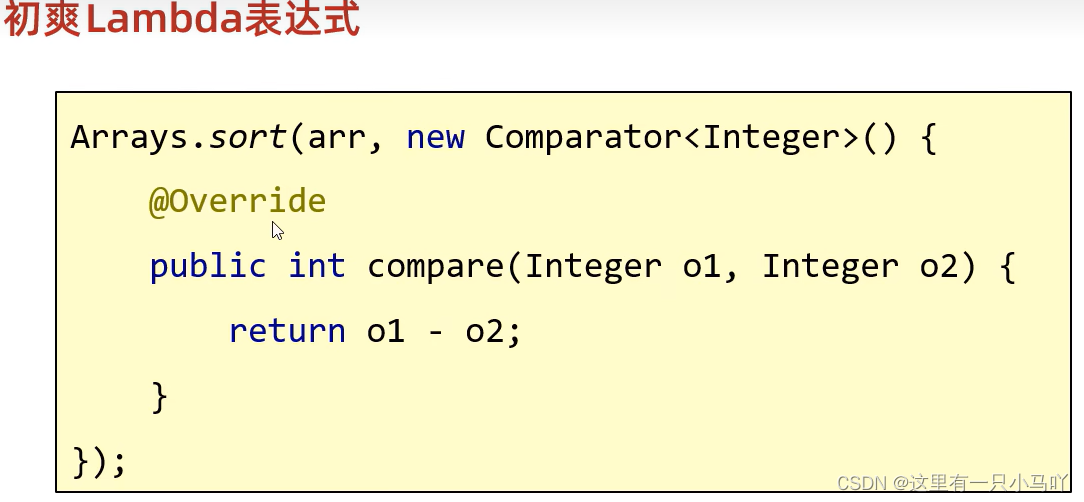
1
2
3
4
5
6
7
8
9
10
11
12
13
14
15
16
| import java.util.Arrays;
public class main {
public static void main(String[] args) {
System.out.println("----------sort--------");
Integer[] arr2={10,2,3,5,6,1,7,8,4,9};
Arrays.sort(arr2,(Integer o1, Integer o2)->
{
return o2-o1;
}
);
System.out.println(Arrays.toString(arr2));
}
}
|
函数式编程
函数式编程( Functional programming) 是一种思想特点。面向对象 :先找对象,让对象做事情。
函数式编程思想,忽略面向对象的复杂语法,强调做什么,而不是谁去做。
而我们要学习的Lambda表达式就是函数式思想的体现。
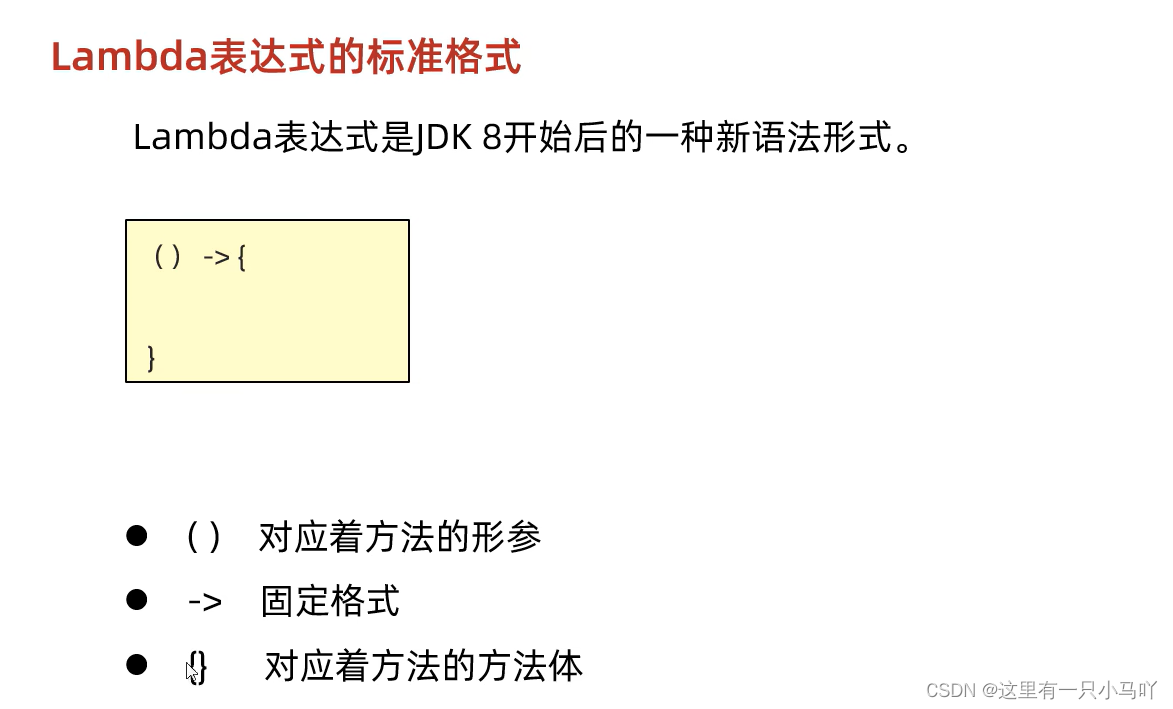
注意点:
- Lambda表达式可以用来简化匿名内部类的书写
- Lambda表达式只能简化函数式接口的匿名内部类的写法
- 函数式接口:
有且仅有一个抽象方法的接口叫做函数式接口,接口.上方可以加@FunctionalInterface注解
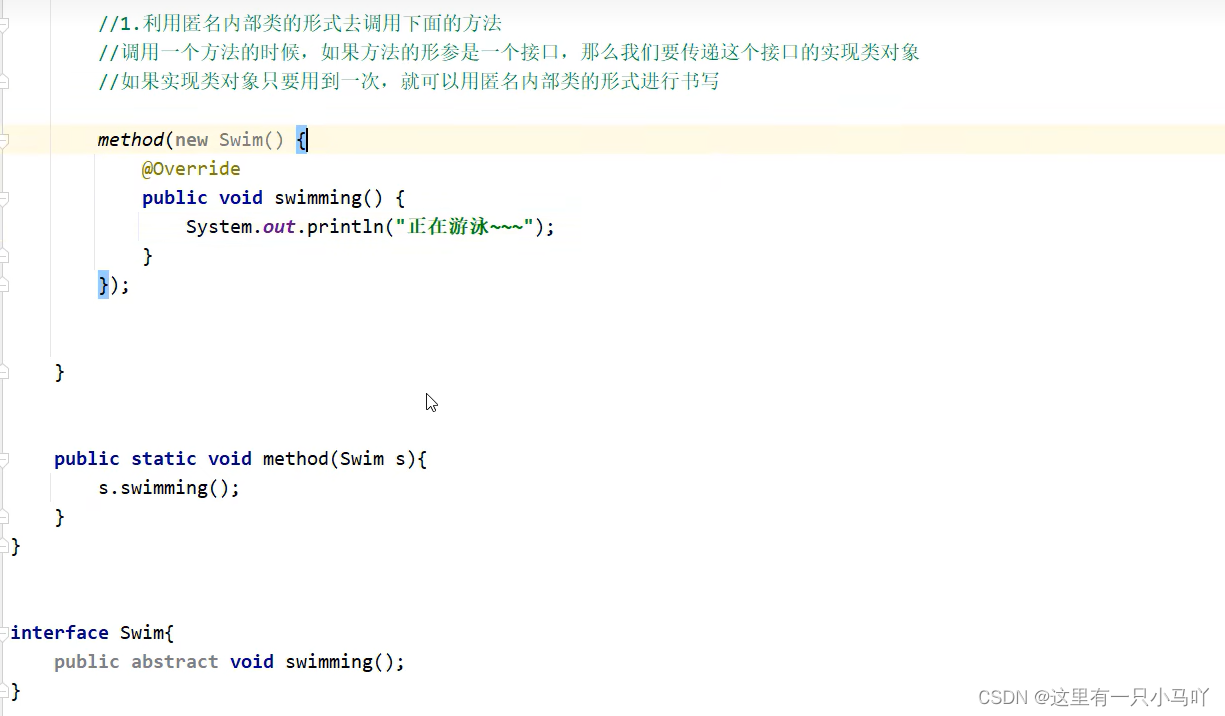
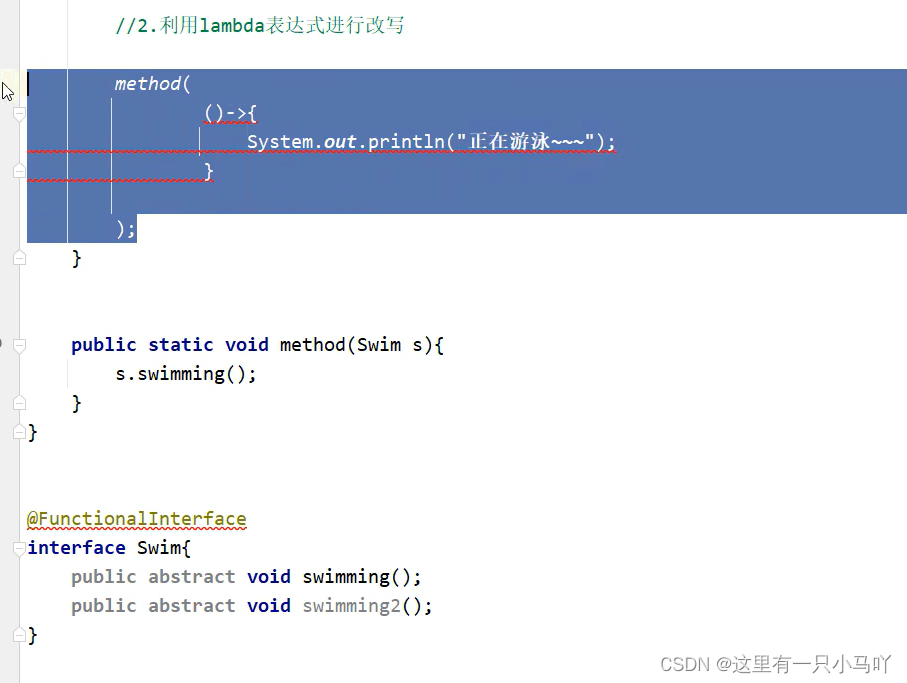
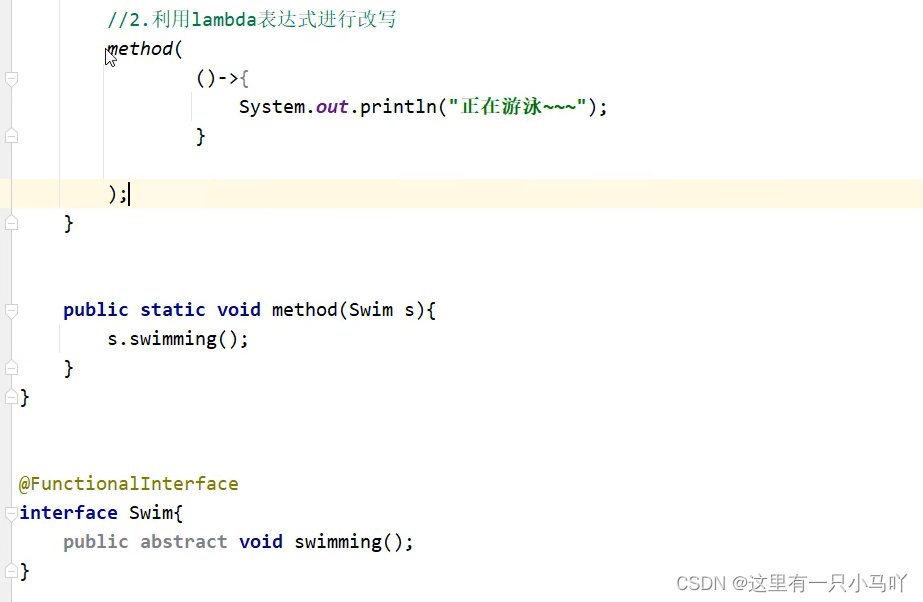
1、Lambda表达式的基本作用?
简化函数式接口的匿名内部类的写法。
2、Lambda表达式有什么使用前提?
必须是接口的匿名内部类,接口中只能有一一个抽象方法
3、Lambda的好处?
Lambda是一个匿名函数,我们可以把Lambda表达式理解为是一段可以传递的代码,它可以写出更简洁、更灵活的 代码,作为一种更紧凑的代码风格,使Java语言表达能力得到了提升。
1
2
3
4
| lambda的省略规则:
1.参数类型可以省略不写。
2.如果只有一个参数,參数类型可以省略,同时()也可以省略。
3.如果Lambda表达式的方法体只有一行,大括号,分号,return可以省略不写,需要同时省略。
|
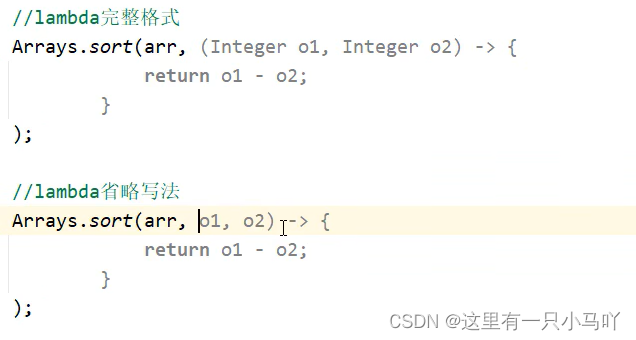

Lambda表达式简化Comparator接口的匿名形式
定义数组并存储一些字符串 ,利用Arrays中的sort方法进行排序
要求:
按照字符串的长度进行排序,短的在前面,长的在后面。
(暂时不比较字符串里面的内容)
1
2
3
4
5
6
7
8
9
10
11
12
13
14
15
16
17
18
19
20
21
22
23
24
25
26
27
28
29
30
31
32
33
34
35
36
37
38
39
40
41
42
43
44
45
46
47
48
49
50
| import java.util.Arrays;
public class main {
public static void main(String[] args) {
System.out.println("----------sort--------");
String[] arr2={"111","1111111","11111","1","11"};
Arrays.sort(arr2, new Comparator<String>() {
@Override
public int compare(String o1, String o2) {
return o1.length()-o2.length();
}
});
System.out.println(Arrays.toString(arr2));
}
}
import java.util.Arrays;
public class main {
public static void main(String[] args) {
System.out.println("----------sort--------");
String[] arr2={"111","1111111","11111","1","11"};
Arrays.sort(arr2, (String o1, String o2)->{
return o1.length()-o2.length();
});
System.out.println(Arrays.toString(arr2));
}
}
import java.util.Arrays;
public class main {
public static void main(String[] args) {
System.out.println("----------sort--------");
String[] arr2={"111","1111111","11111","1","11"};
Arrays.sort(arr2, (String o1, String o2)-> o1.length()-o2.length());
System.out.println(Arrays.toString(arr2));
}
}
|
2.1 Lambda综合练习
按照要求进行排序
定义数组并存储一些女朋友对象,利用Arrays中的sort方法进行排序
要求1:属性有姓名、年龄、身高。
要求2:按照年龄的大小进行排序,年龄一样,按照身高排序,身高一样按照姓名的字母进行排序。
1
2
3
4
5
6
7
8
9
10
11
12
13
14
15
16
17
18
19
20
21
22
23
24
25
26
27
28
29
30
31
| import java.util.Arrays;
import java.util.Comparator;
import java.util.GregorianCalendar;
public class main {
public static void main(String[] args) {
GirlFriend g1 = new GirlFriend("aaa",15,170.1);
GirlFriend g2 = new GirlFriend("bbb",14,170.1);
GirlFriend g3 = new GirlFriend("ccc",15,180.9);
GirlFriend g4 = new GirlFriend("ddd",17,162.7);
GirlFriend[] arr = {g1,g2,g3,g4};
Arrays.sort(arr, new Comparator<GirlFriend>() {
@Override
public int compare(GirlFriend o1, GirlFriend o2) {
if(o1.getAge()!= o2.getAge()) return o1.getAge()-o2.getAge();
if(o1.getHeight()!= o2.getHeight())return (o1.getHeight()>o2.getHeight())?1:-1;
if (o1.getName() !=o2.getName() )return o1.getName().compareTo(o2.getName());
return 0;
}
});
System.out.println(Arrays.toString(arr));
}
}
|
3. 集合进阶
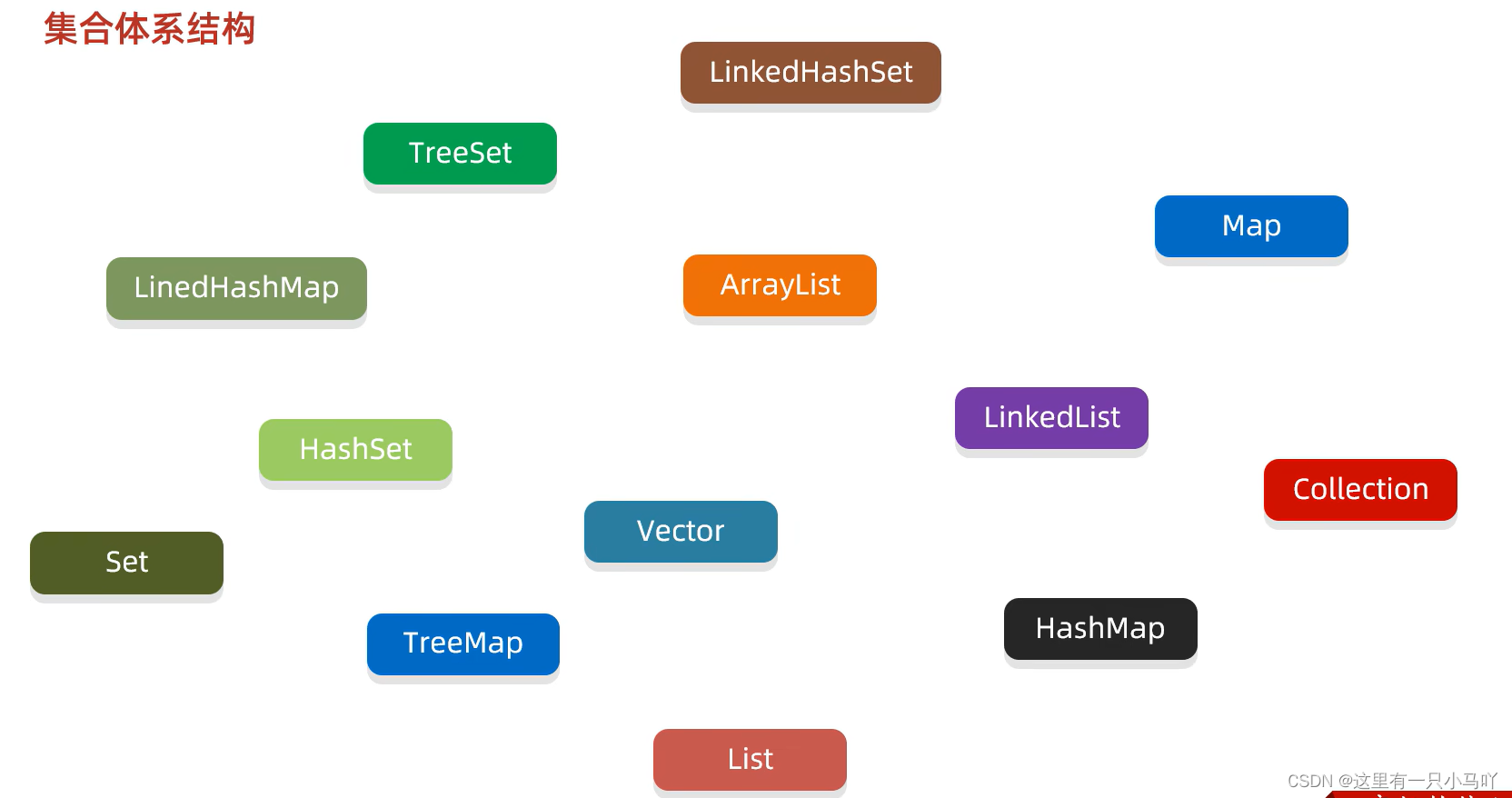
3.1 集合体系结构
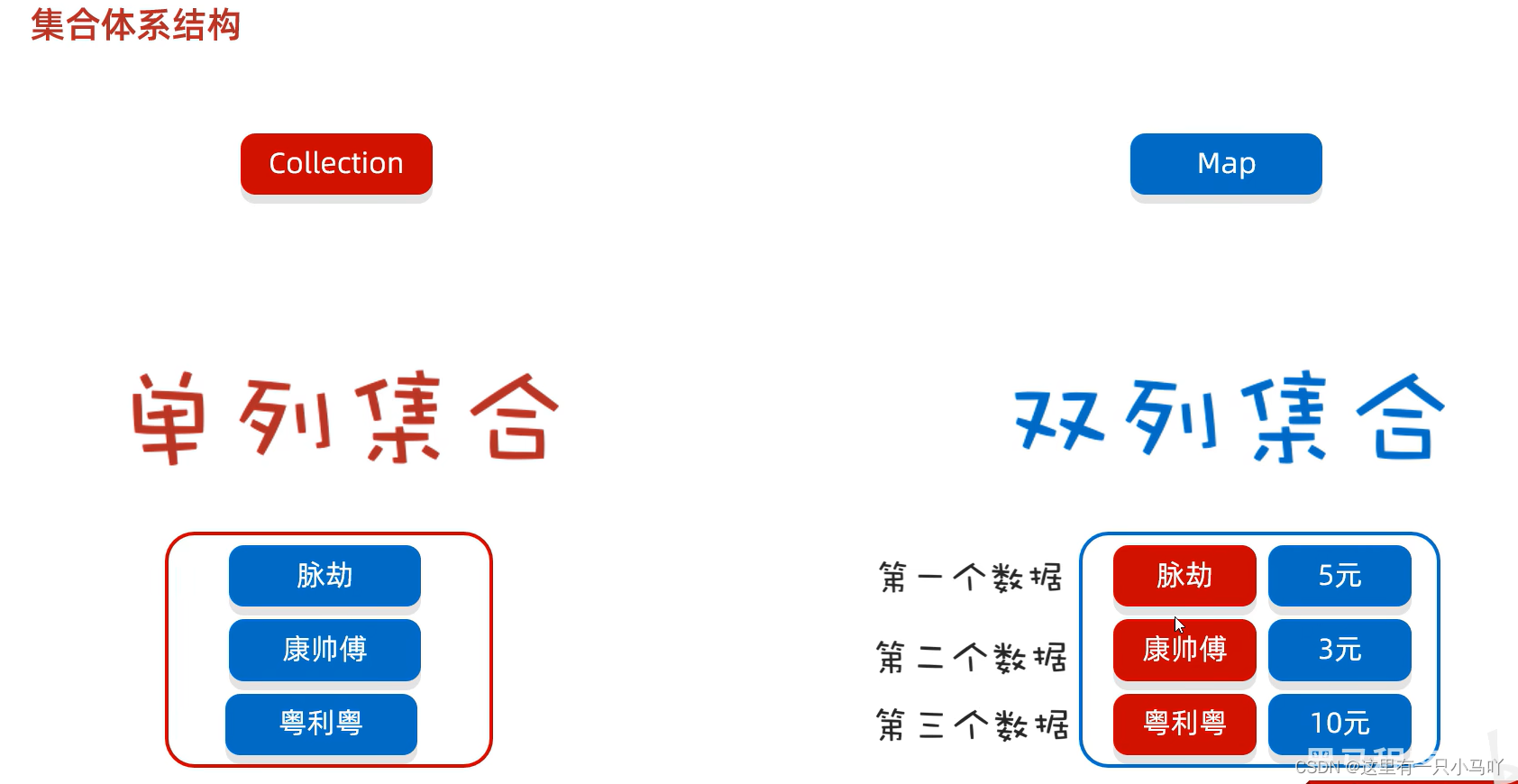
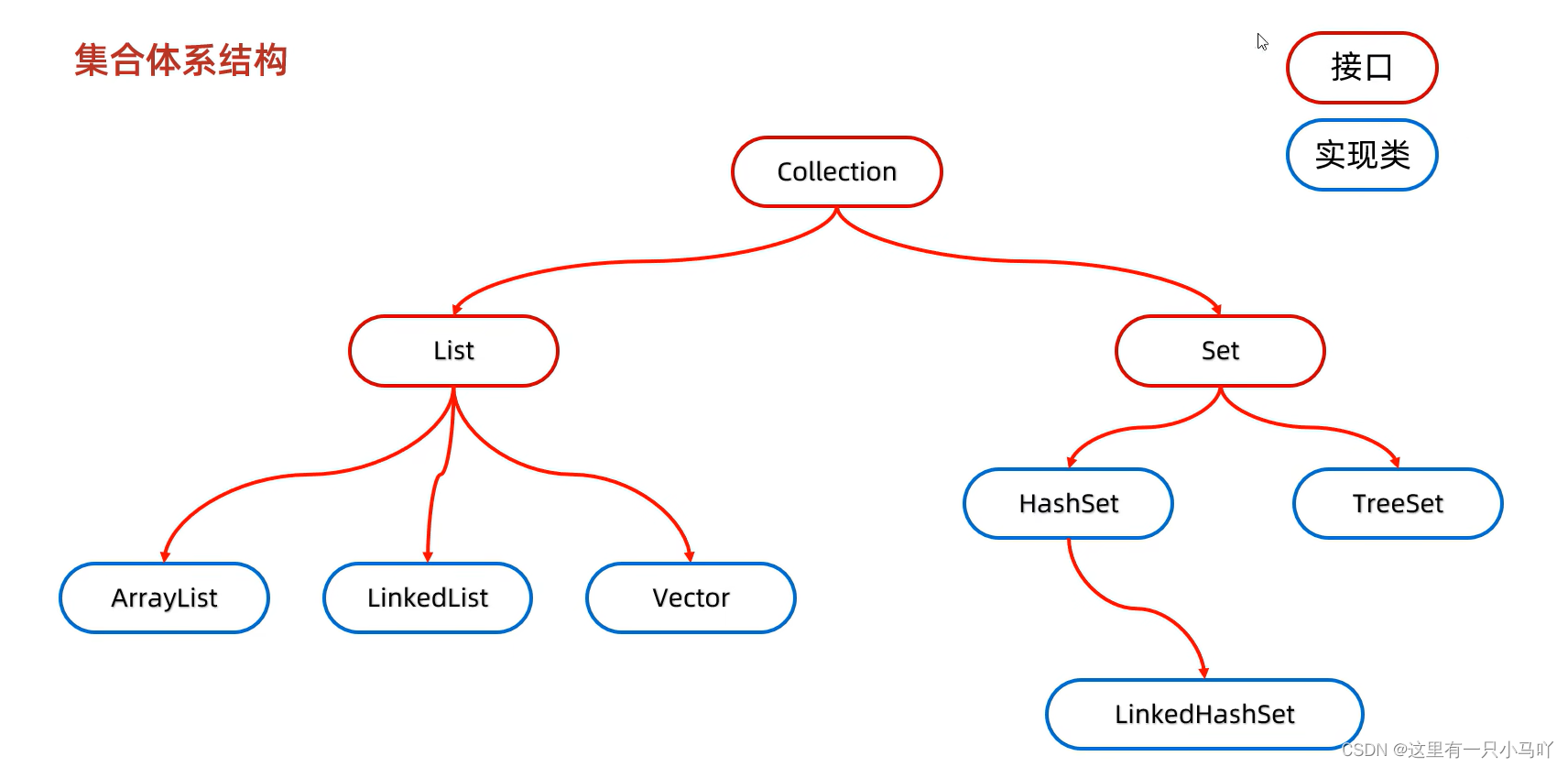
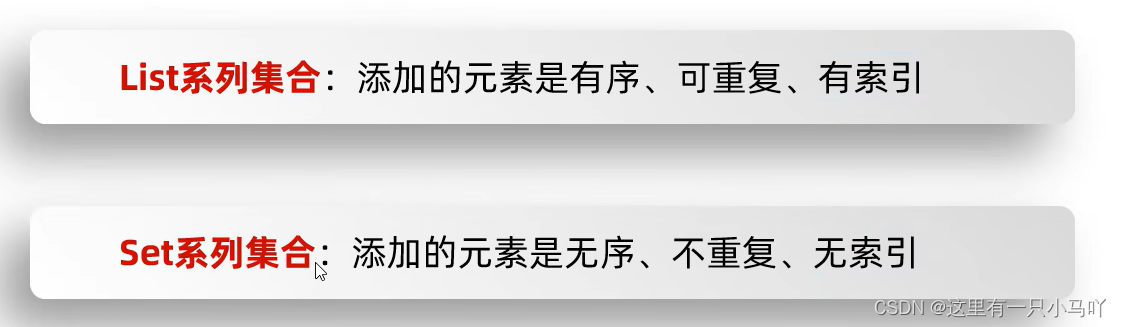
3.2 Collection集合
Collection是单列集合的祖宗接口,它的功能是全部单列集合都可以继承使用的。
3.2.1 Collection方法
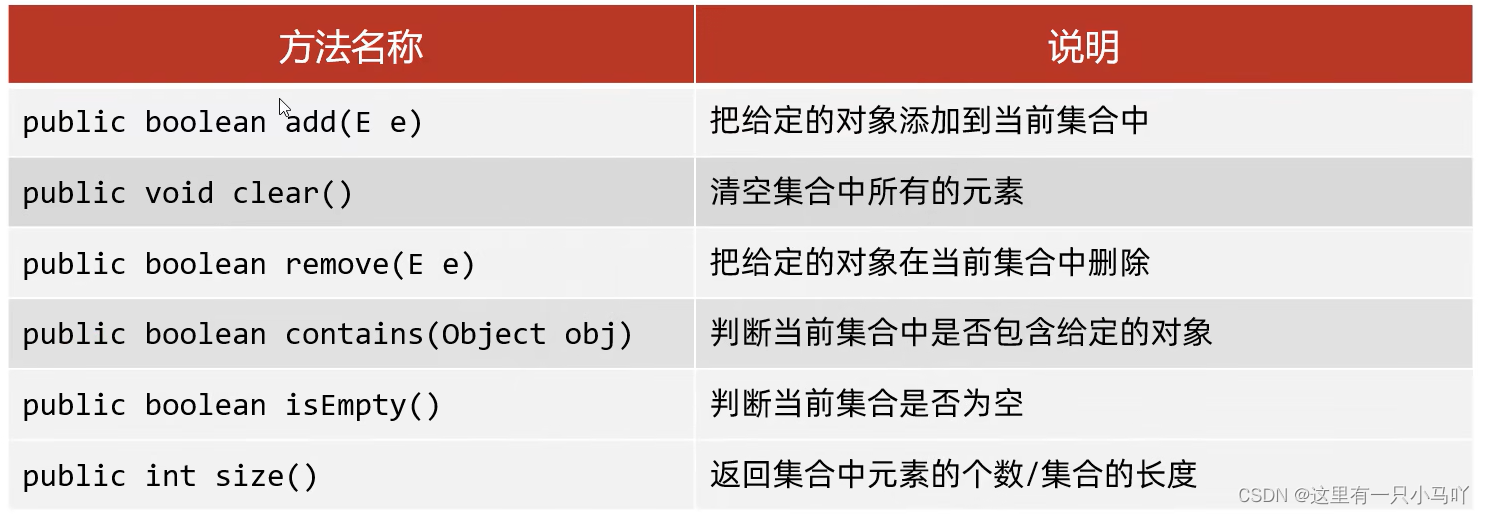
1
2
3
4
5
6
7
8
9
10
11
12
13
14
15
16
17
18
19
20
21
22
23
24
25
26
27
28
29
30
31
32
33
34
35
36
37
38
39
| import java.util.ArrayList;
import java.util.Arrays;
import java.util.Collection;
public class main {
public static void main(String[] args) {
Collection<String> coll= new ArrayList<>();
coll.add("aaaa");
coll.add("bbbb");
coll.add("cccc");
coll.add("dddd");
System.out.println(coll);
System.out.println(coll.size());
coll.remove("cccc");
System.out.println(coll);
System.out.println(coll.contains("cccc"));
System.out.println(coll.isEmpty());
coll.clear();
System.out.println(coll.isEmpty());
}
}
|
对contains 性质的研究——equals
GirlFriend.java
1
2
3
4
5
6
7
8
9
10
11
12
13
14
15
16
17
18
19
20
21
22
23
24
25
26
27
28
29
30
31
32
33
34
35
36
37
38
39
40
41
42
43
44
45
46
47
48
49
50
51
52
53
54
| import java.util.Objects;
public class GirlFriend {
private String name;
private int age;
private double height;
public GirlFriend(String name, int age, double height) {
this.name = name;
this.age = age;
this.height = height;
}
public GirlFriend() {
}
public String getName() {
return name;
}
public void setName(String name) {
this.name = name;
}
public int getAge() {
return age;
}
public void setAge(int age) {
this.age = age;
}
public double getHeight() {
return height;
}
public void setHeight(double height) {
this.height = height;
}
public String toString() {
return "GirlFriend{name = " + name + ", age = " + age + ", height = " + height + "}";
}
@Override
public boolean equals(Object o) {
if (this == o) return true;
if (o == null || getClass() != o.getClass()) return false;
GirlFriend that = (GirlFriend) o;
return age == that.age && Double.compare(that.height, height) == 0 && Objects.equals(name, that.name);
}
}
|
main.java
1
2
3
4
5
6
7
8
9
10
11
12
13
14
15
16
17
18
19
20
21
22
| import java.util.ArrayList;
import java.util.Arrays;
import java.util.Collection;
public class main {
public static void main(String[] args) {
Collection<GirlFriend> gf = new ArrayList<>();
GirlFriend g1 = new GirlFriend("aaa",18,170.5);
GirlFriend g2 = new GirlFriend("bbb",25,167.5);
GirlFriend g3 = new GirlFriend("ccc",20,192.5);
gf.add(g1);
gf.add(g2);
gf.add(g3);
System.out.println(gf);
GirlFriend g4 = new GirlFriend("aaa",18,170.5);
System.out.println(gf.contains(g4));
}
}
|
3.2.2 Collection迭代器遍历
collection有儿子set 所以不能通过索引遍历,以前的for不行了
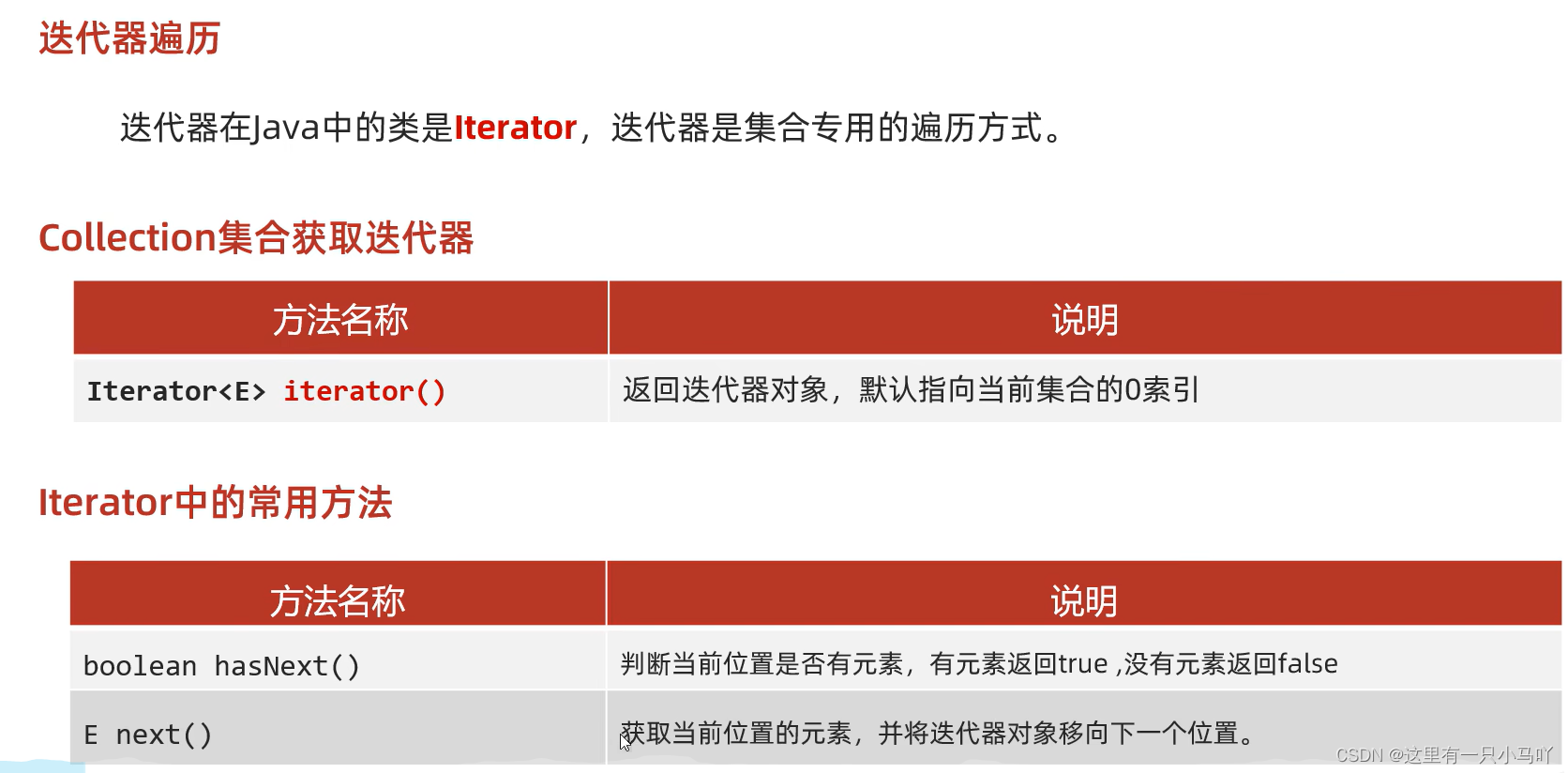
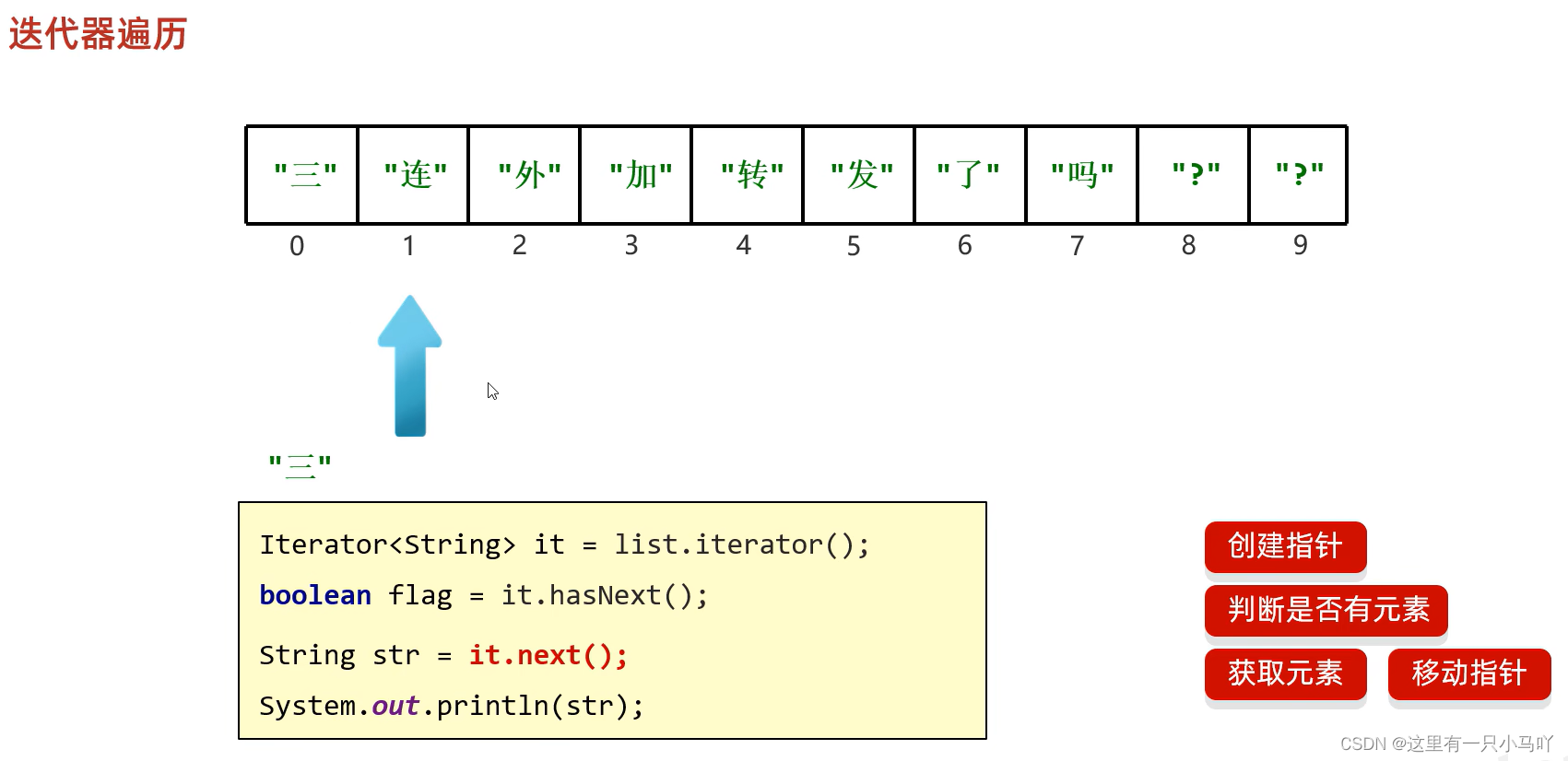
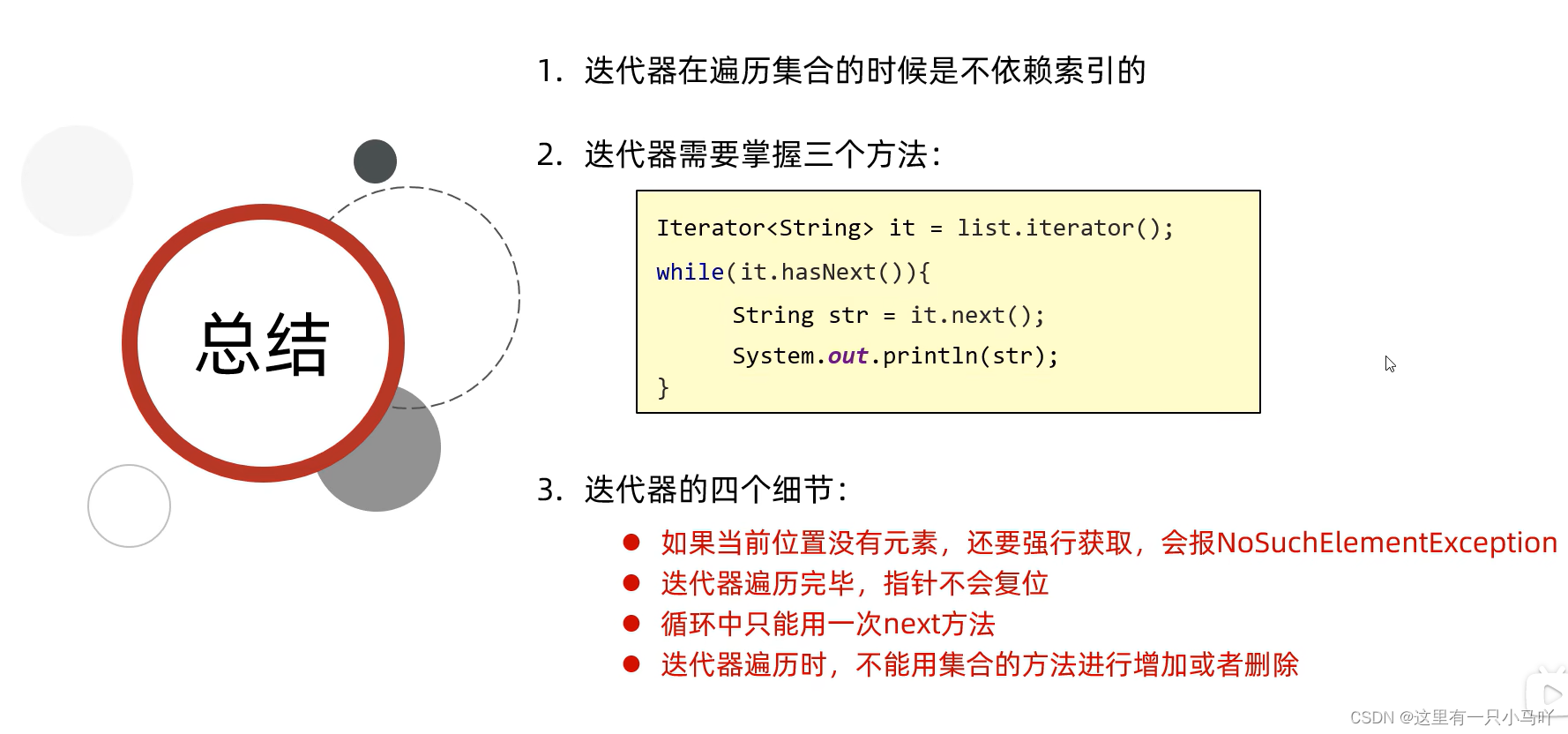
细节注意点:
- 报错NoSuchElementException
- 迭代器遍历完毕,指针不会复位
- 循环中只能用一次next方法
- 迭代器遍历时,不能用集合的方法进行增加或者删除
1
2
3
4
5
6
7
8
9
10
11
12
13
14
15
16
17
18
19
20
21
22
23
24
25
26
27
28
29
30
31
32
33
34
| import java.util.ArrayList;
import java.util.Arrays;
import java.util.Collection;
import java.util.Iterator;
public class main {
public static void main(String[] args) {
Collection<GirlFriend> gf = new ArrayList<>();
GirlFriend g1 = new GirlFriend("aaa",18,170.5);
GirlFriend g2 = new GirlFriend("bbb",25,167.5);
GirlFriend g3 = new GirlFriend("ccc",20,192.5);
gf.add(g1);
gf.add(g2);
gf.add(g3);
Iterator<GirlFriend> it = gf.iterator();
for (int i = 0; i < gf.size(); i++) {
GirlFriend s = it.next();
System.out.println(s);
}
System.out.println("---------------------------------");
Iterator<GirlFriend> it1 = gf.iterator();
while(it1.hasNext()){
GirlFriend s = it1.next();
System.out.println(s);
}
}
}
|
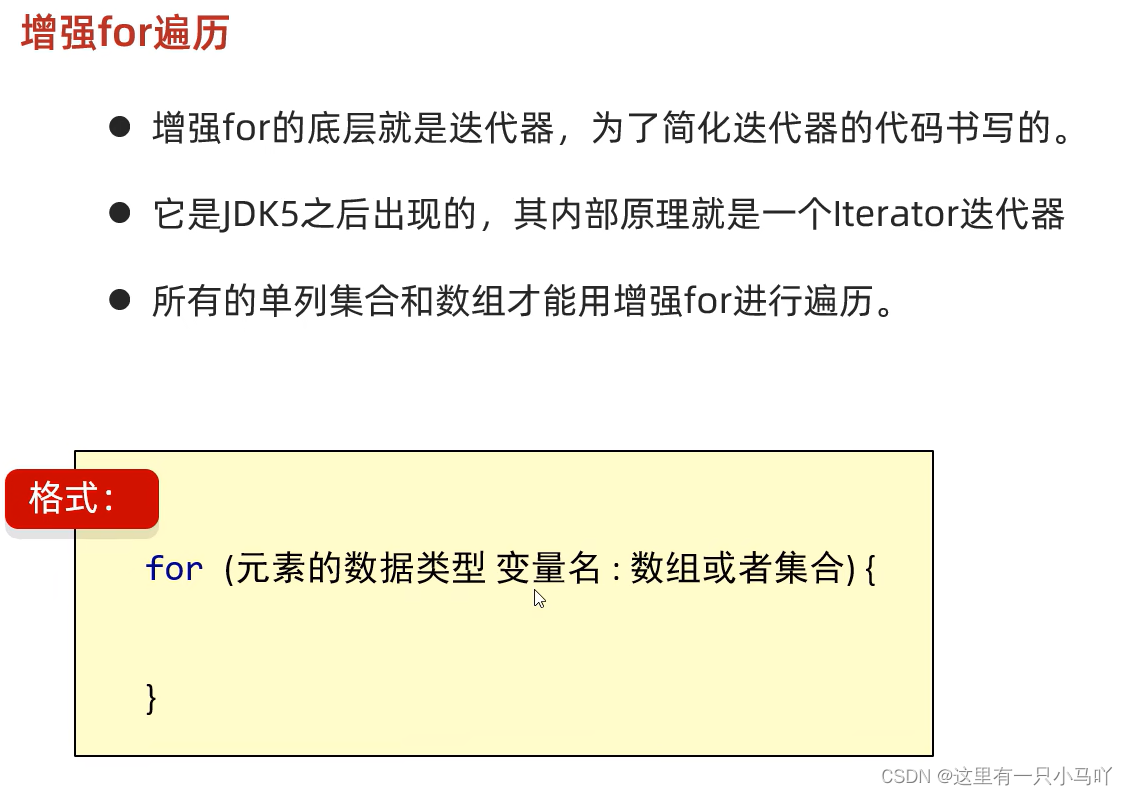
3.2.3 增强for 遍历
1
2
3
4
5
6
7
8
9
10
11
12
13
14
15
16
17
18
19
20
21
22
23
24
| import java.util.ArrayList;
import java.util.Arrays;
import java.util.Collection;
import java.util.Iterator;
public class main {
public static void main(String[] args) {
Collection<GirlFriend> gf = new ArrayList<>();
GirlFriend g1 = new GirlFriend("aaa",18,170.5);
GirlFriend g2 = new GirlFriend("bbb",25,167.5);
GirlFriend g3 = new GirlFriend("ccc",20,192.5);
gf.add(g1);
gf.add(g2);
gf.add(g3);
for(GirlFriend a:gf)
{
System.out.println(a);
}
}
}
|
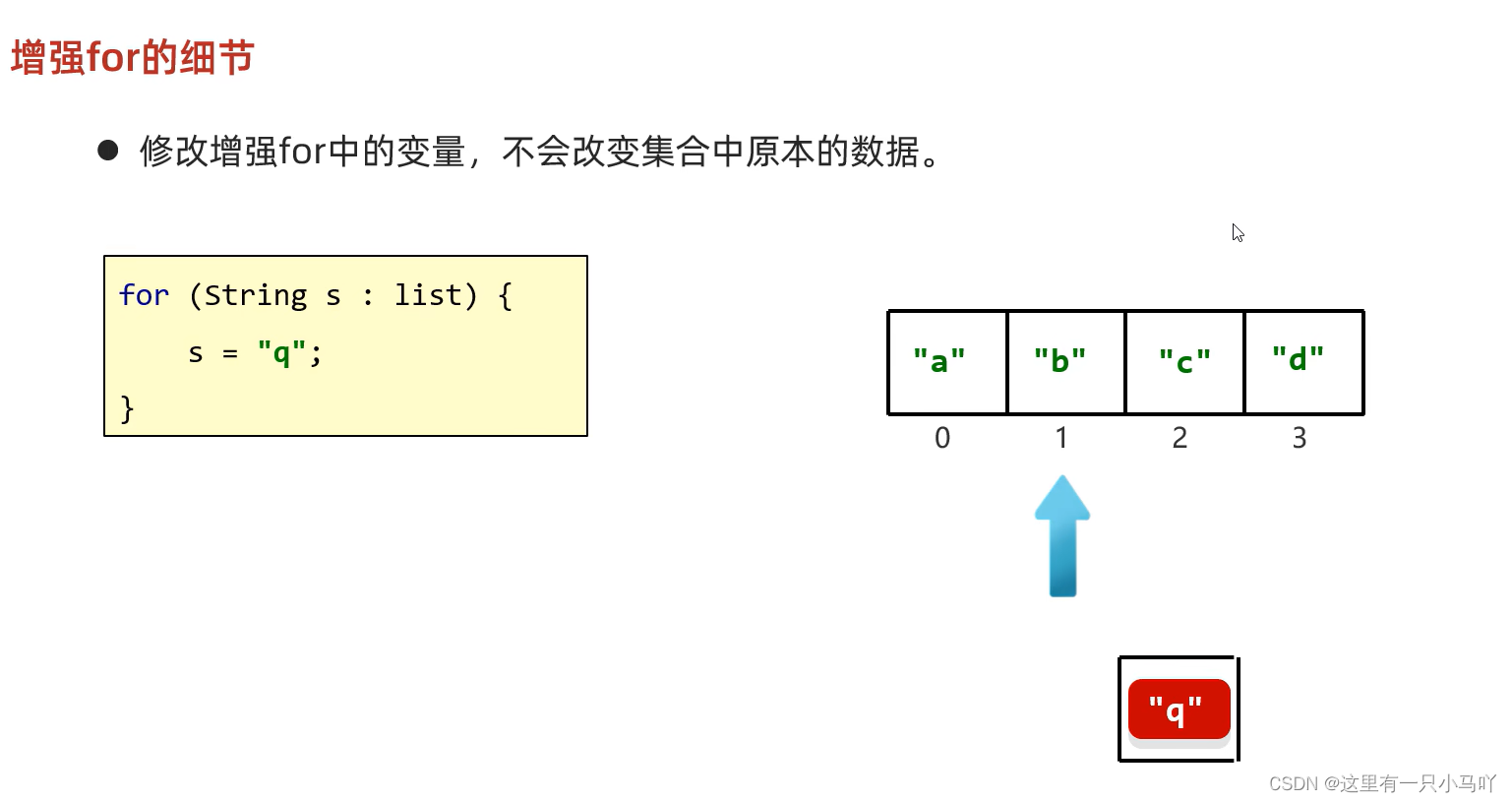
3.2.4 Lambda 遍历
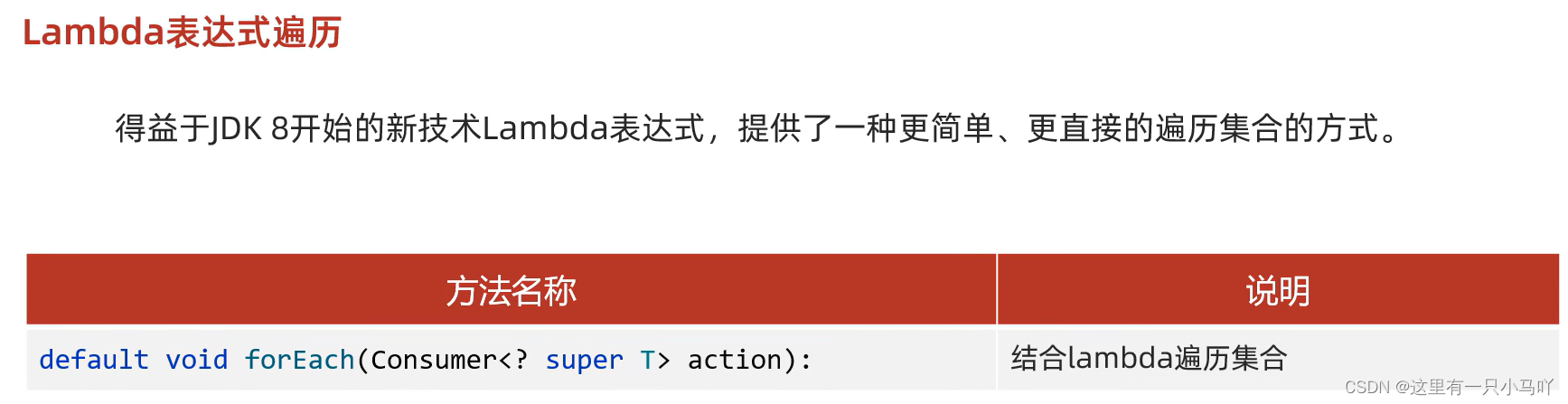
1
2
3
4
5
6
7
8
9
10
11
12
13
14
15
16
17
18
19
20
21
22
23
24
25
26
27
28
29
30
31
32
| import java.util.ArrayList;
import java.util.Arrays;
import java.util.Collection;
import java.util.Iterator;
import java.util.function.Consumer;
public class main {
public static void main(String[] args) {
Collection<GirlFriend> gf = new ArrayList<>();
GirlFriend g1 = new GirlFriend("aaa",18,170.5);
GirlFriend g2 = new GirlFriend("bbb",25,167.5);
GirlFriend g3 = new GirlFriend("ccc",20,192.5);
gf.add(g1);
gf.add(g2);
gf.add(g3);
gf.forEach(girlFriend-> {
System.out.println(girlFriend);
}
);
}
}
|
3.3 List集合
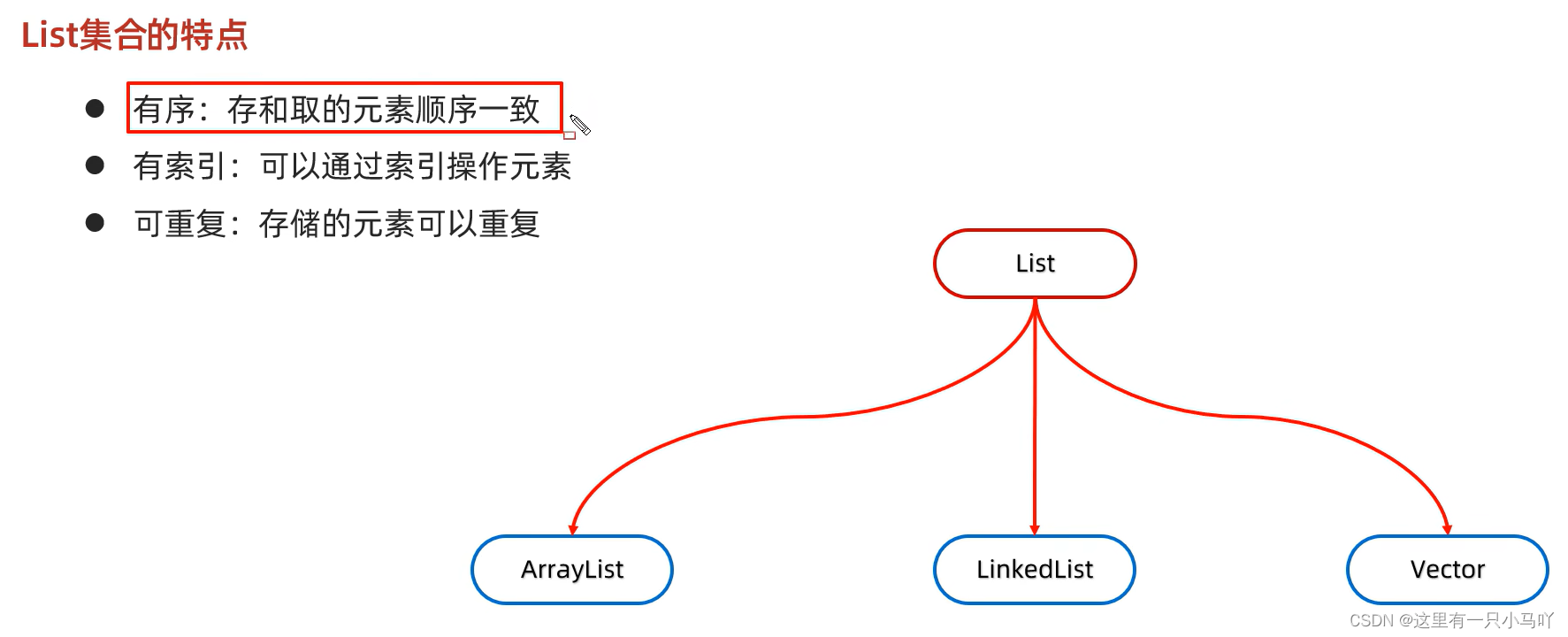
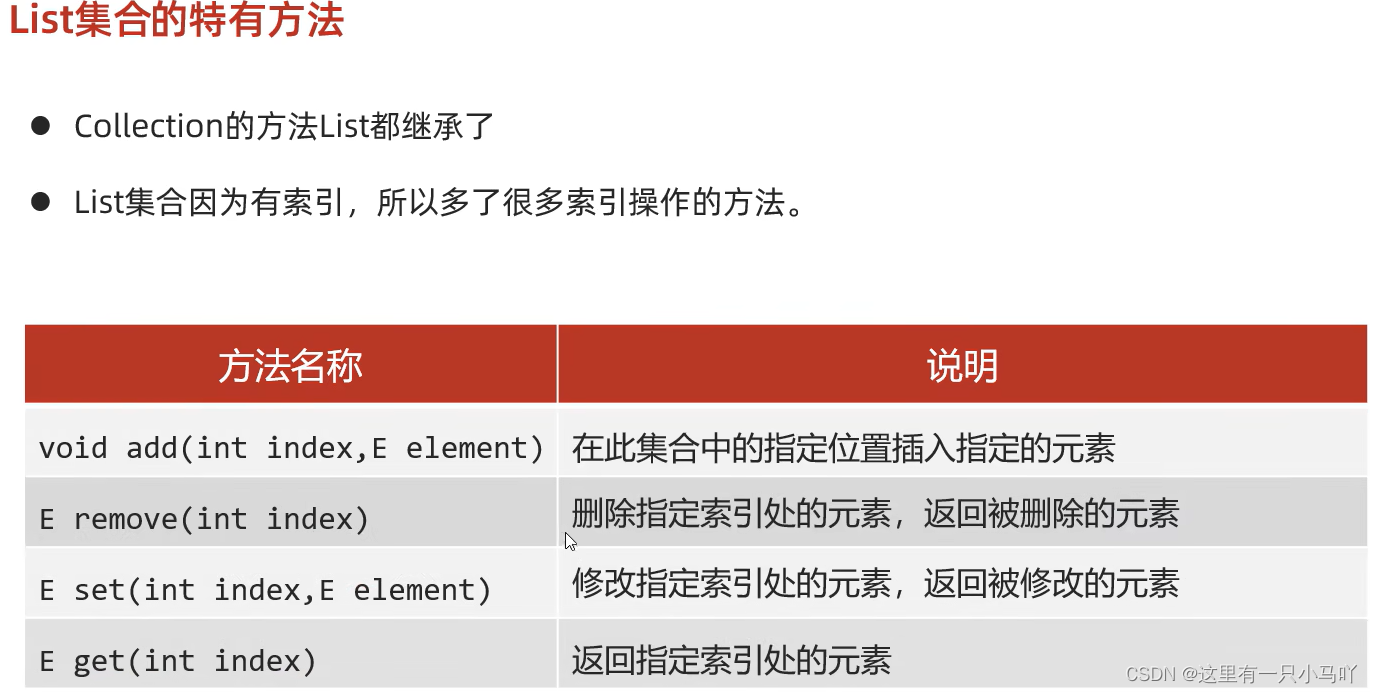
1
2
3
4
5
6
7
8
9
10
11
12
13
14
15
16
17
18
19
20
21
22
23
24
25
26
27
28
29
30
31
32
33
| import java.util.*;
import java.util.function.Consumer;
public class main {
public static void main(String[] args) {
List<GirlFriend> gf = new ArrayList<>();
GirlFriend g1 = new GirlFriend("aaa",18,170.5);
GirlFriend g2 = new GirlFriend("bbb",25,167.5);
GirlFriend g3 = new GirlFriend("ccc",20,192.5);
gf.add(g1);
gf.add(0,g2);
gf.add(0,g3);
gf.remove(0);
GirlFriend g4 = new GirlFriend("ddd",20,192.5);
gf.set(1,g4);
System.out.println(gf.get(1));
gf.forEach(girlFriend-> {
System.out.println(girlFriend);
}
);
}
}
|
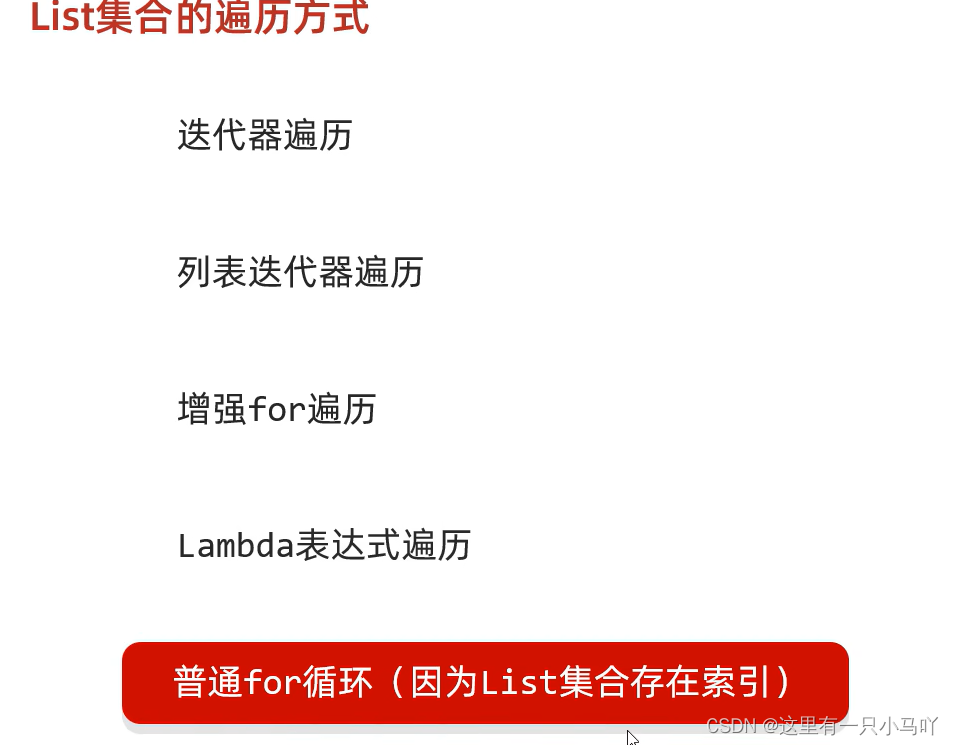
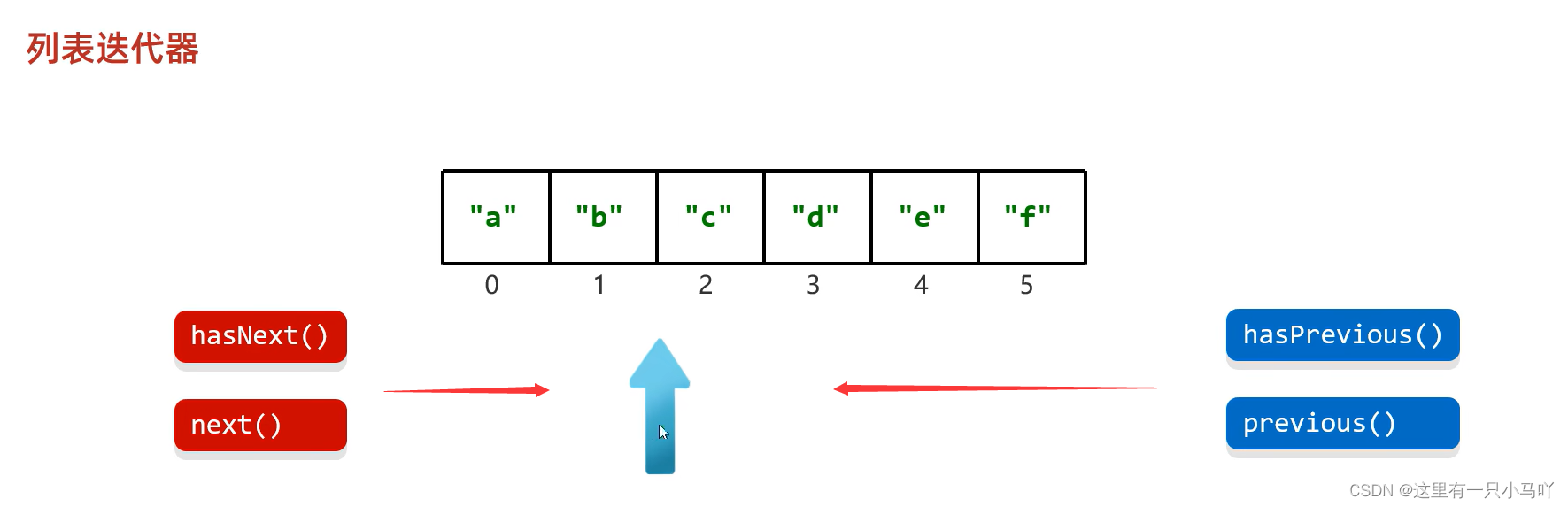
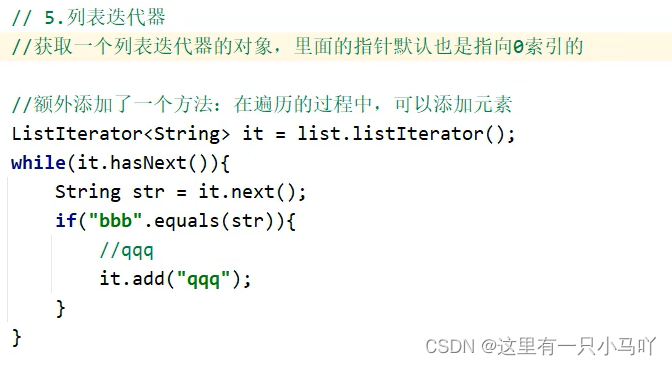
数据结构 :这方面的内容建议大家系统的学一下,下面的链接真的是永远的神!
数据结构与算法基础(青岛大学-王卓)

3.4 ArrayList集合
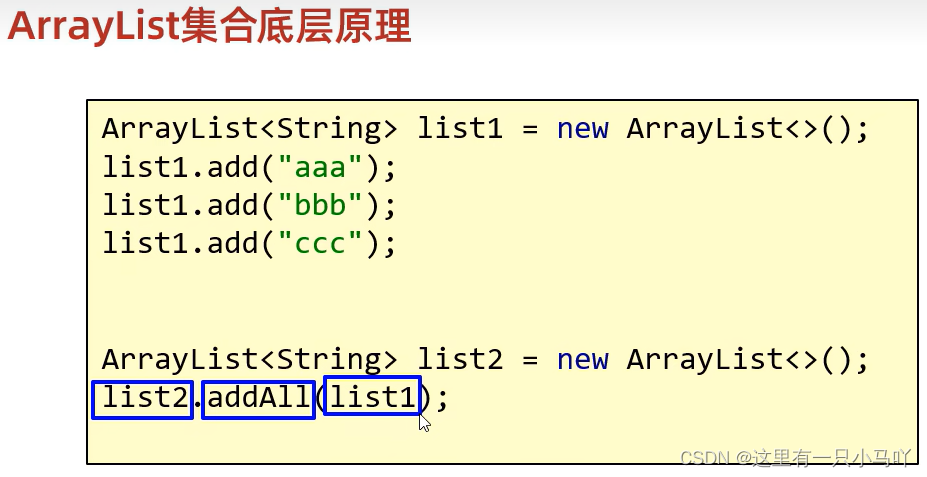
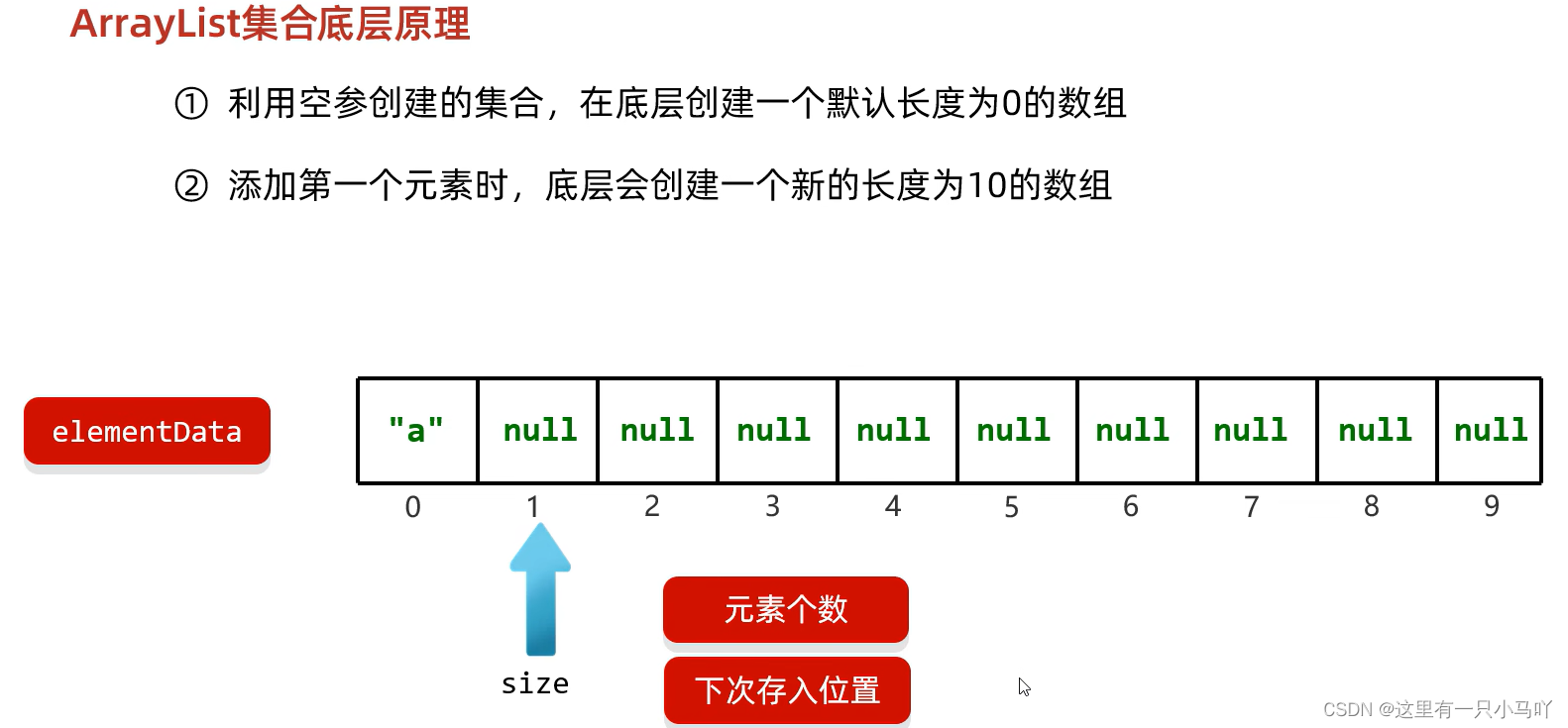
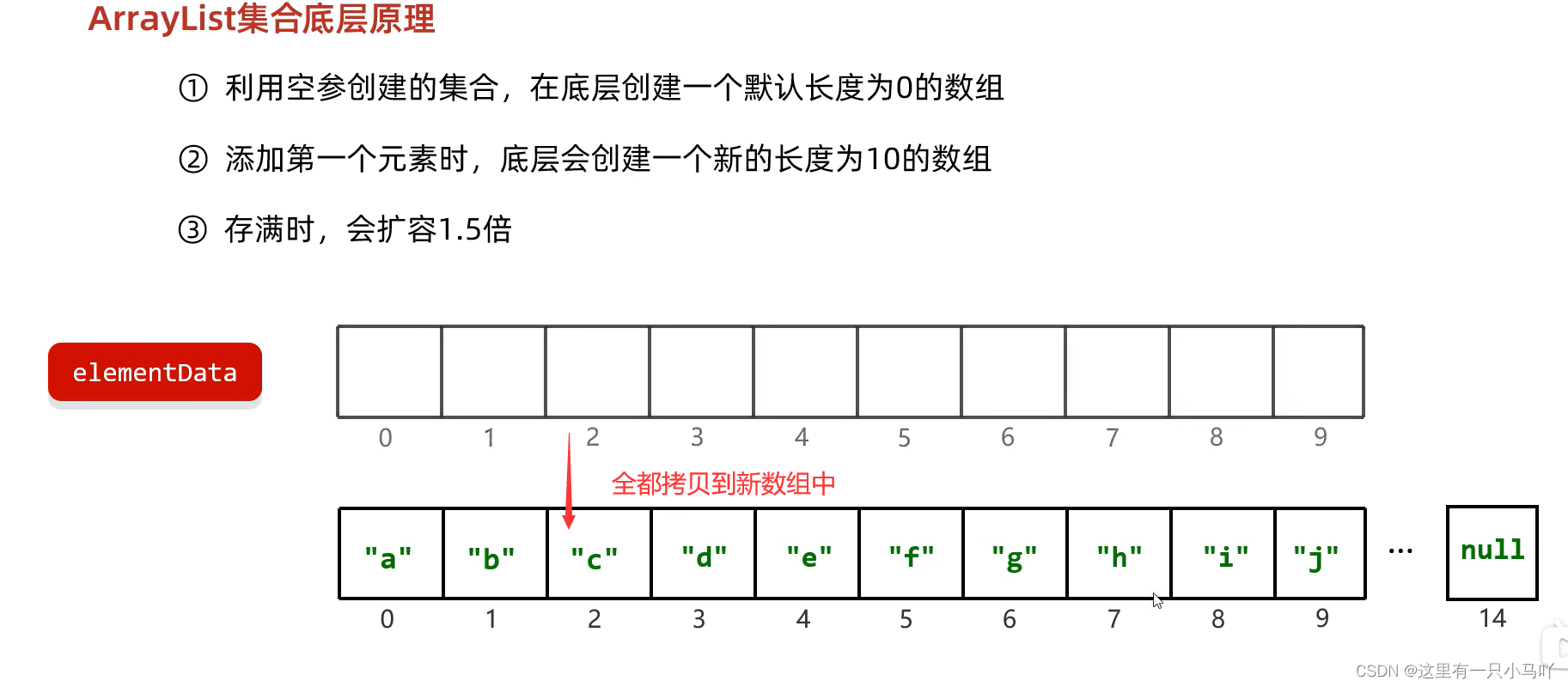
④如果一次添加多个元素,1.5倍还放不下,则新创建数组的长度以实际为准
3.5 LinkedList集合
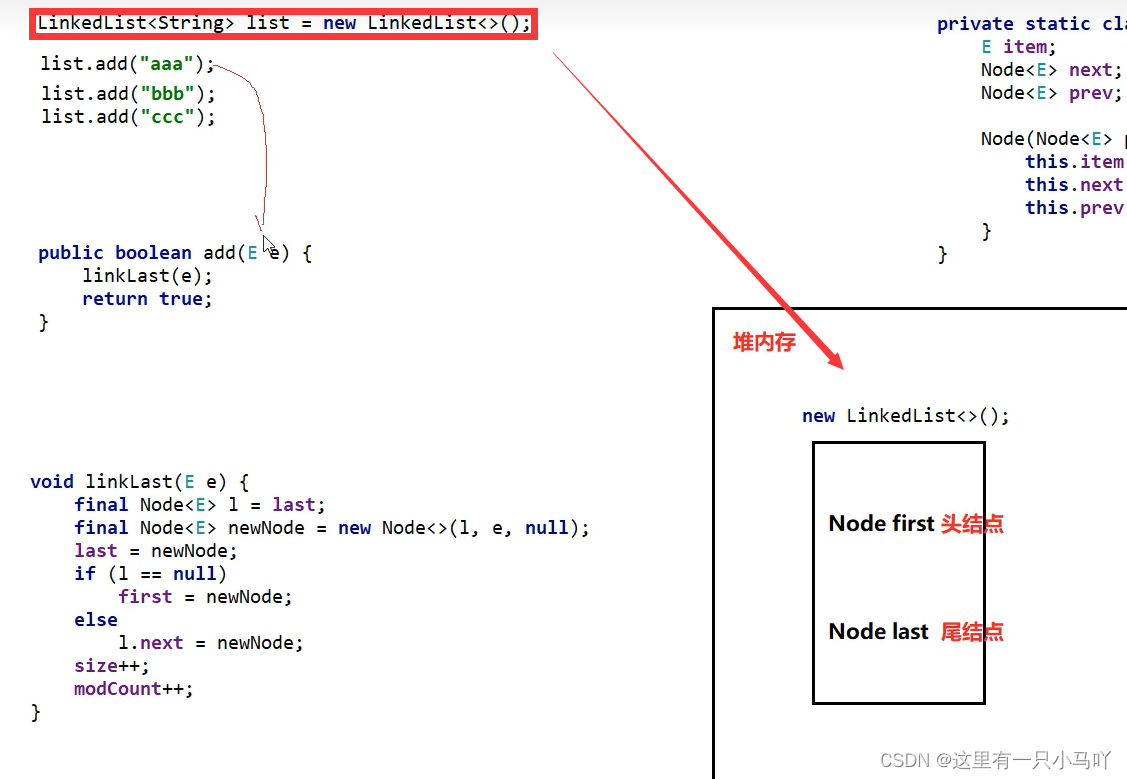
底层数据结构是双链表,查询慢,增删快但是如果操作的是首尾元素,速度也是极快的。

LinkedList本身多了很多直接操作首尾元素的特有API。
| 特有方法 |
说明 |
| public void addFirst(E e) |
在该列表开头插入指定的元素 |
| public void addLast(E e) |
将指定的元素追加到此列表的末尾 |
| public E getFirst() |
返回此列表中的第一个元素 |
| public E getLast() |
返回此列表中的最后一个元素 |
| public E removeFirst() |
从此列表中删除并返回第一个元素 |
| public E removeLast() |
从此列表中删除并返回最后一个元素 |
1
2
3
4
5
6
7
8
9
10
11
12
13
14
15
16
17
18
19
20
21
22
23
24
25
| import java.util.*;
import java.util.function.Consumer;
public class main {
public static void main(String[] args) {
LinkedList<GirlFriend> gf = new LinkedList<>();
GirlFriend g1 = new GirlFriend("aaa",18,170.5);
GirlFriend g2 = new GirlFriend("bbb",25,167.5);
GirlFriend g3 = new GirlFriend("ccc",20,192.5);
gf.add(g1);
gf.add(g2);
gf.add(2,g3);
System.out.println(gf);
System.out.println(gf.getFirst());
System.out.println(gf.getLast());
Iterator<GirlFriend> it = gf.iterator();
while(it.hasNext())
{
System.out.println(it.next());
}
}
}
|
3.6 泛型深入
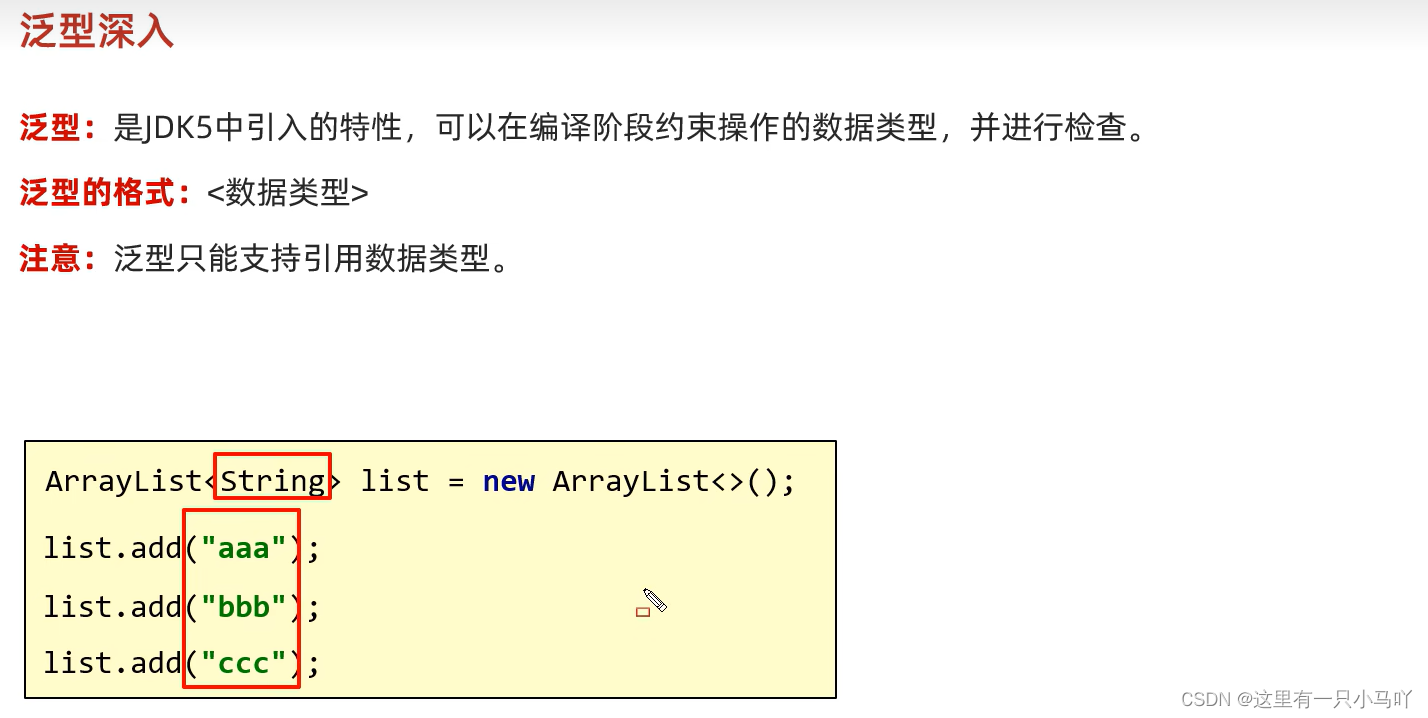
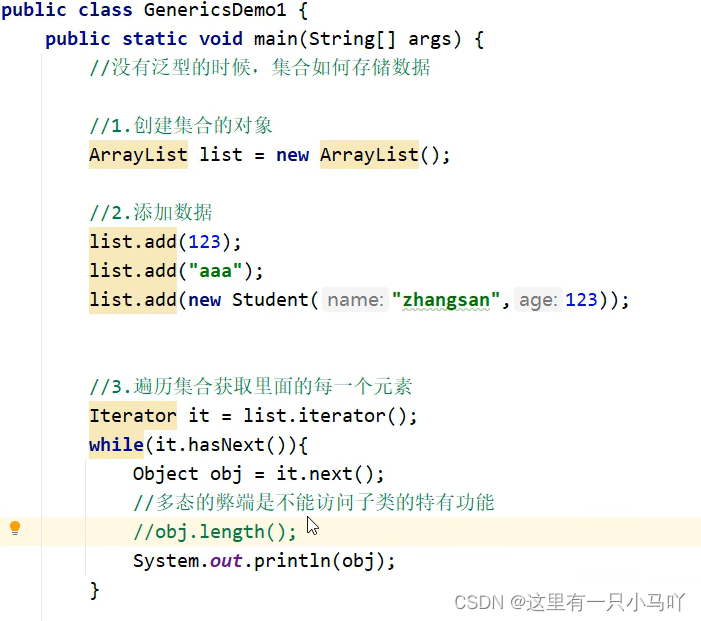
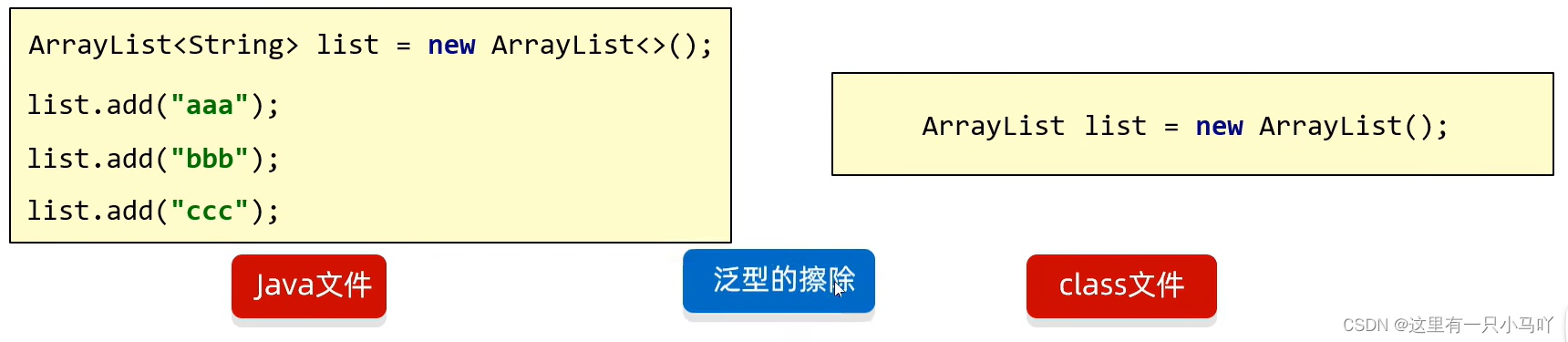
泛型的好处
- 统一数据类型。
- 把运行时期 的问题提前到了编译期间避免了强制类型转换可能出现的异常,因为在编译阶段类型就能确定下来。
Java中的泛型是伪泛型
泛型的细节
- 泛型中不能写基本数据类型
- 指定泛型的具体类型后,传递数据时,可以传入该类类型或者其子类类型
- 如果不写泛型,类型默认是Object
3.6.1 泛型类
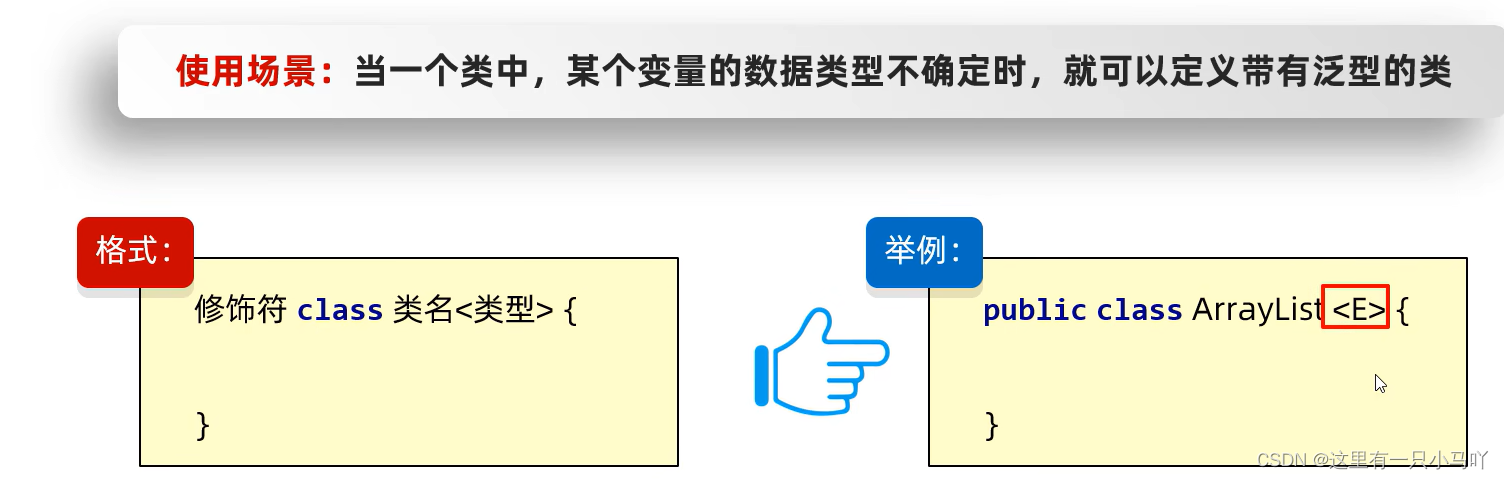
此处E可以理解为变量,但是不是用来记录数据的,而是记录数据的类型,可以写成: T、E、K、V等
(可以理解成C++中的template)
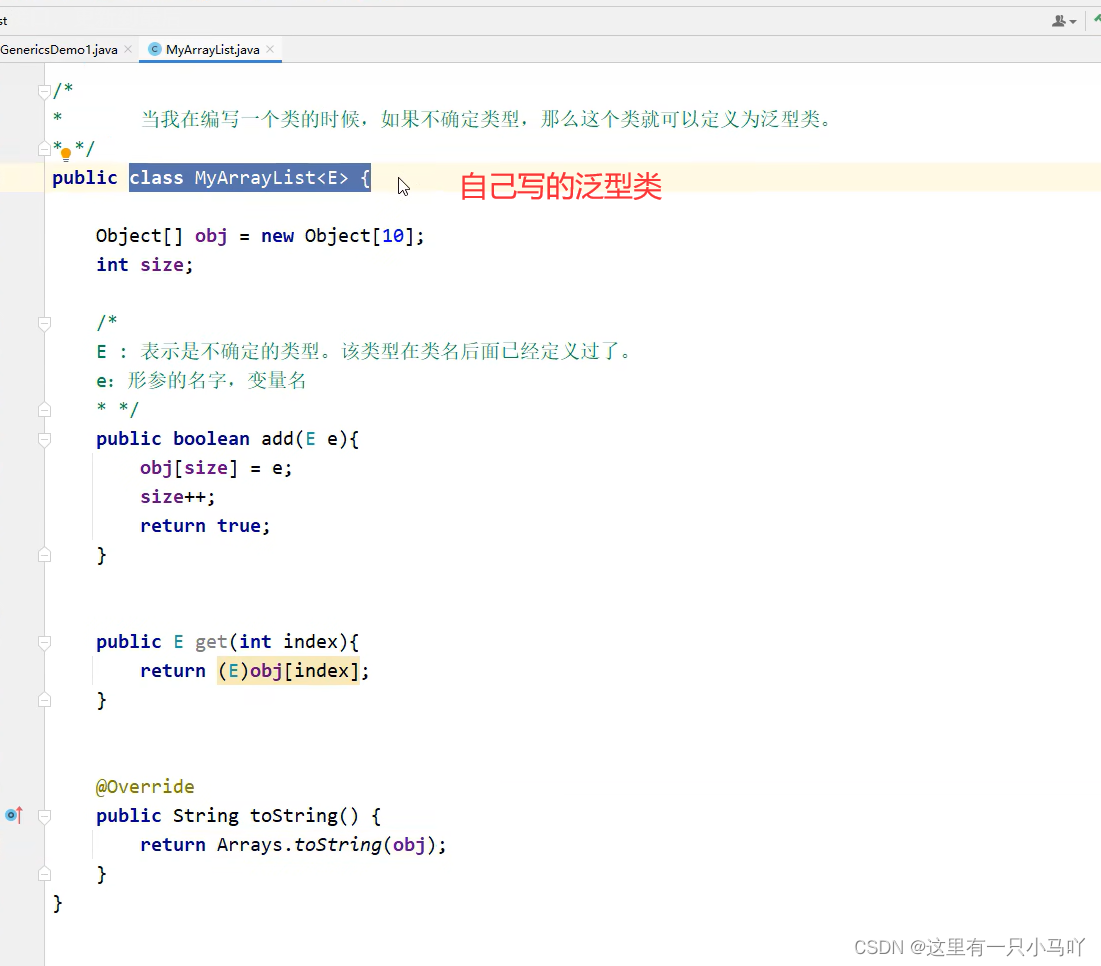
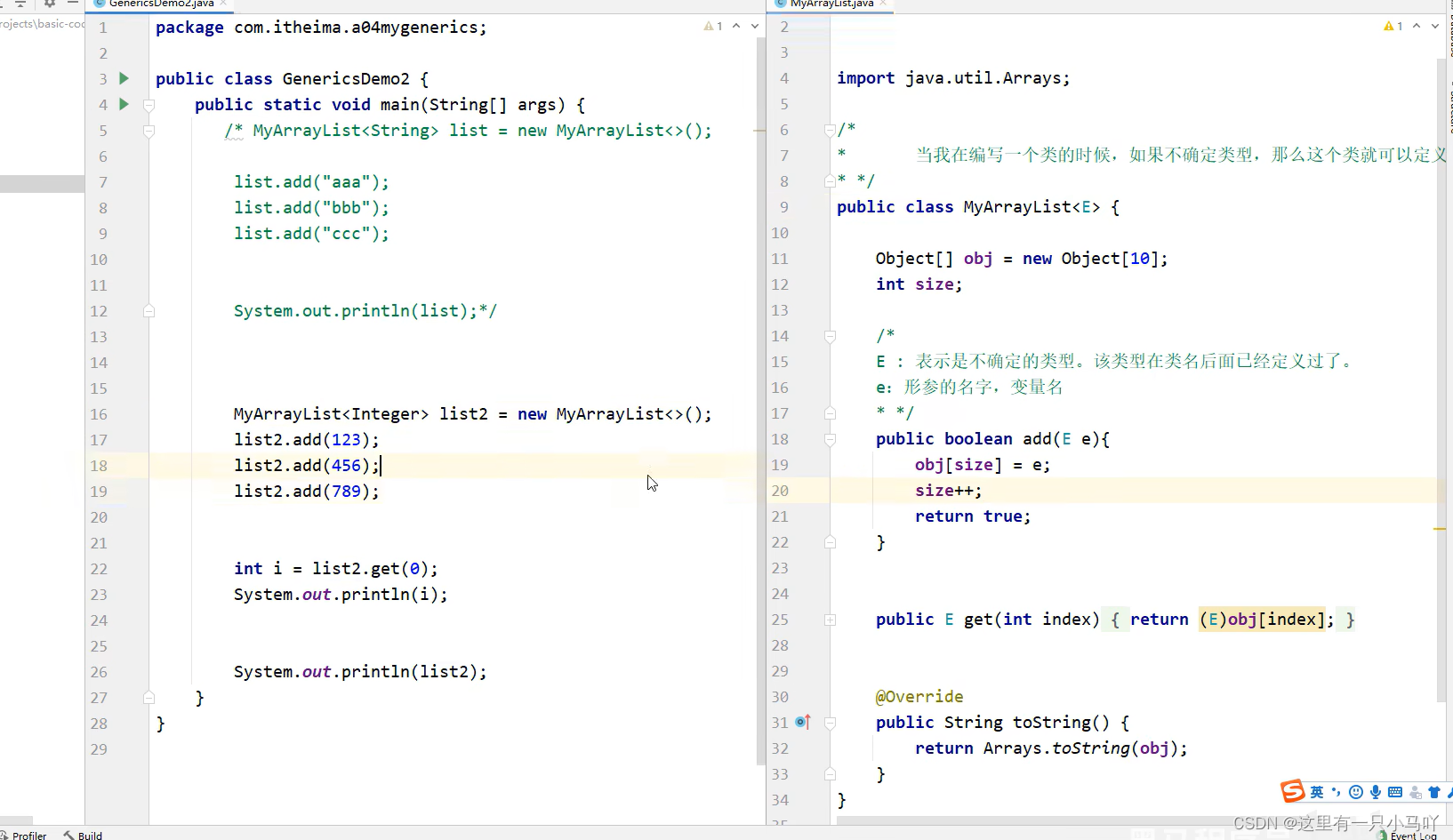
泛型类:
1
2
3
4
5
6
7
8
9
10
11
12
13
14
15
16
17
18
19
20
21
| import Duotai.Animal;
import java.util.Arrays;
public class MyArrayList<E> {
Object [] obj = new Object[10];
int size;
public boolean add(E e)
{
obj[size] = e;
size++;
return true;
}
public E get(int index)
{
return (E)obj[index];
}
public String toString(){
return Arrays.toString(obj);
}
}
|
测试类
1
2
3
4
5
6
7
8
9
10
11
12
13
14
15
16
| import java.util.*;
import java.util.function.Consumer;
public class main {
public static void main(String[] args) {
MyArrayList<GirlFriend> gf = new MyArrayList<>();
GirlFriend g1 = new GirlFriend("aaa",18,170.5);
GirlFriend g2 = new GirlFriend("bbb",25,167.5);
GirlFriend g3 = new GirlFriend("ccc",20,192.5);
gf.add(g1);
gf.add(g2);
System.out.println(gf);
}
}
|
3.6.2 泛型方法
方法中形参类型不确定时,可以使用类名后面定义的泛型
- 方案①:使用类名后面定义的泛型——所有的方法都可以使用
- 方案②:在方法申明上定义自己的泛型——本方法能用

泛型方法的练习
定义一个工具类: ListUtil
类中定义一个静态方法addAll,用来添加多个集合的元素。
1
2
3
4
5
6
7
8
9
10
11
12
13
14
15
16
17
18
19
20
21
22
23
24
25
26
27
28
29
30
31
| import java.util.ArrayList;
import java.util.Arrays;
public class ListUtil {
private ListUtil(){}
public static<E> void addArray(ArrayList<E> list,E e1,E e2){
list.add(e1);
list.add(e2);
}
}
Lobster AIjava运行12345678910111213
import java.util.*;
import java.util.function.Consumer;
public class main {
public static void main(String[] args) {
GirlFriend g1 = new GirlFriend("aaa",18,170.5);
GirlFriend g2 = new GirlFriend("bbb",25,167.5);
GirlFriend g3 = new GirlFriend("ccc",20,192.5);
ArrayList<GirlFriend> list =new ArrayList<>();
ListUtil.addArray(list,g1,g2);
for(GirlFriend g:list) System.out.println(g);
}
}
|
3.6.3 泛型接口

重点:如何使用一个带泛型的接口
- 方式1:实现类给出具体类型
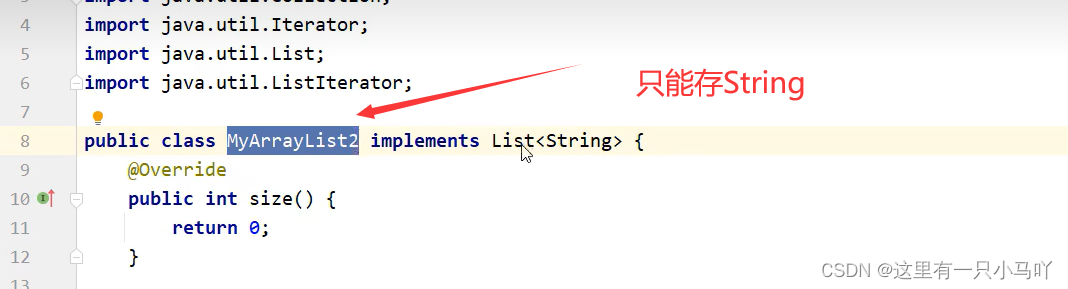
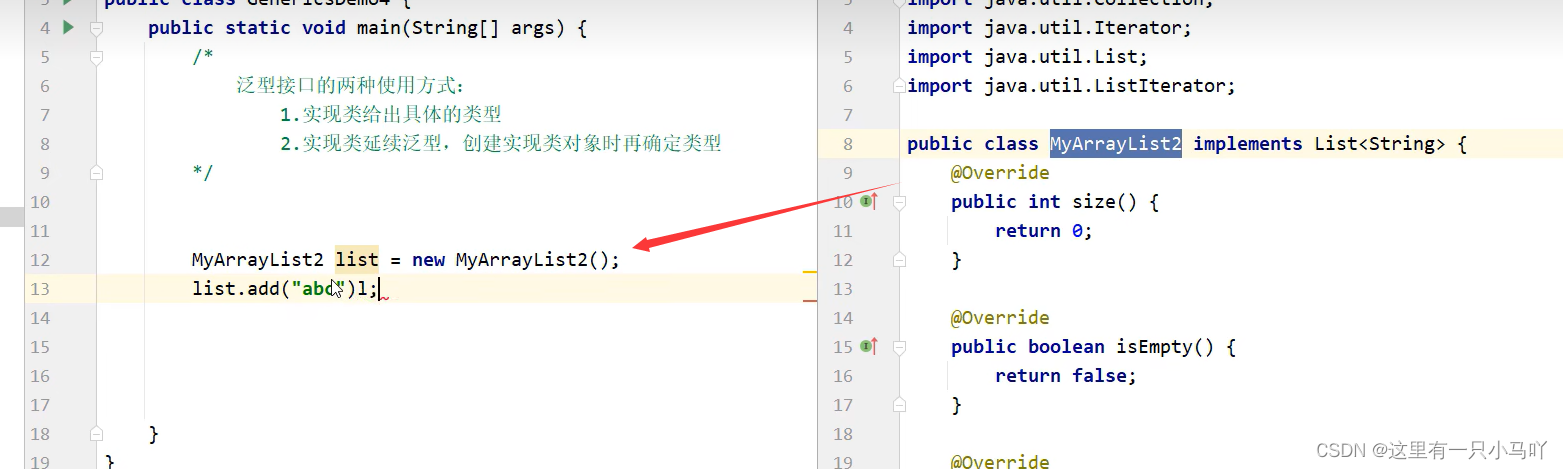
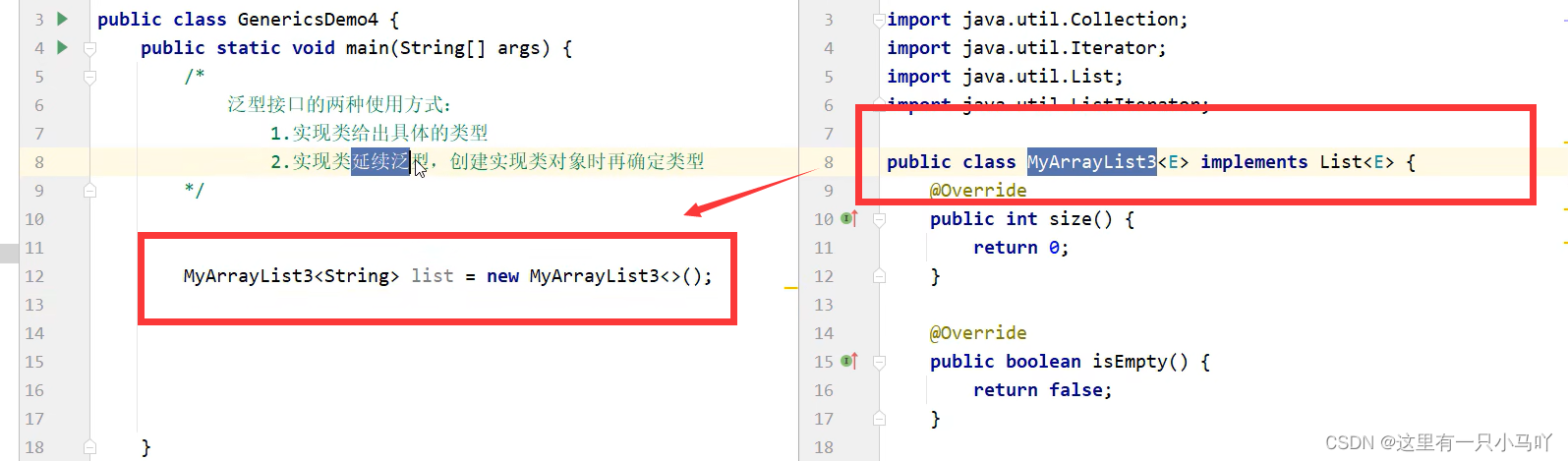
泛型的继承和通配符
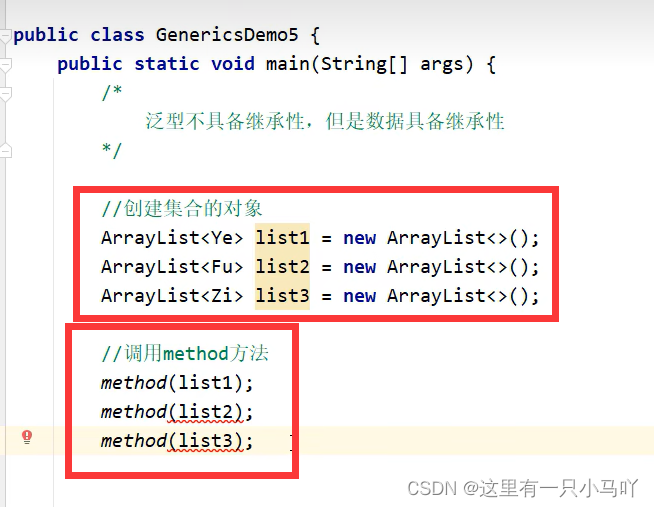
- 什么是泛型?
JDK5引入的特性,可以在编译阶段约束操作的数据类型,并进行检查
- 泛型的好处?
统一数据类型
把运行时期的问题提前到了编译期间,避免了强制
类型转换可能出现的异常,因为在编译阶段类型就能确定下来。
- 泛型的细节?
泛型中不能写基本数据类型
指定泛型的具体类型后,传递数据时,可以传入该类型和他的子类类型
如果不写泛型,类型默认是Object,
- 哪里定义泛型?
泛型类:在类名后面定义泛型,创建该类对象的时候,确定类型
泛型方法:在修饰符后面定义方法,调用该方法的时候,确定类型
泛型接口:在接口名后面定义泛型,实现类确定类型,实现类延续泛型
- 泛型的继承和通配符
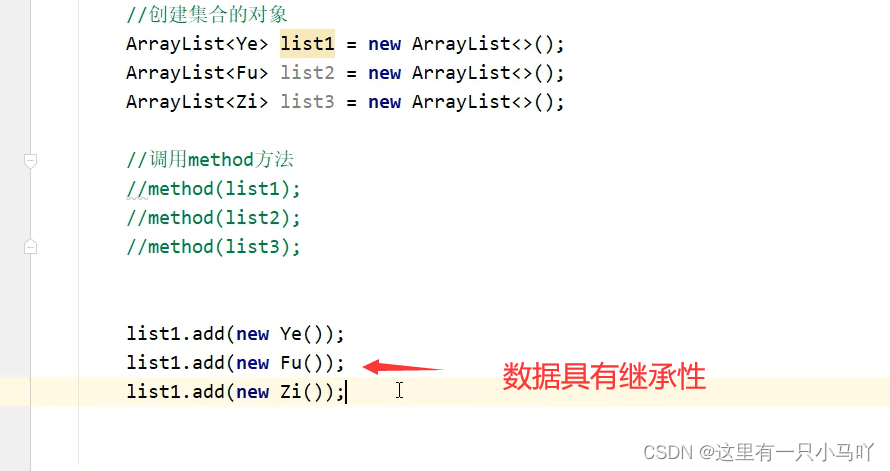
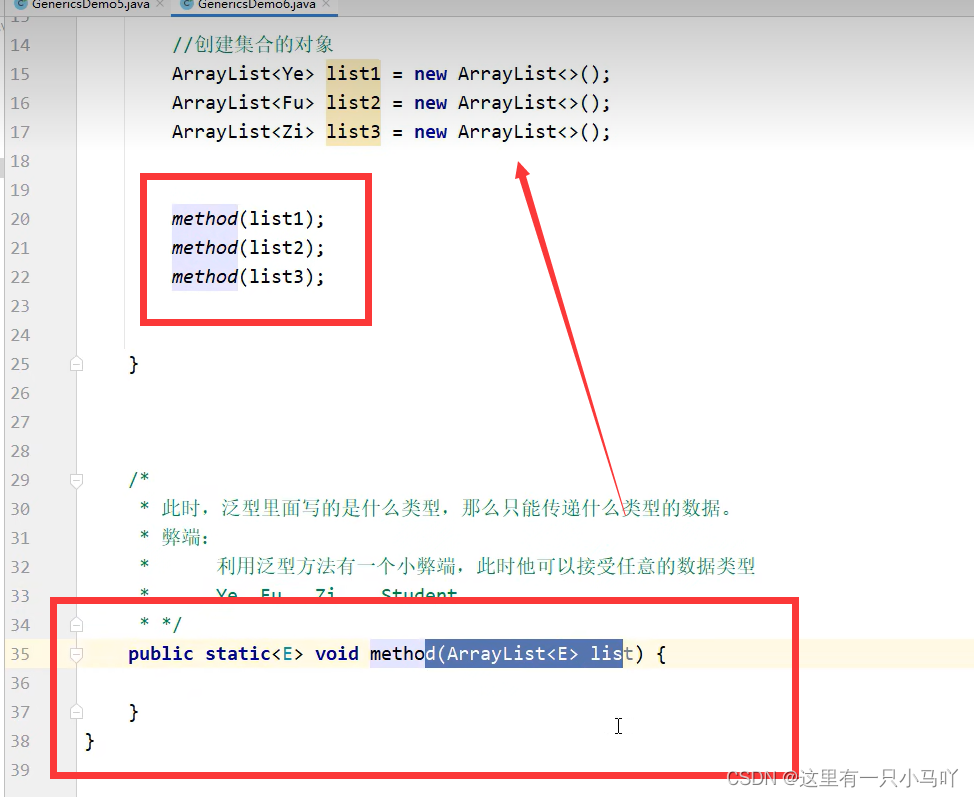
泛型不具备继承性,但是数据具备继承性
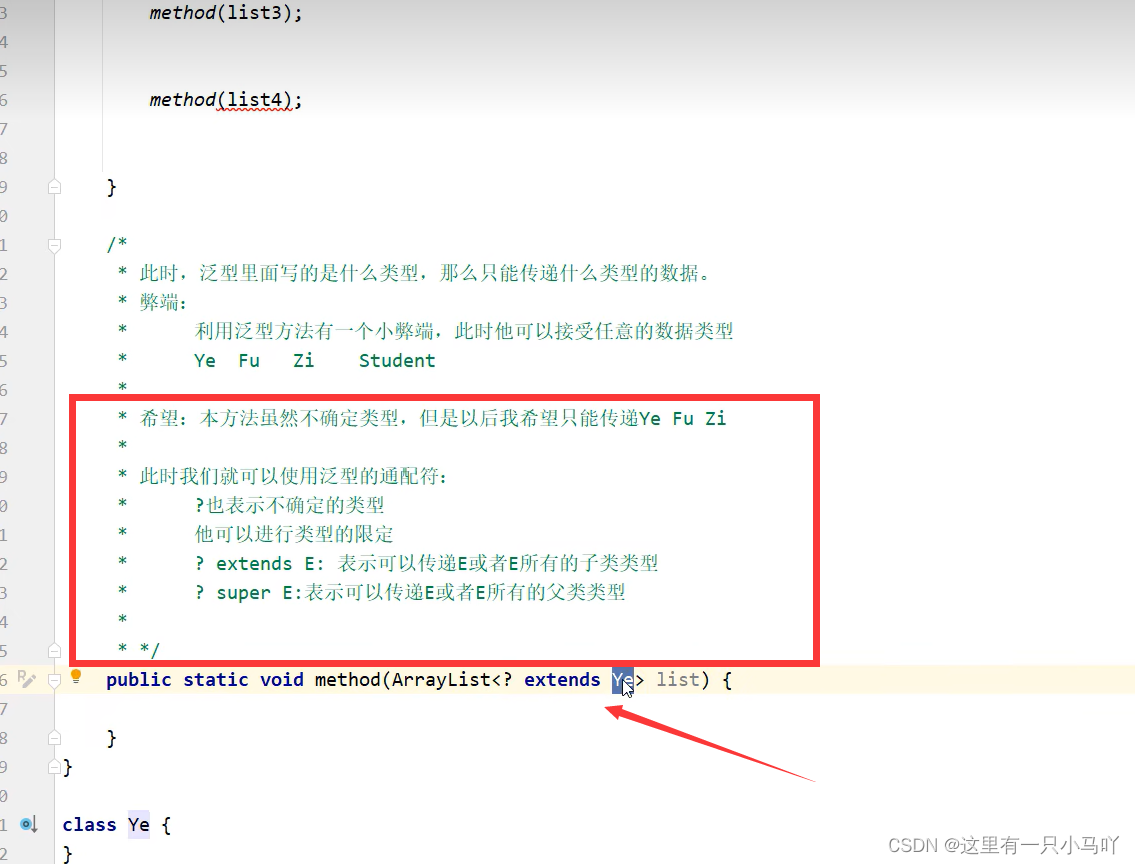
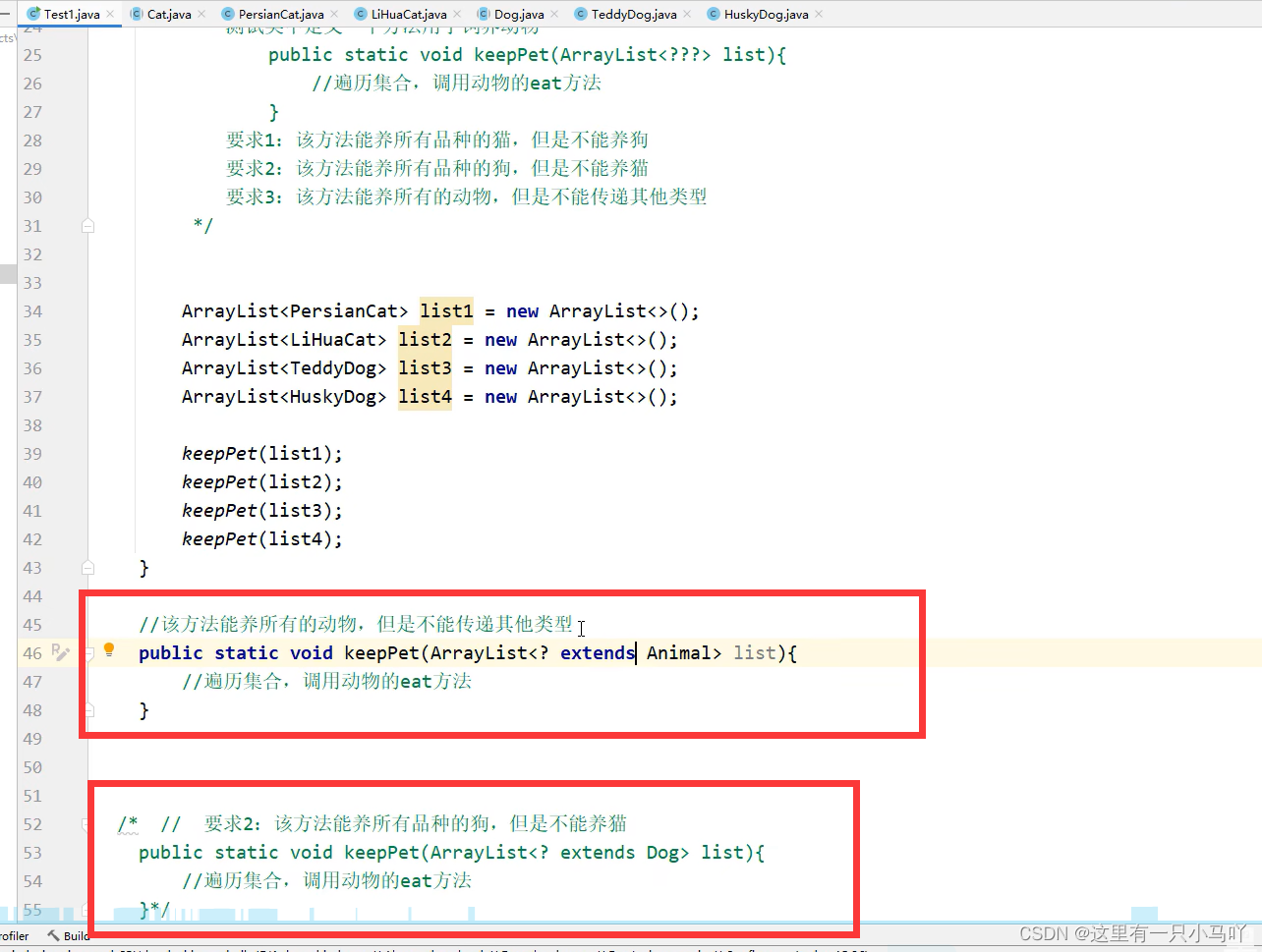
泛型的通配符: ?
? extend E
? super E
- 使用场景
定义类、方法、接口的时候,如果类型不确定,就可以定义泛型
如果类型不确定,但是能知道是哪个继承体系中的,可以使用泛型的通配符
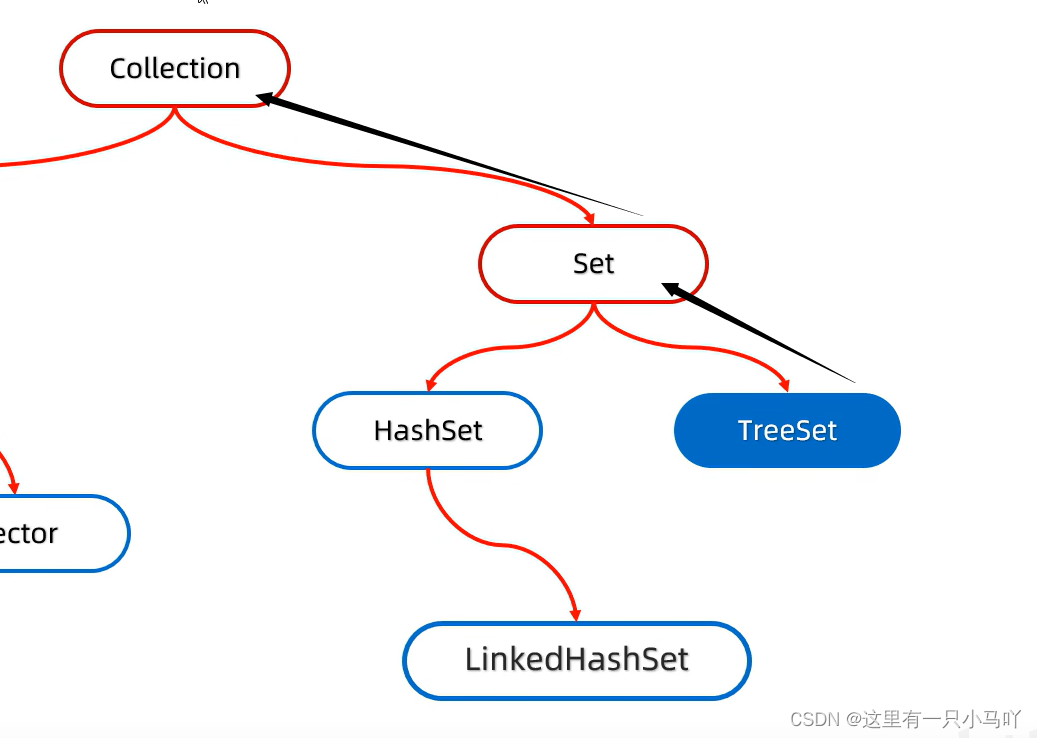
3.7 Set系列集合
Set系列集合
- 无序: 存取顺序不一致
- 不重复:可以去除重复
- 无索引:没有带索引的方法,所以不能使用普通for循环遍历,也不能通过索引来获取元素
Set集合的实现类
- HashSet:无序、不重复、无索引
- LinkedHashSet:有序、不重复、无索引
- TreeSet:可排序、不重复、无索引
Set接口中的方法上基本上与Collection的API一致。
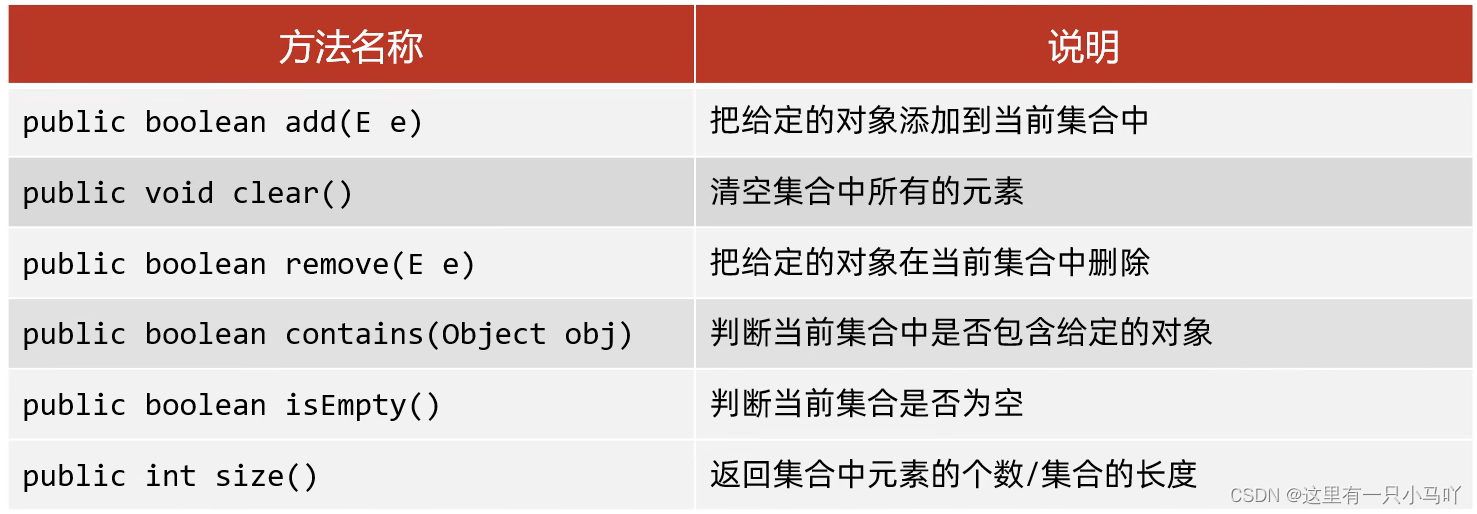
1
2
3
4
5
6
7
8
9
10
11
12
13
14
15
16
17
18
19
20
21
22
23
24
25
26
27
28
29
| import java.util.*;
import java.util.function.Consumer;
public class main {
public static void main(String[] args) {
Set<GirlFriend> gf = new HashSet<>();
GirlFriend g1 = new GirlFriend("aaa",18,170.5);
GirlFriend g2 = new GirlFriend("bbb",25,167.5);
GirlFriend g3 = new GirlFriend("ccc",20,192.5);
gf.add(g1);
gf.add(g2);
gf.add(g3);
System.out.println("==============================");
Iterator<GirlFriend> it = gf.iterator();
while (it.hasNext())
{
System.out.println(it.next());
}
System.out.println("==============================");
for(GirlFriend g:gf)
System.out.println(g);
System.out.println("==============================");
gf.forEach(g->{
System.out.println(g);
});
}
}
|
3.8 HashSet
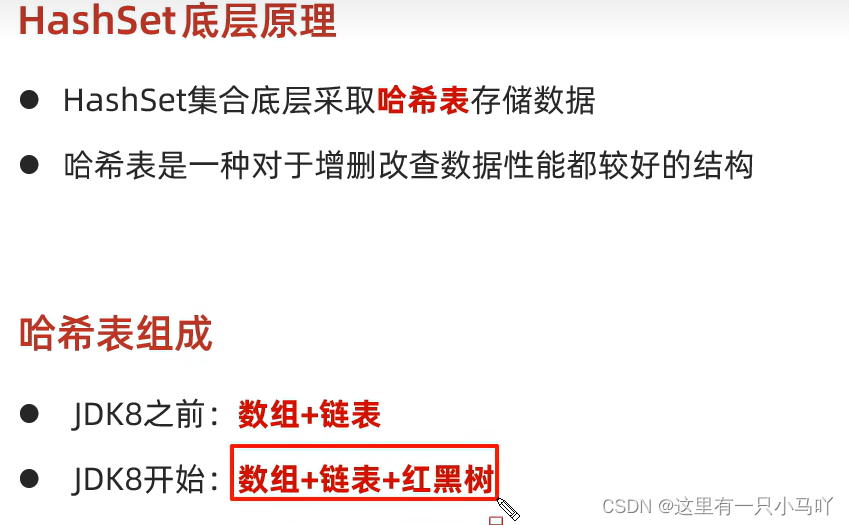
哈希值
- 根据hashCode方 法算出来的int类型的整数
- 该方法定义在Object类中,所有对象都可以调用,默认使用地址值进行计算
- 一般情况下,会重写hashCode方法,利用对象内部的属性值计算哈希值
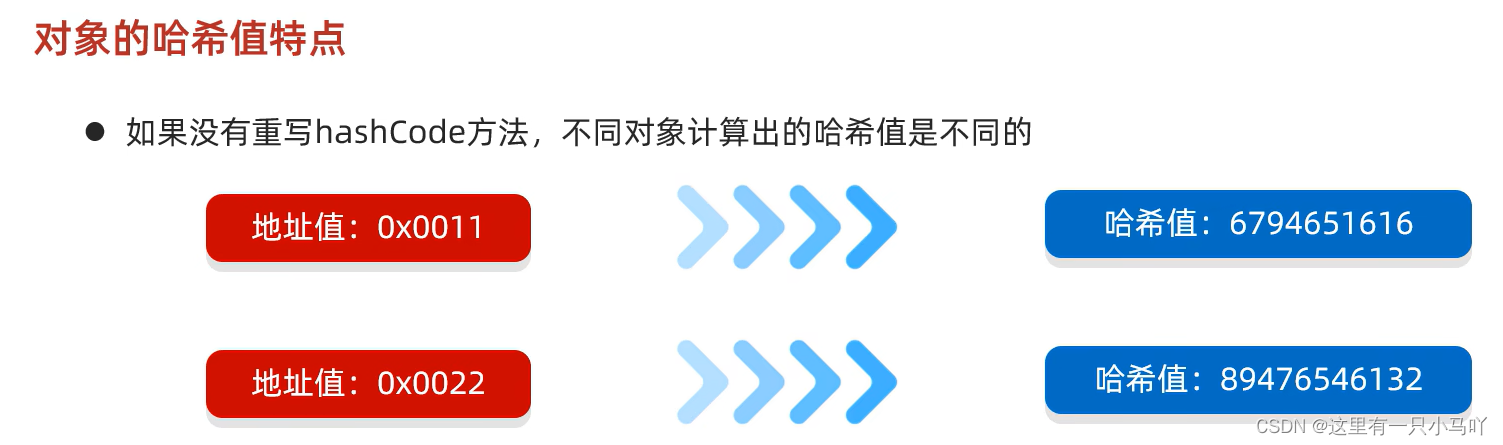
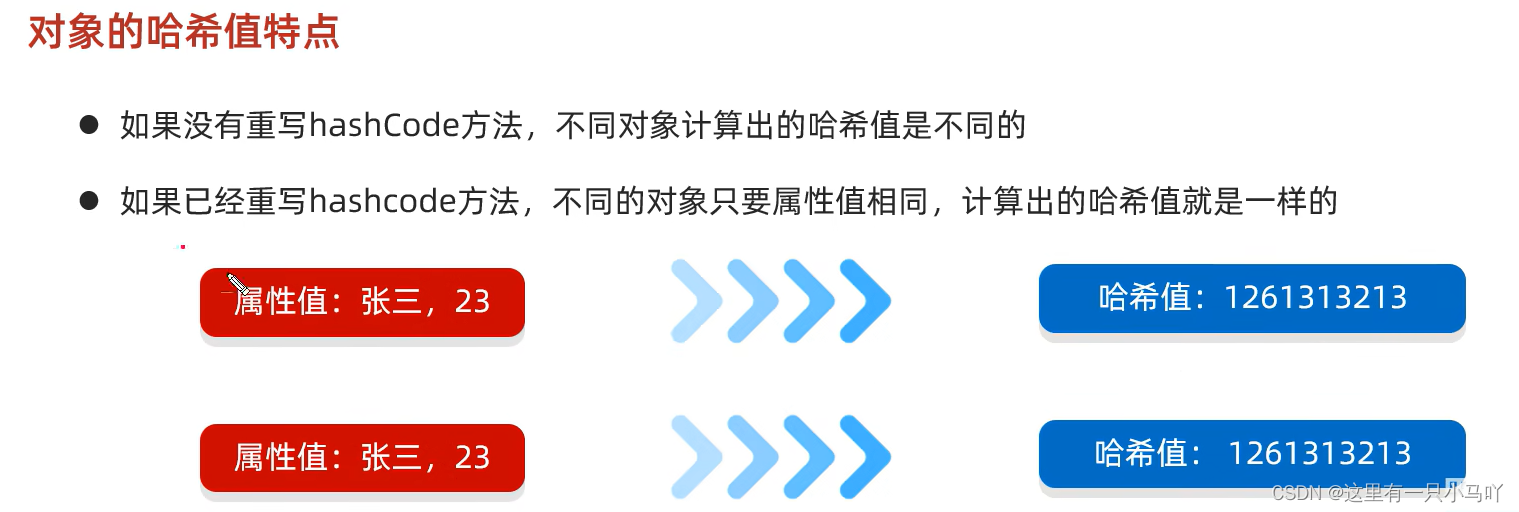
在小部分情况下,不同的属性值或者不同的地址值计算出来的哈希值也有可能一样。( 哈希碰撞)

重写 直接Alt+Insert 。
1
2
3
4
5
6
7
8
9
10
11
12
13
14
15
16
17
18
19
20
21
22
23
24
25
26
27
| @Override
public int hashCode() {
return Objects.hash(name, age, height);
}
Lobster AIjava运行1234
import java.util.*;
import java.util.function.Consumer;
public class main {
public static void main(String[] args) {
GirlFriend g1 = new GirlFriend("aaa",18,170.5);
GirlFriend g2 = new GirlFriend("bbb",25,167.5);
GirlFriend g3 = new GirlFriend("ccc",20,192.5);
GirlFriend g4 = new GirlFriend("ccc",20,192.5);
System.out.println("============================");
System.out.println(g1.hashCode());
System.out.println(g2.hashCode());
System.out.println("============================");
System.out.println(g3.hashCode());
System.out.println(g4.hashCode());
}
}
|
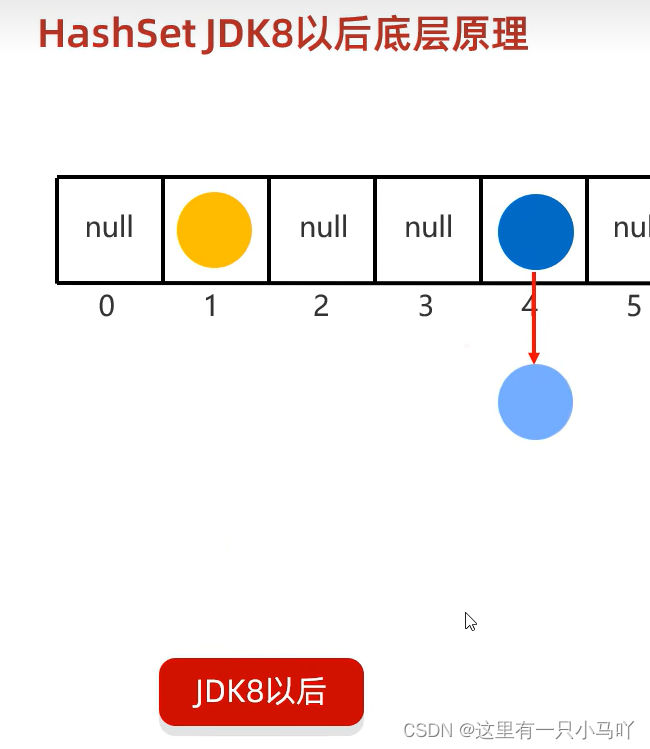
3.8.1 HashSet JDK8以前底层原理
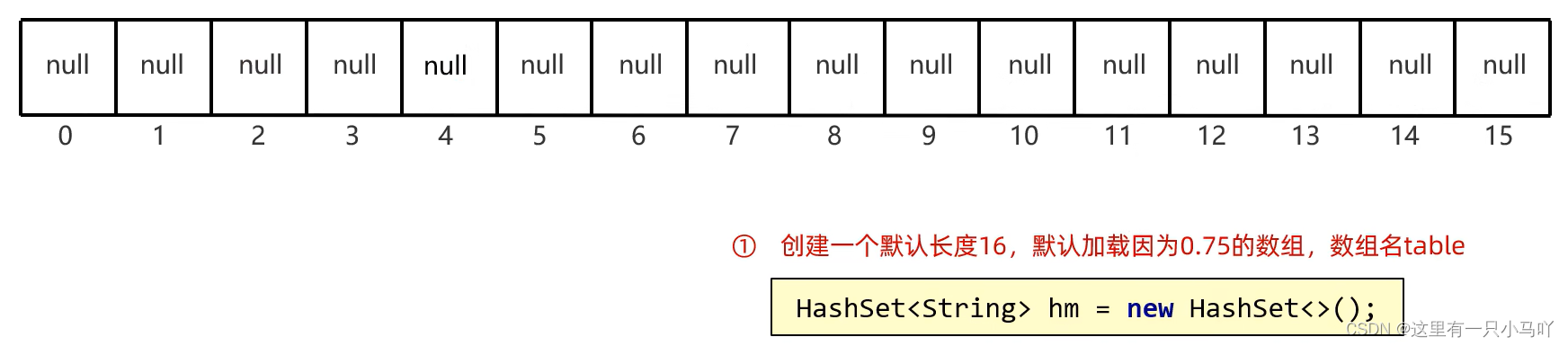
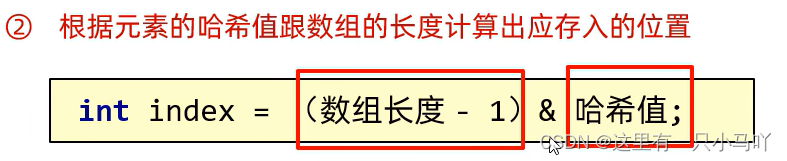
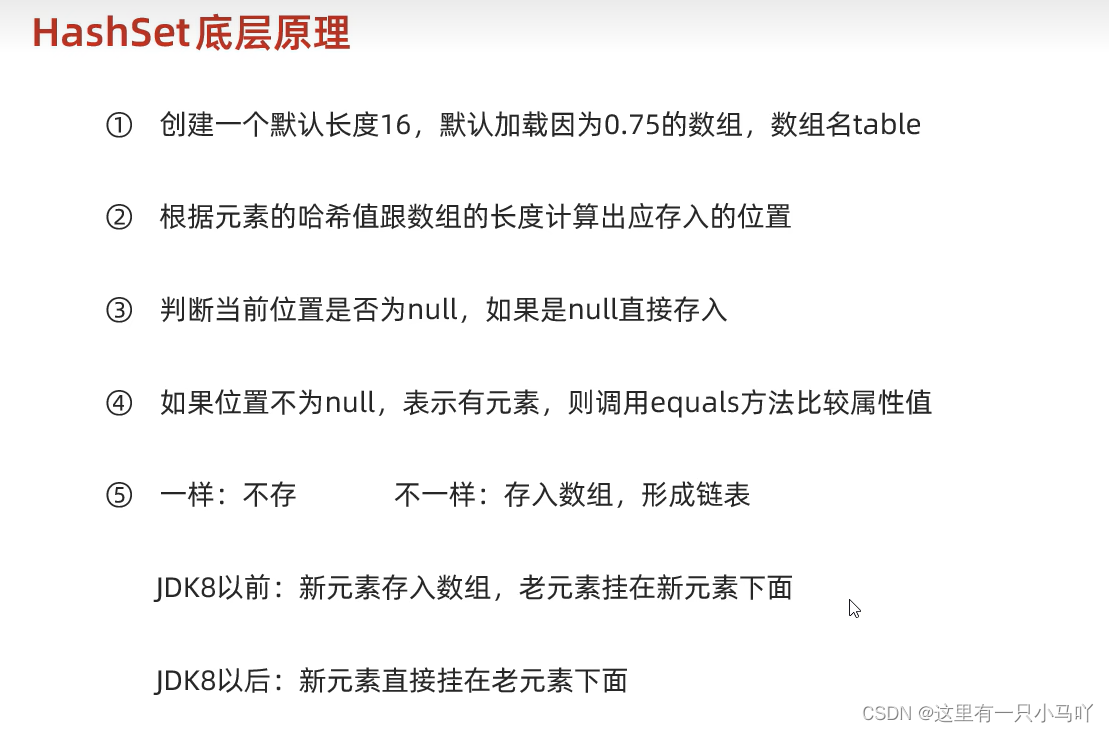
③判断当前位置是否为null,如果是null直接存入。
④如果位置不为null,表示有元素则调用equals方法比较属性值。
⑤一样:不存 不一样:存入数组,形成链表
- JDK8以前:新元素存入数组,老元素挂在新元素下面
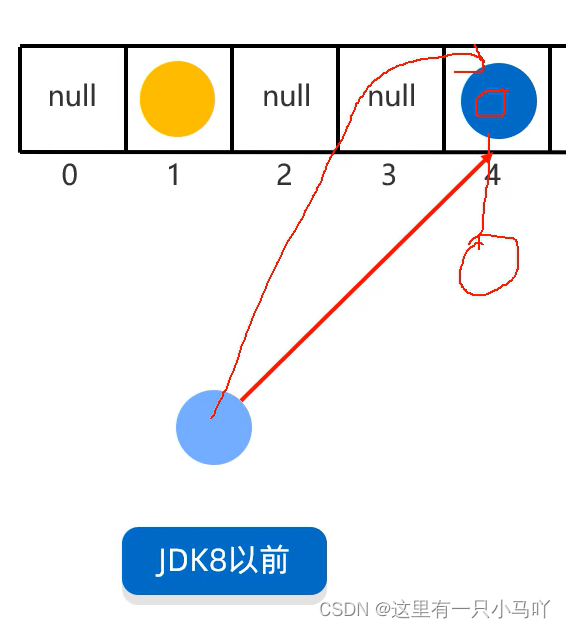
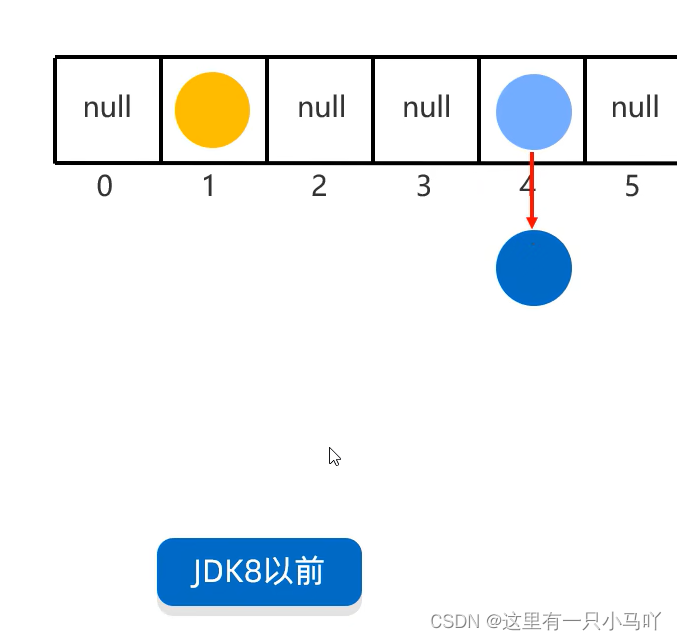
- JDK8以后:新元素直接挂在老元素下面

3.8.2 HashSet JDK8以后底层原理
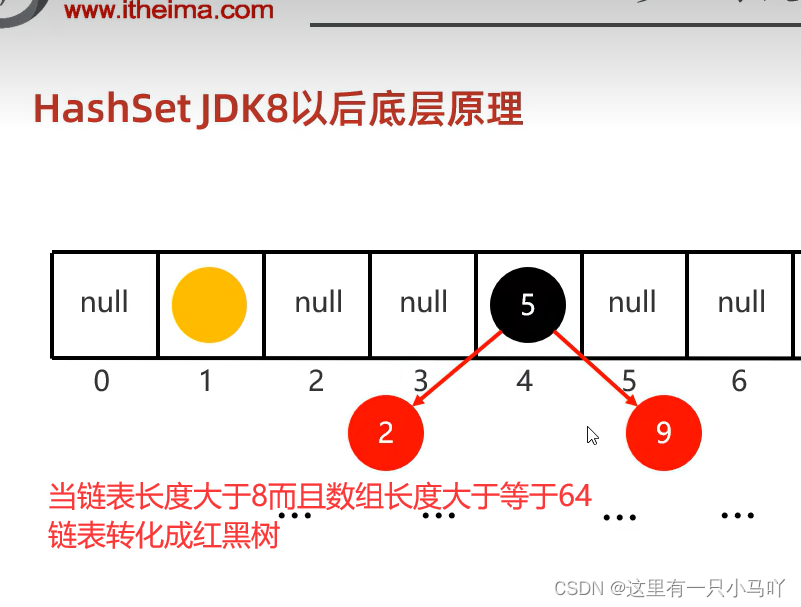
所以!!!!!
如果集合中存储的是自定义对象,必须要重写hashCode和equals方法
GirlFriend.java
1
2
3
4
5
6
7
8
9
10
11
12
13
14
15
16
17
18
19
20
21
22
23
24
25
26
27
28
29
30
31
32
33
34
35
36
37
38
39
40
41
42
43
44
45
46
47
48
49
50
51
52
53
54
55
56
57
| import java.util.Objects;
public class GirlFriend {
private String name;
private int age;
private double height;
public GirlFriend(String name, int age, double height) {
this.name = name;
this.age = age;
this.height = height;
}
public GirlFriend() {
}
public String getName() {
return name;
}
public void setName(String name) {
this.name = name;
}
public int getAge() {
return age;
}
public void setAge(int age) {
this.age = age;
}
public double getHeight() {
return height;
}
public void setHeight(double height) {
this.height = height;
}
public String toString() {
return "GirlFriend{name = " + name + ", age = " + age + ", height = " + height + "}";
}
@Override
public boolean equals(Object o) {
if (this == o) return true;
if (o == null || getClass() != o.getClass()) return false;
GirlFriend that = (GirlFriend) o;
return age == that.age && Double.compare(that.height, height) == 0 && Objects.equals(name, that.name);
}
@Override
public int hashCode() {
return Objects.hash(name, age, height);
}
}
|
main.java
1
2
3
4
5
6
7
8
9
10
11
12
13
14
15
16
17
18
19
20
21
22
23
24
| import java.util.HashSet;
public class main {
public static void main(String[] args) {
GirlFriend g1 = new GirlFriend("aaa",18,170.5);
GirlFriend g2 = new GirlFriend("bbb",25,167.5);
GirlFriend g3 = new GirlFriend("ccc",20,192.5);
GirlFriend g4 = new GirlFriend("ccc",20,192.5);
System.out.println("============================");
HashSet<GirlFriend> gf = new HashSet<>();
gf.add(g1);
gf.add(g2);
gf.add(g3);
gf.add(g4);
for(GirlFriend g:gf) System.out.println(g);
}
}
|
3.9 LinkedHashSet
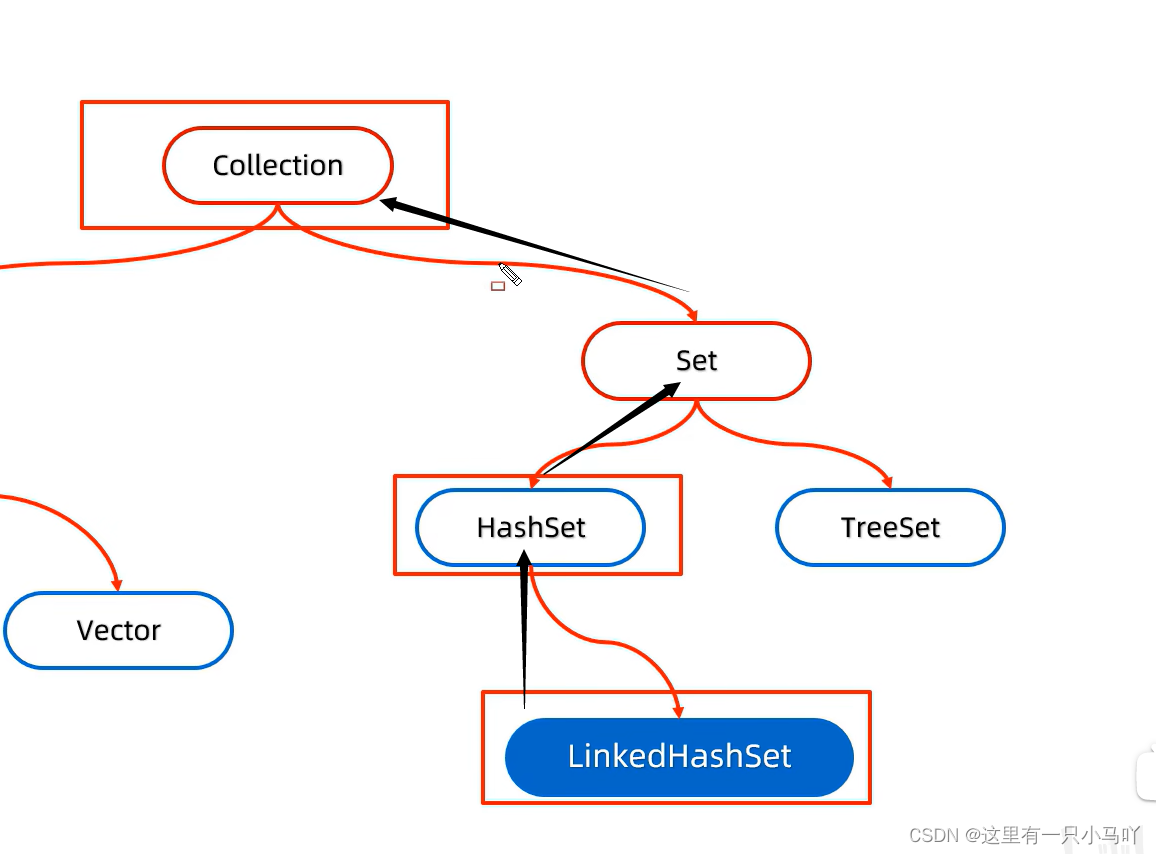
LinkedHashSet底层原理
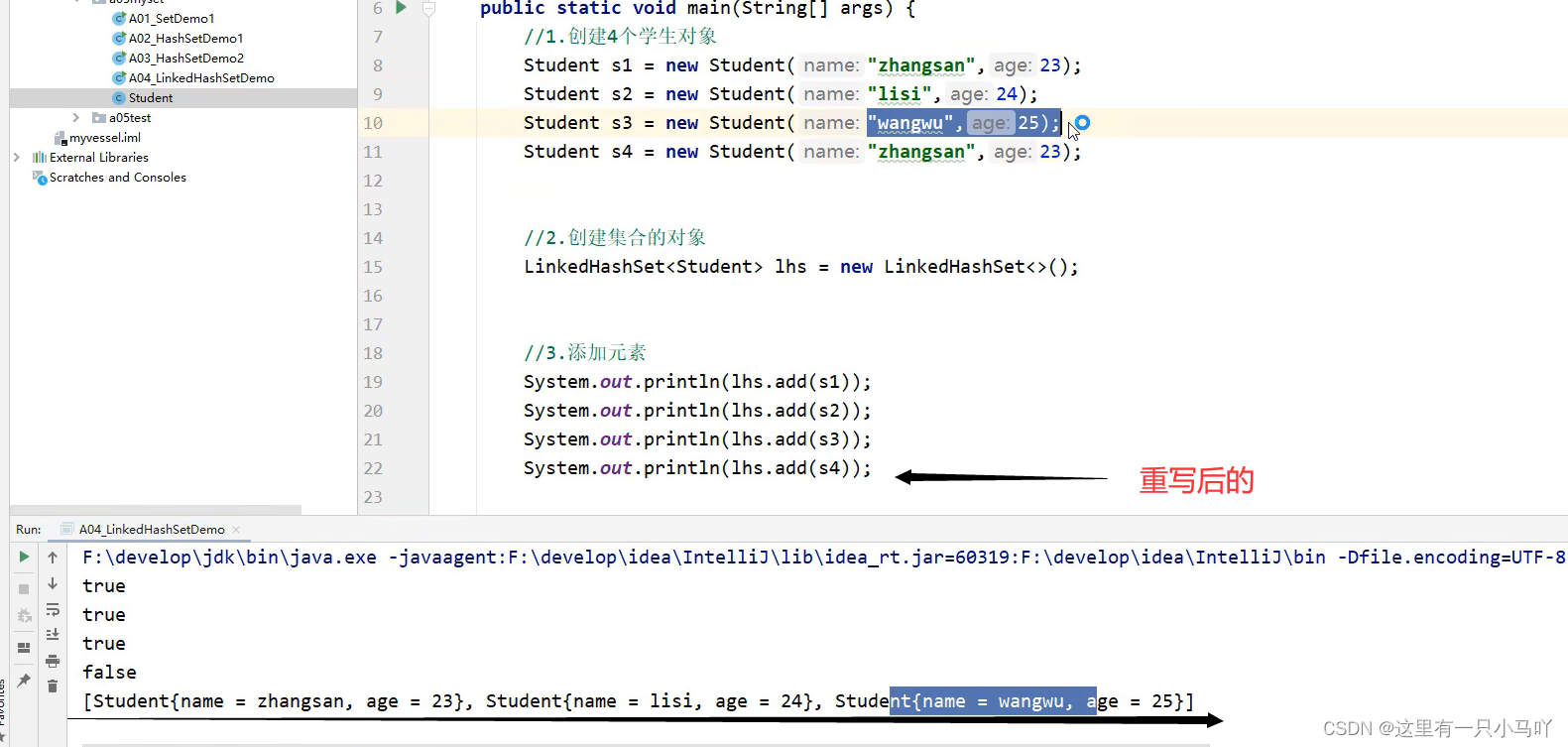
- 有序、不重复、无索引。
- 这里的有序指的是保证存储和取出的元素顺序一致
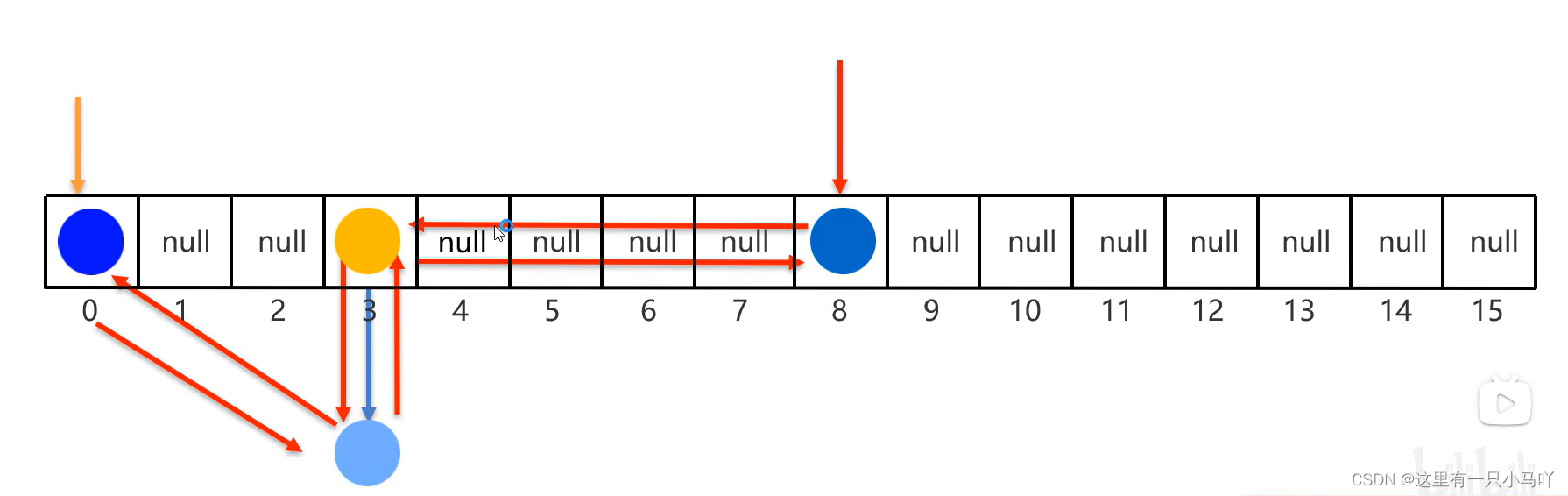
- 原理:底层数据结构是依然哈希表,只是每个元素又额外的多了一个双链表的机制记录存储的顺序。
保证存和取得顺序是一样的
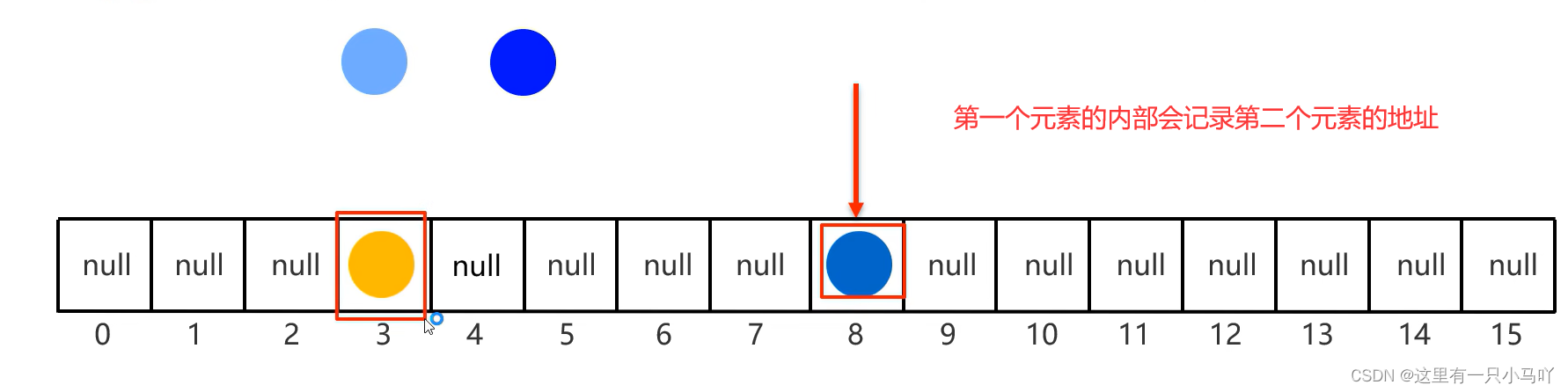
第二个元素也会记录第一个元素的地址值
全部放入后:
3.10 TreeSet
- 不重复、无索引、可排序
- 可排序:按照元素的默认规则(有小到大)排序。
- TreeSet集合底层是基于红黑树的数据结构实现排序的,增删改查性能都较好。
非自定义类型:
1
2
3
4
5
6
7
8
9
10
11
12
13
14
15
16
17
| import java.util.HashSet;
import java.util.TreeMap;
import java.util.TreeSet;
public class main {
public static void main(String[] args) {
TreeSet<Integer> treeSet =new TreeSet<>();
treeSet.add(2);
treeSet.add(1);
treeSet.add(3);
treeSet.add(8);
treeSet.add(4);
treeSet.add(3);
treeSet.add(2);
for(Integer a:treeSet) System.out.print(a+" ");
}
}
|
3.10.1 TreeSet集合默认的规则
- 对于数值 类型: Integer , Double,默认按照从小到大的顺序进行排序。
- 对于字符、字符串类型:按照字符在ASCII码表中的数字升序进行排序。
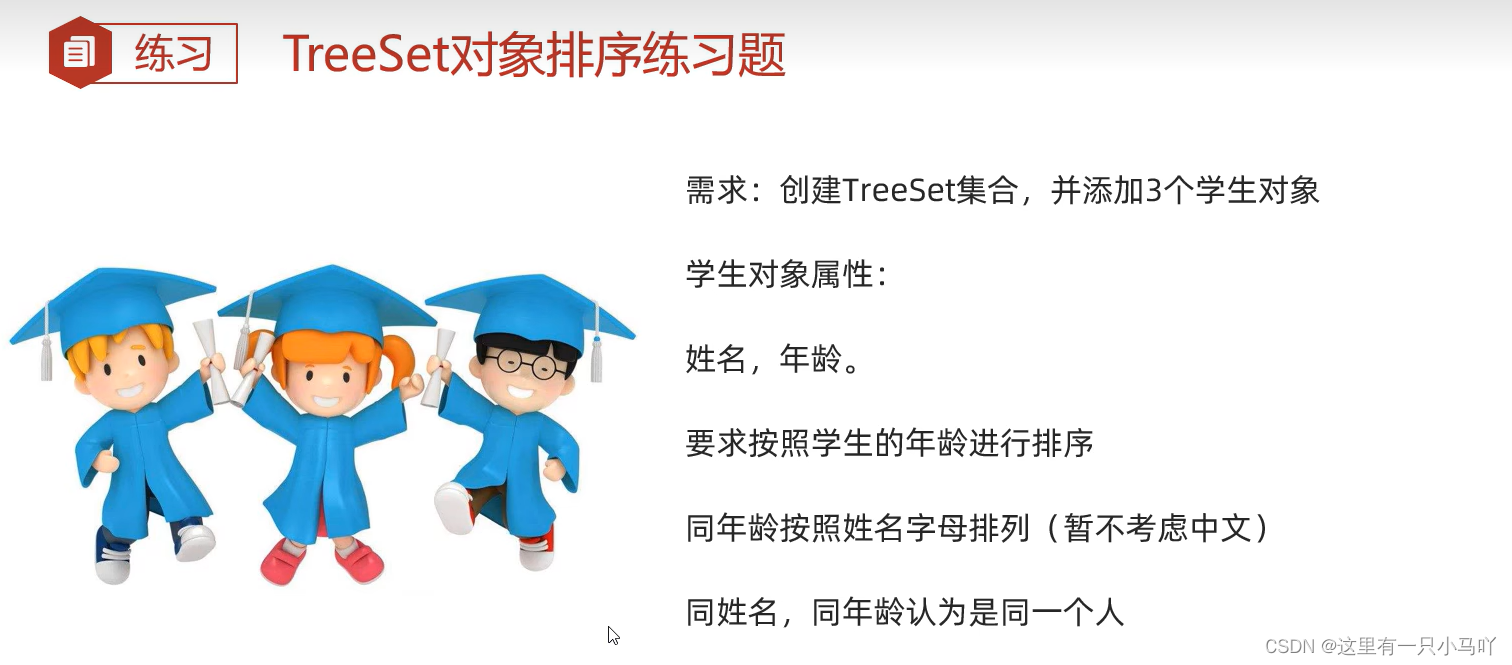
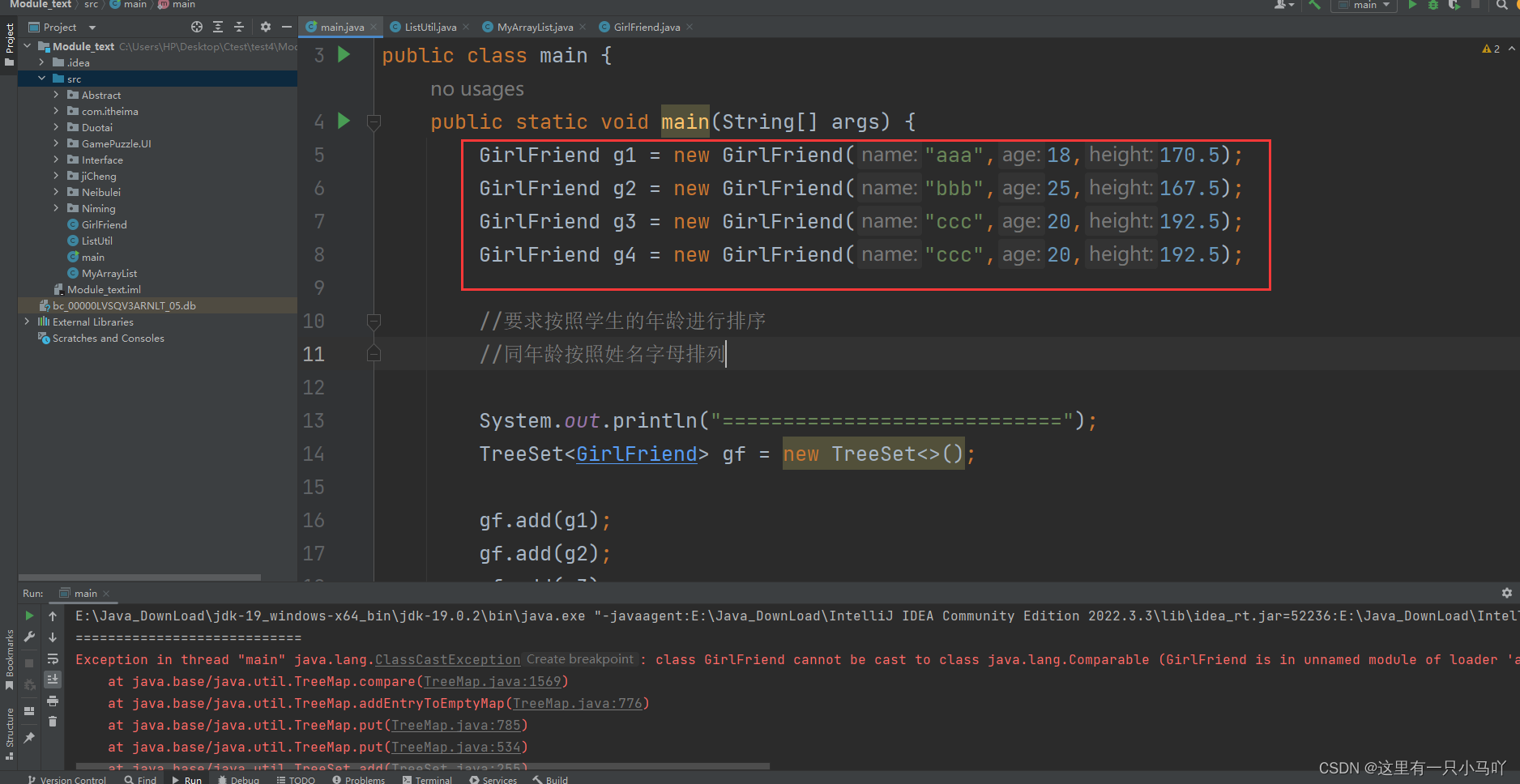
由于是自己定义的类,所以没有赋予TreeSet 的比较方式,运行会报错。
赋予排序方式:
默认排序/自然排序: Javabean类实现Comparable接口指定比较规则.
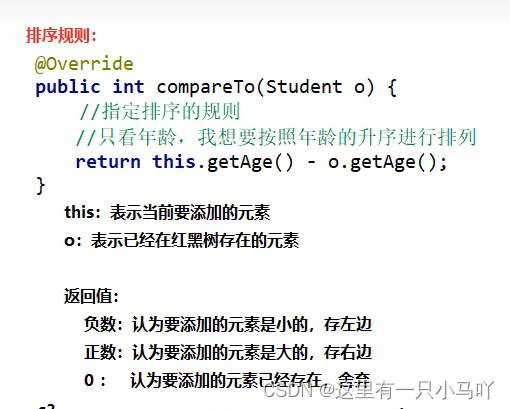
注意implements Comparable<GirlFriend>与public int compareTo(GirlFriend o)
1
2
3
4
5
6
7
8
9
10
11
12
13
14
15
16
17
18
19
20
21
22
23
24
25
26
27
28
29
30
31
32
33
34
35
36
37
38
39
40
41
42
43
44
45
46
47
48
49
50
51
52
53
54
55
56
57
58
59
60
61
62
63
| import java.util.Objects;
public class GirlFriend implements Comparable<GirlFriend>{
private String name;
private int age;
private double height;
public GirlFriend(String name, int age, double height) {
this.name = name;
this.age = age;
this.height = height;
}
public GirlFriend() {
}
public String getName() {
return name;
}
public void setName(String name) {
this.name = name;
}
public int getAge() {
return age;
}
public void setAge(int age) {
this.age = age;
}
public double getHeight() {
return height;
}
public void setHeight(double height) {
this.height = height;
}
public String toString() {
return "GirlFriend{name = " + name + ", age = " + age + ", height = " + height + "}";
}
@Override
public boolean equals(Object o) {
if (this == o) return true;
if (o == null || getClass() != o.getClass()) return false;
GirlFriend that = (GirlFriend) o;
return age == that.age && Double.compare(that.height, height) == 0 && Objects.equals(name, that.name);
}
@Override
public int hashCode() {
return Objects.hash(name, age, height);
}
@Override
public int compareTo(GirlFriend o) {
return this.getAge() - o.getAge();
}
}
|
1
2
3
4
5
6
7
8
9
10
11
12
13
14
15
16
17
18
19
20
21
22
23
24
25
26
27
28
29
30
31
32
33
34
35
36
37
38
39
40
41
42
43
44
45
46
47
48
49
50
51
52
53
54
55
56
57
58
59
60
61
62
63
64
65
66
67
| import java.util.Objects;
public class GirlFriend implements Comparable<GirlFriend>{
private String name;
private int age;
private double height;
public GirlFriend(String name, int age, double height) {
this.name = name;
this.age = age;
this.height = height;
}
public GirlFriend() {
}
public String getName() {
return name;
}
public void setName(String name) {
this.name = name;
}
public int getAge() {
return age;
}
public void setAge(int age) {
this.age = age;
}
public double getHeight() {
return height;
}
public void setHeight(double height) {
this.height = height;
}
public String toString() {
return "GirlFriend{name = " + name + ", age = " + age + ", height = " + height + "}";
}
@Override
public boolean equals(Object o) {
if (this == o) return true;
if (o == null || getClass() != o.getClass()) return false;
GirlFriend that = (GirlFriend) o;
return age == that.age && Double.compare(that.height, height) == 0 && Objects.equals(name, that.name);
}
@Override
public int hashCode() {
return Objects.hash(name, age, height);
}
@Override
public int compareTo(GirlFriend o) {
System.out.println("-------------");
System.out.println("this="+this);
System.out.println(" o= "+o);
return this.getAge() - o.getAge();
}
}
|
3.10.2 TreeSet比较器的规则
比较器排序:创建TreeSet对象时候,传递比较器Comparator指定规则
使用原则:默认使用第一种,如果第一种不能满足当前需求,就使用第二种
不需要重写compareTO
1
2
3
4
5
6
7
8
9
10
11
12
13
14
15
16
17
18
19
20
21
22
23
24
25
26
27
28
29
30
31
32
33
34
35
36
37
38
| import java.util.Comparator;
import java.util.TreeSet;
public class main {
public static void main(String[] args) {
GirlFriend g1 = new GirlFriend("aaa",18,170.5);
GirlFriend g2 = new GirlFriend("bbb",25,167.5);
GirlFriend g3 = new GirlFriend("ccc",20,192.5);
GirlFriend g4 = new GirlFriend("ccc",20,192.5);
GirlFriend g5 = new GirlFriend("ddd",20,190.0);
GirlFriend g6 = new GirlFriend("eee",18,170.5);
System.out.println("============================");
TreeSet<GirlFriend> gf = new TreeSet<>(new Comparator<GirlFriend>() {
@Override
public int compare(GirlFriend o1, GirlFriend o2) {
if(o1.getAge()!= o2.getAge()) return o1.getAge()- o2.getAge();
if(o1.getHeight()!=o2.getHeight()) return o1.getHeight()>o2.getHeight()?1:-1;
if(o1.getName()!= o2.getName())return o1.getName().compareTo(o2.getName());
return 0;
}
});
gf.add(g1);
gf.add(g2);
gf.add(g3);
gf.add(g4);
gf.add(g5);
gf.add(g6);
for(GirlFriend g:gf) System.out.println(g);
}
}
|
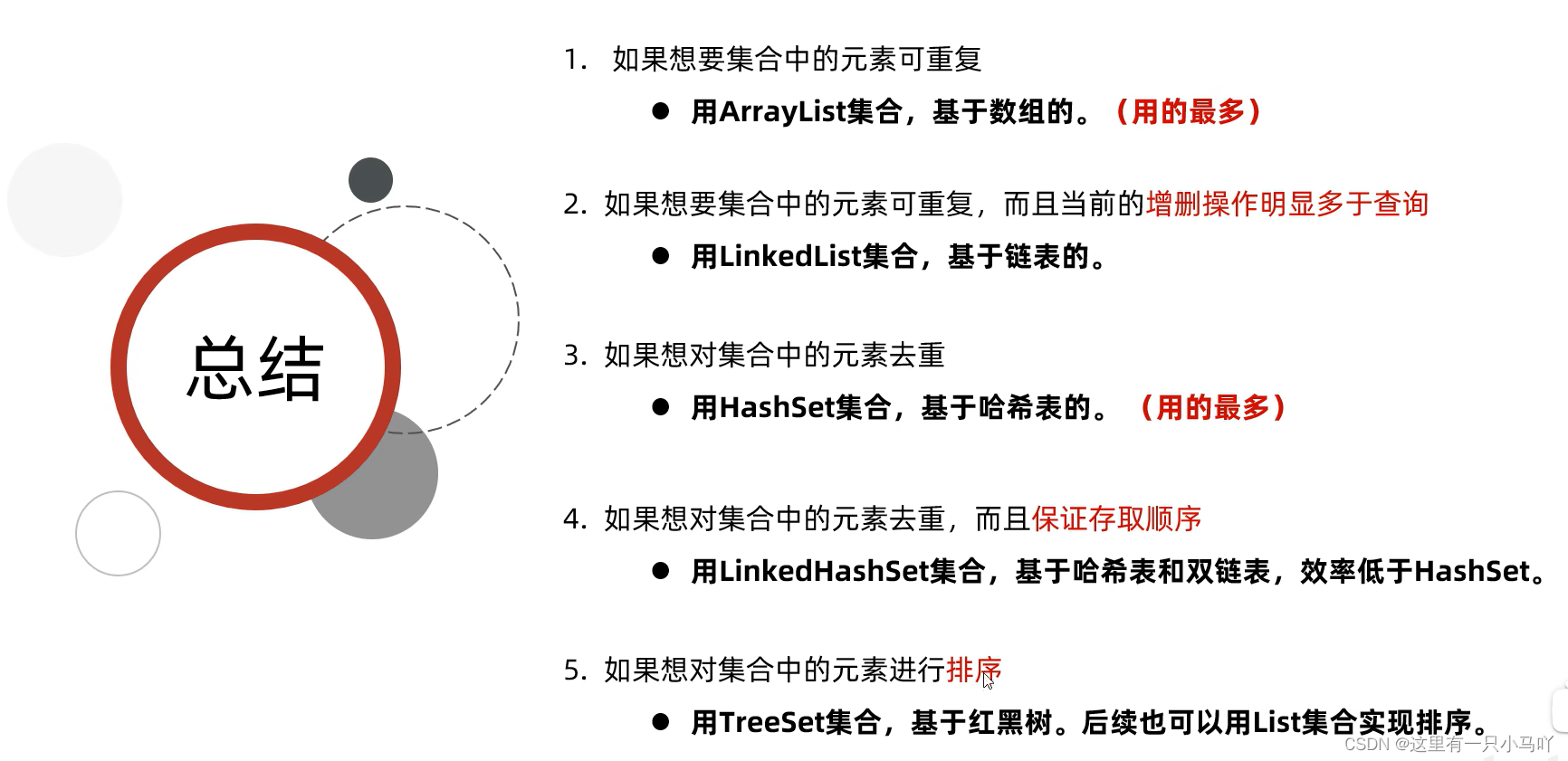
- TreeSet集合的特点是怎么样的?
●可排序、 不重复、无索引
●底层基于红黑树实现排序,增删改查性能较好
- TreeSet集合自 定义排序规则有几种方式
●方式一: Javabean类实现Comparable接口,指定比较规则
●方式二:创建集合时,自定义Comparator比较器对象,指定比较规则
- 方法返回值的特点
●负数:表示当前要添加的元素是小的,存左边
●正数: 表示当前要添加的元素是大的,存右边
●0:表示当前要添加的元素已经存在,舍弃

 微信
微信 支付宝
支付宝