黑马程序员Java零基础视频教程_下部(P1-P51)学习笔记
1. 双列集合
1.1 初识双列集合
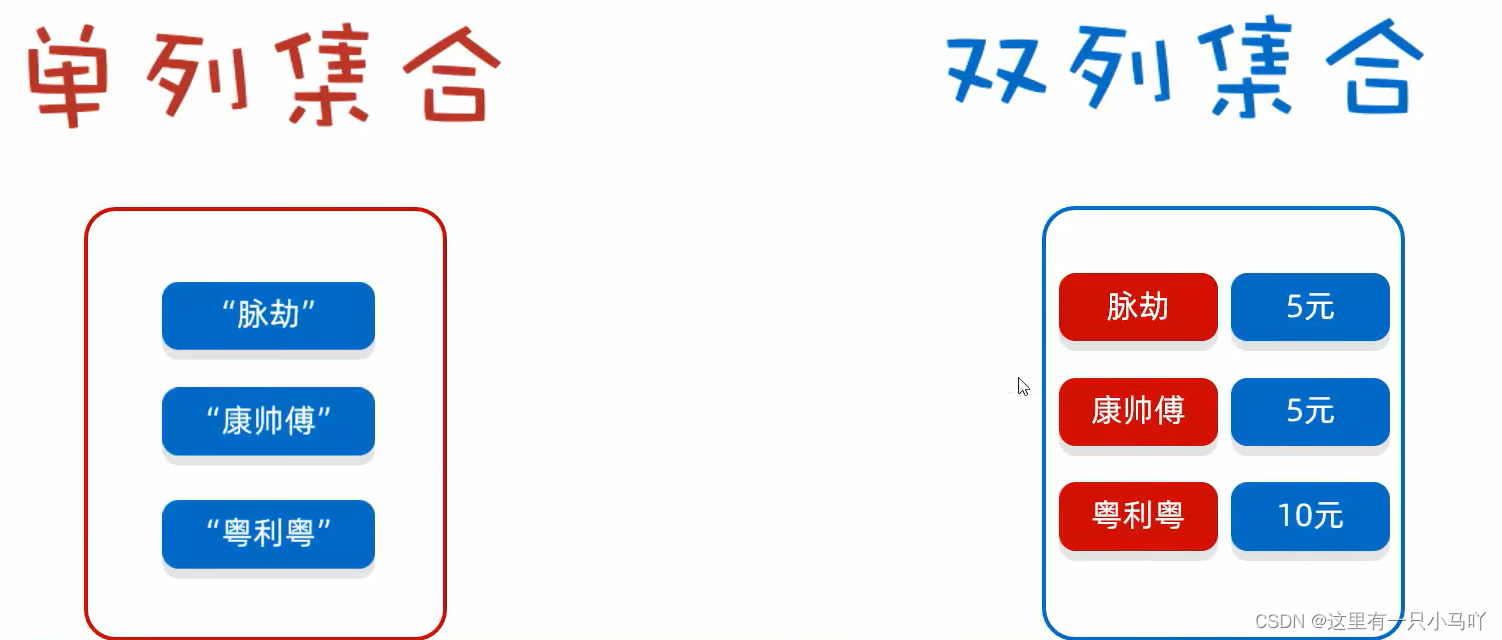
键:不可重复、唯一
值:可以重复
键值是一一对应的
1.1.1 双列集合的特点
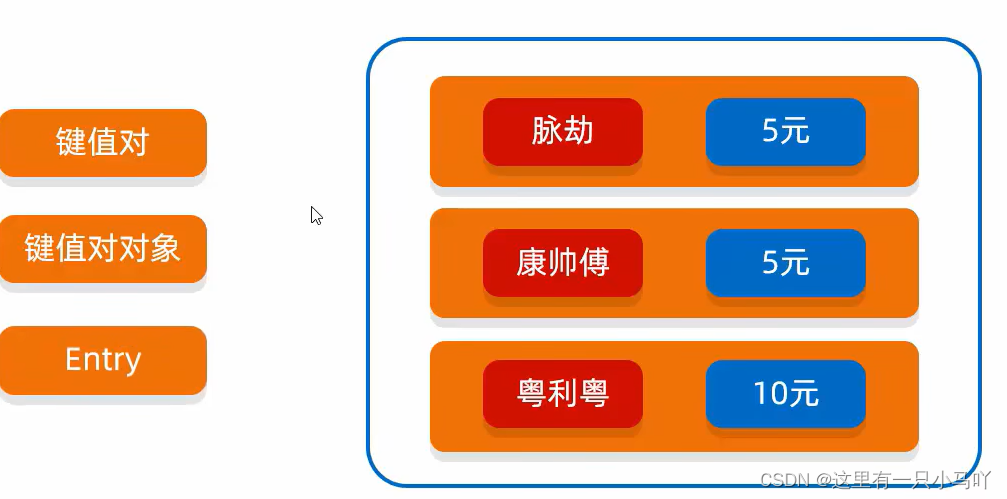
- ①双列集合一次需要存一对数据,分别为键和值
- ②键不能重复,值可以重复
- ③键和值是一一对应的,每一个键只能找到自己对应的值
- ④键+值这个整体 我们称之为“键值对”或者“键值对对象”,在Java中叫做 Entry 对象
1.1.2 双列集合的体系结构
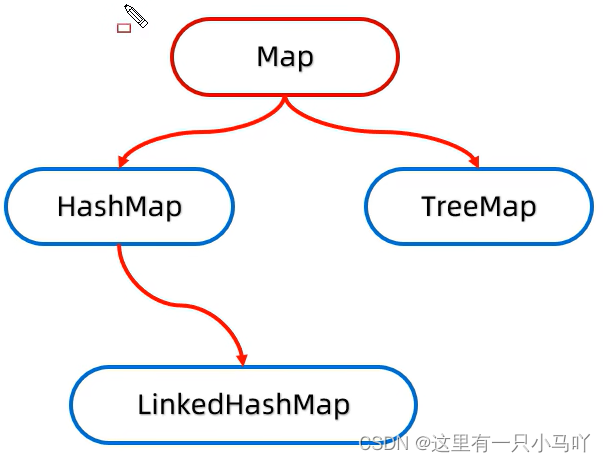
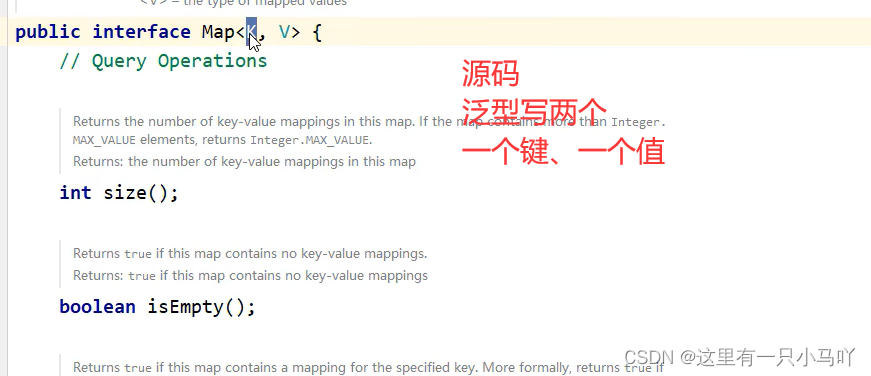
Map是双列集合的顶层接口,它的功能是全部双列集合都可以继承使用的
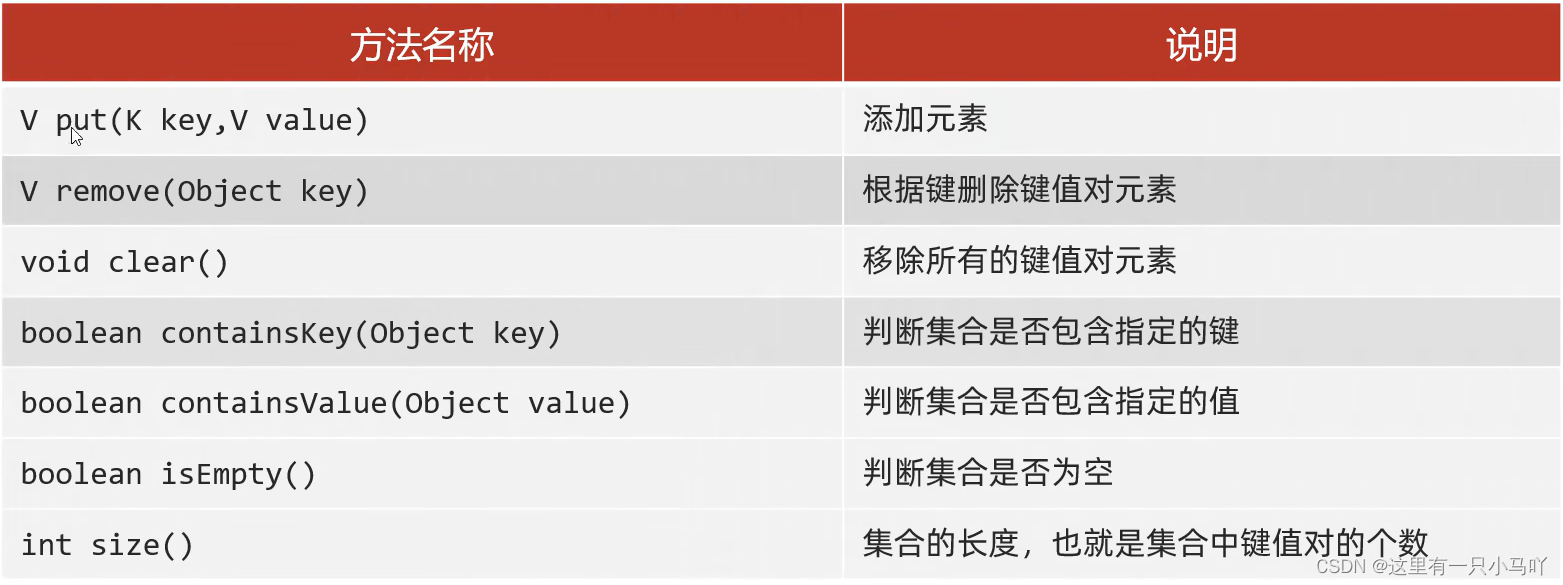
1.1.3 put
1
2
3
4
5
6
7
8
9
10
11
12
13
14
15
16
17
18
19
| import java.util.HashMap;
import java.util.Map;
public class main {
public static void main(String[] args) {
Map<Integer,String> mp = new HashMap<>();
mp.put(1,"a");
String q = mp.put(2,"b");
mp.put(3,"c");
String s = mp.put(1,"w");
System.out.println(q);
System.out.println(mp);
System.out.println(s);
}
}
|
1.1.4 remove
1
2
3
4
5
6
7
8
9
10
11
12
13
14
15
16
17
| import java.util.HashMap;
import java.util.Map;
public class main {
public static void main(String[] args) {
Map<Integer,String> mp = new HashMap<>();
mp.put(1,"a");
String q = mp.put(2,"b");
mp.put(3,"c");
String s = mp.put(1,"w");
mp.remove(3);
System.out.println(mp);
}
}
|
1.1.5 clear
1
2
3
4
5
6
7
8
9
10
11
12
13
14
15
16
17
| import java.util.HashMap;
import java.util.Map;
public class main {
public static void main(String[] args) {
Map<Integer,String> mp = new HashMap<>();
mp.put(1,"a");
String q = mp.put(2,"b");
mp.put(3,"c");
String s = mp.put(1,"w");
mp.clear();
System.out.println(mp);
}
}
|
1.1.6 containsKey 与 containsValue
1
2
3
4
5
6
7
8
9
10
11
12
13
14
15
16
17
18
19
| import java.util.HashMap;
import java.util.Map;
public class main {
public static void main(String[] args) {
Map<Integer,String> mp = new HashMap<>();
mp.put(1,"a");
String q = mp.put(2,"b");
mp.put(3,"c");
String s = mp.put(1,"w");
System.out.println(mp.containsKey(1));
System.out.println(mp.containsValue("b"));
}
}
|
1.1.7 isEmpty 与 size
1
2
3
4
5
6
7
8
9
10
11
12
13
14
15
16
17
18
19
| import java.util.HashMap;
import java.util.Map;
public class main {
public static void main(String[] args) {
Map<Integer,String> mp = new HashMap<>();
mp.put(1,"a");
String q = mp.put(2,"b");
mp.put(3,"c");
String s = mp.put(1,"w");
System.out.println(mp.isEmpty());
System.out.println(mp.size());
}
}
|
1.1.8 遍历方式
- 键找值
增强For
1
2
3
4
5
6
7
8
9
10
11
12
13
14
15
16
17
18
19
20
21
22
23
24
25
26
27
28
29
| import java.util.HashMap;
import java.util.Map;
import java.util.Set;
public class main {
public static void main(String[] args) {
Map<Integer,String> mp = new HashMap<>();
mp.put(1,"a");
mp.put(2,"b");
mp.put(3,"c");
mp.put(4,"d");
mp.put(5,"e");
mp.put(6,"e");
Set<Integer> keys = mp.keySet();
for(Integer a:keys){
String val = mp.get(a);
System.out.println(a+"="+val);
}
}
}
|
迭代器
1
2
3
4
5
6
7
8
9
10
11
12
13
14
15
16
17
18
19
20
21
22
23
24
25
26
27
28
29
30
31
32
33
| import java.util.HashMap;
import java.util.Iterator;
import java.util.Map;
import java.util.Set;
public class main {
public static void main(String[] args) {
Map<Integer,String> mp = new HashMap<>();
mp.put(1,"a");
mp.put(2,"b");
mp.put(3,"c");
mp.put(4,"d");
mp.put(5,"e");
mp.put(6,"e");
Set<Integer> keys = mp.keySet();
Iterator<Integer> it = keys.iterator();
while(it.hasNext())
{
Integer a = it.next();
String val = mp.get(a);
System.out.println(a+"="+val);
}
}
}
|
Lambda表达式
1
2
3
4
5
6
7
8
9
10
11
12
13
14
15
16
17
18
19
20
21
22
23
24
25
26
27
28
29
30
31
32
33
34
35
36
| import java.util.HashMap;
import java.util.Iterator;
import java.util.Map;
import java.util.Set;
import java.util.function.Consumer;
public class main {
public static void main(String[] args) {
Map<Integer,String> mp = new HashMap<>();
mp.put(1,"a");
mp.put(2,"b");
mp.put(3,"c");
mp.put(4,"d");
mp.put(5,"e");
mp.put(6,"e");
Set<Integer> keys = mp.keySet();
keys.forEach(a->{
String str = mp.get(a);
System.out.println(a+"="+str);
});
}
}
|
- 遍历键值对
增强For
1
2
3
4
5
6
7
8
9
10
11
12
13
14
15
16
17
18
19
20
21
22
23
24
| import java.util.HashMap;
import java.util.Iterator;
import java.util.Map;
import java.util.Set;
import java.util.function.Consumer;
public class main {
public static void main(String[] args) {
Map<Integer,String> mp = new HashMap<>();
mp.put(1,"a");
mp.put(2,"b");
mp.put(3,"c");
mp.put(4,"d");
mp.put(5,"e");
mp.put(6,"e");
Set<Map.Entry<Integer, String>> entries = mp.entrySet();
for(Map.Entry<Integer, String> e:entries)
{
System.out.println(e);
}
}
}
|
迭代器
1
2
3
4
5
6
7
8
9
10
11
12
13
14
15
16
17
18
19
20
21
22
23
24
25
26
27
| import java.util.HashMap;
import java.util.Iterator;
import java.util.Map;
import java.util.Set;
import java.util.function.Consumer;
public class main {
public static void main(String[] args) {
Map<Integer,String> mp = new HashMap<>();
mp.put(1,"a");
mp.put(2,"b");
mp.put(3,"c");
mp.put(4,"d");
mp.put(5,"e");
mp.put(6,"e");
Set<Map.Entry<Integer, String>> entries = mp.entrySet();
Iterator<Map.Entry<Integer, String>> it = entries.iterator();
while(it.hasNext())
{
System.out.println(it.next());
}
}
}
|
Lambda表达式
1
2
3
4
5
6
7
8
9
10
11
12
13
14
15
16
17
18
19
20
21
22
23
24
25
26
27
28
29
30
31
32
33
34
| import java.util.HashMap;
import java.util.Iterator;
import java.util.Map;
import java.util.Set;
import java.util.function.Consumer;
public class main {
public static void main(String[] args) {
Map<Integer,String> mp = new HashMap<>();
mp.put(1,"a");
mp.put(2,"b");
mp.put(3,"c");
mp.put(4,"d");
mp.put(5,"e");
mp.put(6,"e");
Set<Map.Entry<Integer, String>> entries = mp.entrySet();
entries.forEach(new Consumer<Map.Entry<Integer, String>>() {
@Override
public void accept(Map.Entry<Integer, String> integerStringEntry) {
System.out.println(integerStringEntry);
}
});
}
}
|
- Lambda表达式
1
2
3
4
5
6
7
8
9
10
11
12
13
14
15
16
17
18
19
20
21
22
23
24
25
26
27
28
29
| import java.util.HashMap;
import java.util.Iterator;
import java.util.Map;
import java.util.Set;
import java.util.function.BiConsumer;
import java.util.function.Consumer;
public class main {
public static void main(String[] args) {
Map<Integer,String> mp = new HashMap<>();
mp.put(1,"a");
mp.put(2,"b");
mp.put(3,"c");
mp.put(4,"d");
mp.put(5,"e");
mp.put(6,"e");
mp.forEach((Integer integer, String s)->{
System.out.println(integer+"="+s);
});
}
}
|
1.2 HashMap
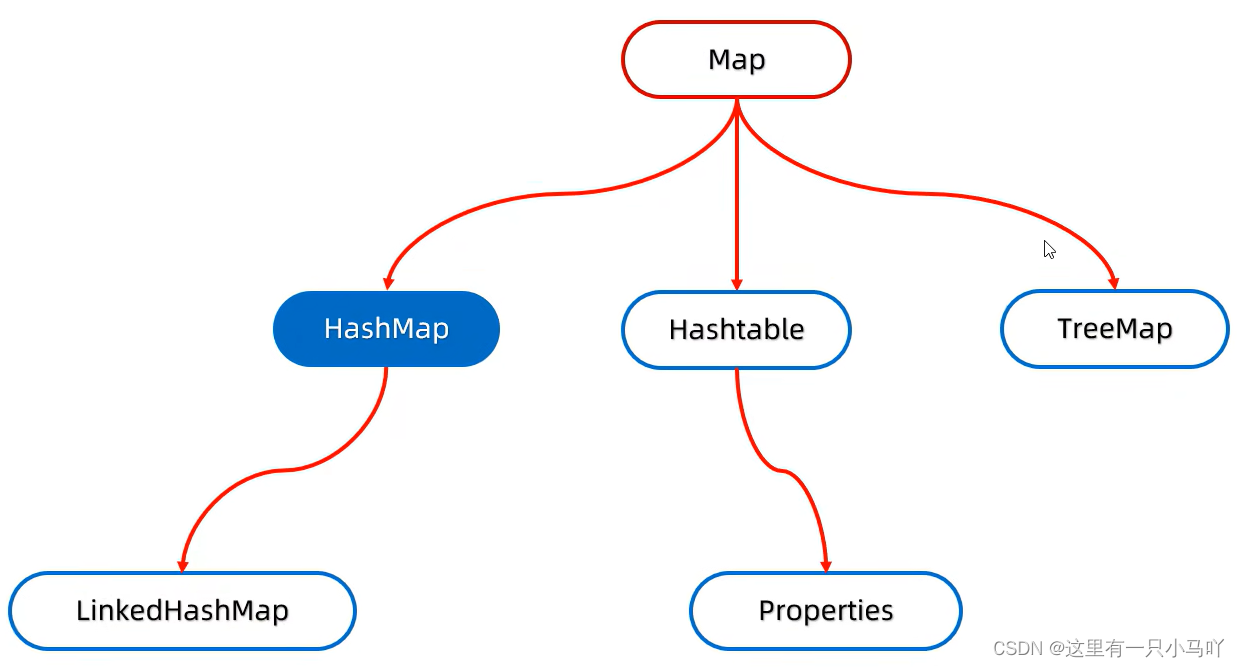
- ①HashMap是Map里面的一个实现类。
- ②没有额外需要学习的特有方法,直接使用Map里面的方法就可以了。
- ③特点都是由键决定的:无序、不重复、无索引
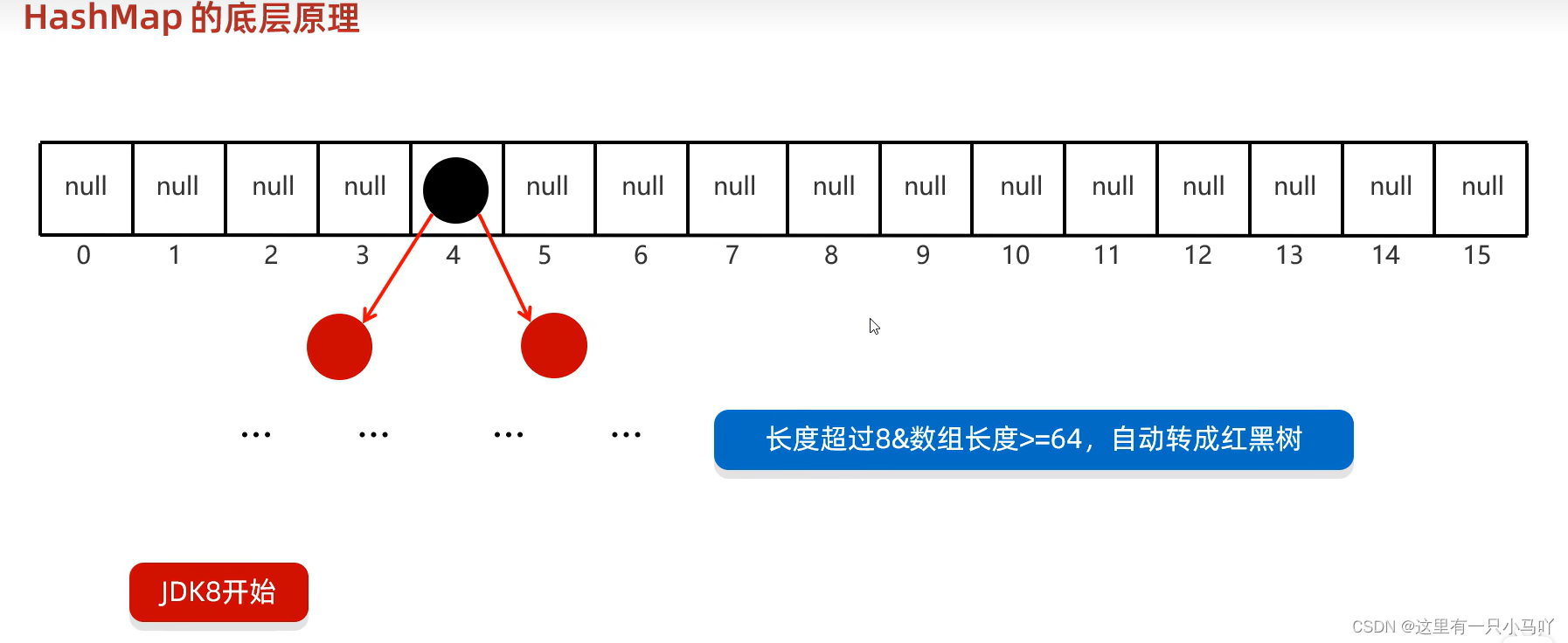
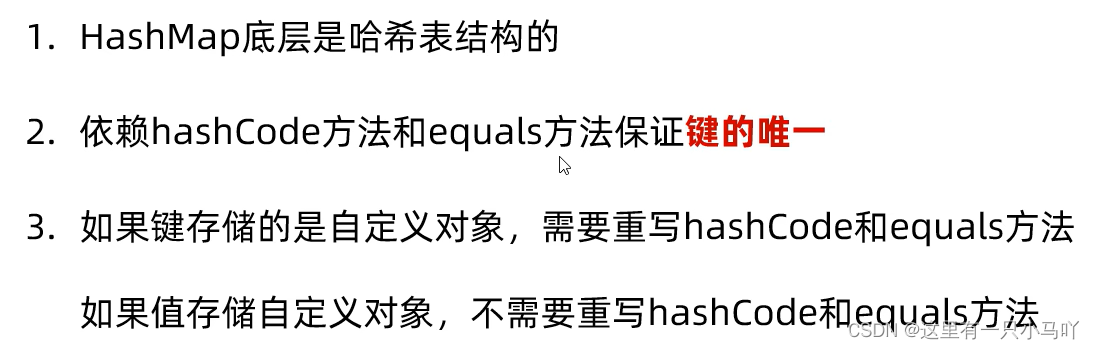
- ④HashMap跟HashSet底层原理是一模一样的,都是哈希表结构
1.2.1 HashMap案例一
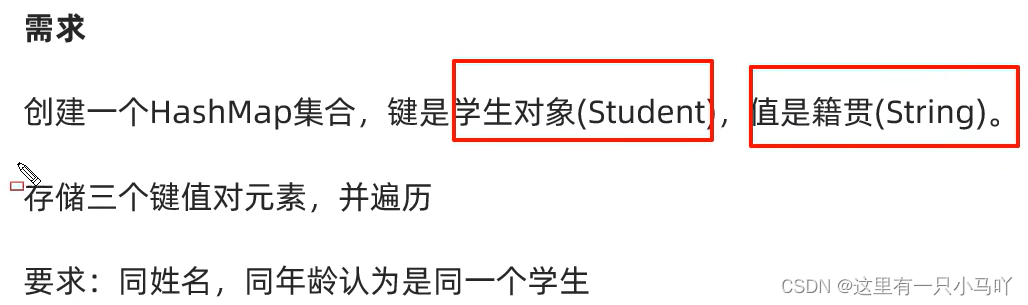
Student.java
1
2
3
4
5
6
7
8
9
10
11
12
13
14
15
16
17
18
19
20
21
22
23
24
25
26
27
28
29
30
31
32
33
34
35
36
37
38
39
40
41
42
43
44
45
46
47
48
49
50
51
52
53
54
55
56
57
| import java.util.Objects;
public class Student {
private String name;
private int age;
private double height;
public Student() {
}
public Student(String name, int age, double height) {
this.name = name;
this.age = age;
this.height = height;
}
public String getName() {
return name;
}
public void setName(String name) {
this.name = name;
}
public int getAge() {
return age;
}
public void setAge(int age) {
this.age = age;
}
public double getHeight() {
return height;
}
public void setHeight(double height) {
this.height = height;
}
public String toString() {
return "Student{name = " + name + ", age = " + age + ", height = " + height + "}";
}
@Override
public boolean equals(Object o) {
if (this == o) return true;
if (o == null || getClass() != o.getClass()) return false;
Student student = (Student) o;
return age == student.age && Double.compare(student.height, height) == 0 && Objects.equals(name, student.name);
}
@Override
public int hashCode() {
return Objects.hash(name, age, height);
}
}
|
main.java
1
2
3
4
5
6
7
8
9
10
11
12
13
14
15
16
17
18
19
20
21
22
23
24
25
| import java.util.*;
import java.util.function.BiConsumer;
import java.util.function.Consumer;
public class main {
public static void main(String[] args) {
HashMap<Student,String> hm = new HashMap<>();
Student st1 = new Student("aaaa",12,180.5);
Student st2 = new Student("bbbb",15,147.5);
Student st3 = new Student("cccc",32,164.7);
Student st4 = new Student("dddd",54,145.2);
hm.put(st1,"beijing");
hm.put(st2,"shanghai");
hm.put(st3,"beijing");
hm.put(st4,"guangzhou");
hm.forEach(new BiConsumer<Student, String>() {
@Override
public void accept(Student student, String s) {
System.out.println(student+"="+s);
}
});
}
}
|
1.2.2 HashMap案例二
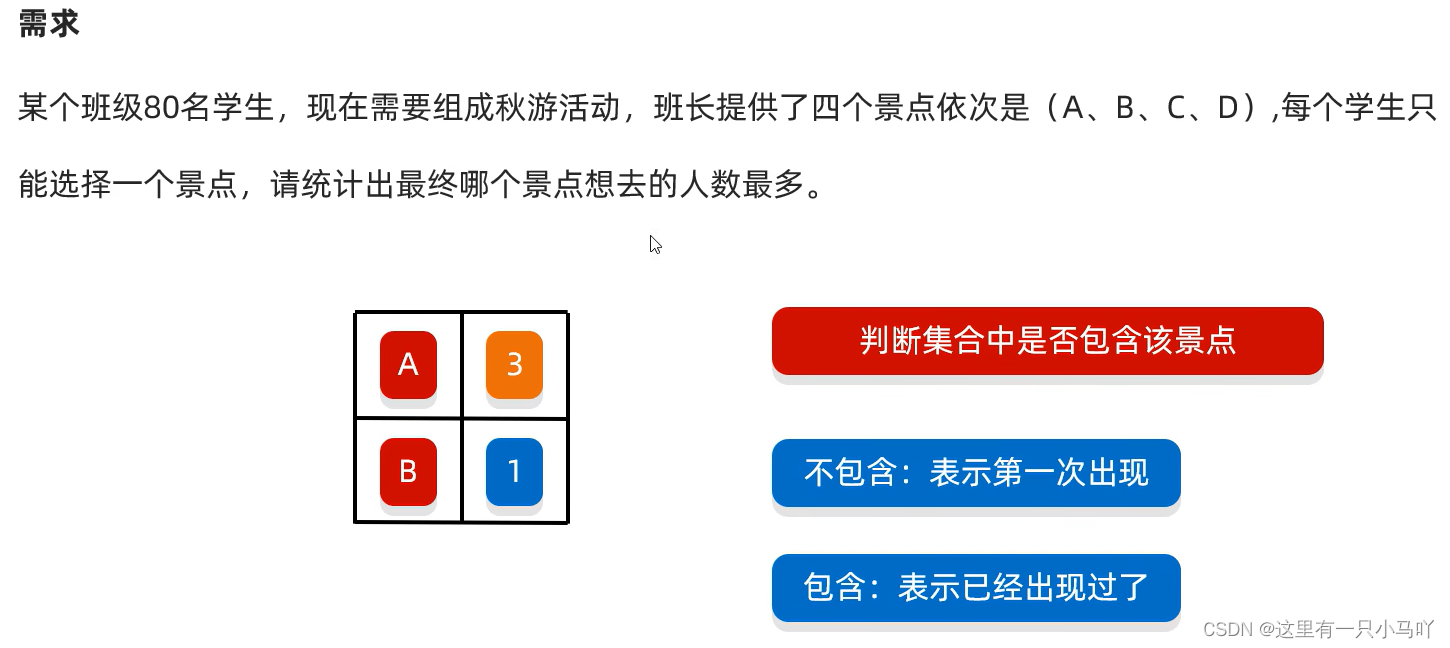
1
2
3
4
5
6
7
8
9
10
11
12
13
14
15
16
17
18
19
20
21
22
23
24
25
26
27
28
29
| import java.util.*;
import java.lang.Integer;
import java.lang.Character;
import java.util.function.BiConsumer;
public class main {
public static void main(String[] args) {
HashMap<Character,Integer> jishu = new HashMap<>();
for(int i =0;i<80;i++)
{
Character c = (char)('A'+Math.random()*('Z'-'A'+1));
if(jishu.containsKey(c))
{
jishu.put(c,jishu.get(c)+1);
}
else
{
jishu.put(c,1);
}
}
jishu.forEach(new BiConsumer<Character, Integer>() {
@Override
public void accept(Character character, Integer integer) {
System.out.println(character +"="+integer);
}
});
}
}
|
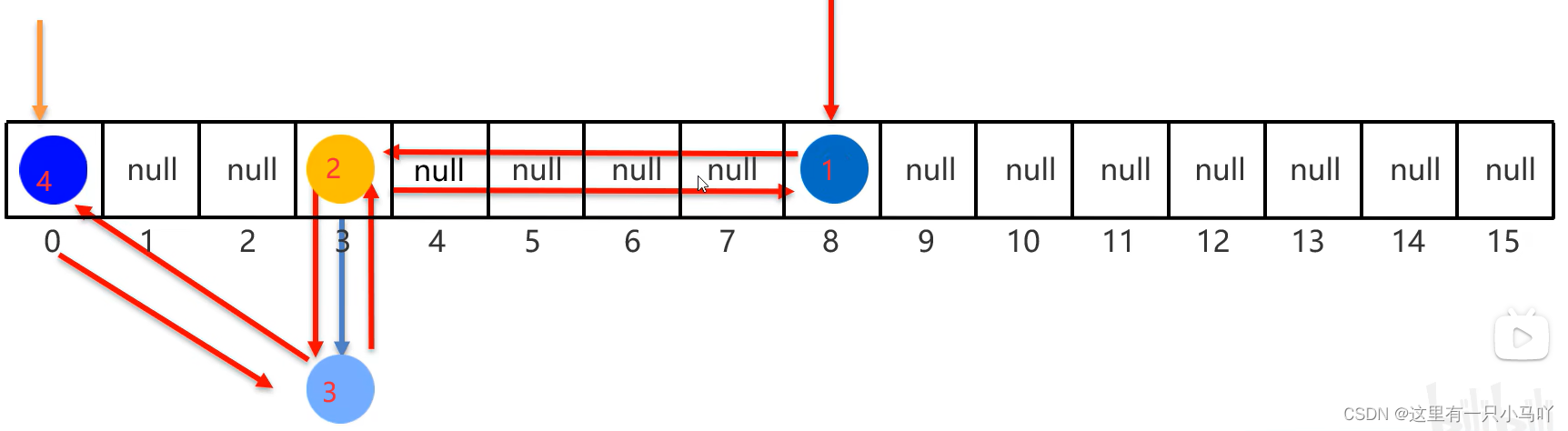
1.3 LinkedHashMap
他爹就是HashMap
- 由键决定:有序、不重复、无索引。
- 这里的有序指的是保证存储和取出的元素顺序一致
- 原理:底层数据结构是依然哈希表,只是每个键值对元素又额外的多了一一个双链表的机制记录存储的顺序。
1
2
3
4
5
6
7
8
9
10
11
12
13
14
15
| import java.util.*;
import java.lang.Integer;
import java.lang.Character;
import java.util.function.BiConsumer;
public class main {
public static void main(String[] args) {
LinkedHashMap<Integer,String> lhm = new LinkedHashMap<>();
lhm.put(1,"a");
lhm.put(2,"b");
lhm.put(3,"c");
lhm.put(4,"d");
System.out.println(lhm);
}
}
|
1.4 TreeMap
- TreeMap跟TreeSet底层原理一样, 都是红黑树结构的。
- 由键决定特性:不重复、无索引、可排序
- 可排序:对键进行排序。
- 注意:默认按照键的从小到大进行排序,也可以自己规定键的排序规则
代码书写两种排序规则
- 实现Comparable接口, 指定比较规则。
Student.java
1
2
3
4
5
6
7
8
9
10
11
12
13
14
15
16
17
18
19
20
21
22
23
24
25
26
27
28
29
30
31
32
33
34
35
36
37
38
39
40
41
42
43
44
45
46
47
48
49
50
51
52
53
54
55
56
57
58
59
60
61
62
63
64
65
| import java.util.Objects;
public class Student implements Comparable<Student>{
private String name;
private int age;
private double height;
public Student() {
}
public Student(String name, int age, double height) {
this.name = name;
this.age = age;
this.height = height;
}
public String getName() {
return name;
}
public void setName(String name) {
this.name = name;
}
public int getAge() {
return age;
}
public void setAge(int age) {
this.age = age;
}
public double getHeight() {
return height;
}
public void setHeight(double height) {
this.height = height;
}
public String toString() {
return "Student{name = " + name + ", age = " + age + ", height = " + height + "}";
}
@Override
public boolean equals(Object o) {
if (this == o) return true;
if (o == null || getClass() != o.getClass()) return false;
Student student = (Student) o;
return age == student.age && Double.compare(student.height, height) == 0 && Objects.equals(name, student.name);
}
@Override
public int hashCode() {
return Objects.hash(name, age, height);
}
@Override
public int compareTo(Student o) {
if(this.age!= o.age) return this.age-o.age;
if(this.height != o.height) return (int)(this.height-o.height);
if(this.name != o.name)return this.name.compareTo(o.name);
else return 0;
}
}
|
main.java
1
2
3
4
5
6
7
8
9
10
11
12
13
14
15
16
17
18
19
20
21
22
23
24
25
| import java.util.*;
import java.lang.Integer;
import java.lang.String;
public class main {
public static void main(String[] args) {
TreeMap<Student,String> lhm = new TreeMap<>();
Student st1 = new Student("aaaa",12,180.5);
Student st2 = new Student("bbbb",12,147.5);
Student st3 = new Student("cccc",32,164.7);
Student st4 = new Student("dddd",54,145.2);
lhm.put(st1,"beijing");
lhm.put(st2,"shanghai");
lhm.put(st3,"beijing");
lhm.put(st4,"guangzhou");
System.out.println(lhm);
}
}
|
- 创建集合时传递Comparator比较器对象, 指定比较规则。
1
2
3
4
5
6
7
8
9
10
11
12
13
14
15
16
17
18
19
20
21
22
23
24
25
26
27
28
29
30
| import java.util.*;
import java.lang.Integer;
import java.lang.String;
public class main {
public static void main(String[] args) {
TreeMap<Integer,String> lhm = new TreeMap<>(new Comparator<Integer>() {
@Override
public int compare(Integer o1, Integer o2) {
return o2-o1;
}
});
lhm.put(1,"a");
lhm.put(4,"d");
lhm.put(2,"b");
lhm.put(3,"yui");
lhm.put(78,"yt");
lhm.put(53,"rt");
lhm.put(6,"we");
System.out.println(lhm);
}
}
|
1.4.1 案例分析
需求:字符串 “aababcabcdabcde”
请统计字符串中每一个字符出现的次数,并按照以下格式输出
输出结果: a(5)b(4)C(3)d(2)e(1)
1
2
3
4
5
6
7
8
9
10
11
12
13
14
15
16
17
18
19
20
21
22
23
24
25
26
27
28
29
30
31
32
| import java.util.*;
import java.lang.Integer;
import java.lang.String;
public class main {
public static void main(String[] args) {
TreeMap<Character,Integer> lhm = new TreeMap<>();
lhm.put('a',0);
lhm.put('b',0);
lhm.put('c',0);
lhm.put('d',0);
String str = "abcdacdacdaaadcdcbcbda";
for (int i = 0; i < str.length(); i++) {
if(lhm.containsKey(str.charAt(i)))
{
Integer a = lhm.get(str.charAt(i))+1;
lhm.put(str.charAt(i),a);
}
else
{
lhm.put(str.charAt(i),1);
}
}
System.out.println(lhm);
}
}
|
1.5 源码解析
1.5.1 TreeMap源码解析
可以看看视频 这部分主要是源码组成讲解
1.5.2 HashMap源码解析
可以看看视频 这部分主要是源码组成讲解
1.6 可变参数
假如需要定义一一个方法求和,该方法可以灵活的完成如下需求:
计算2个数据的和
计算3个数据的和
计算4个数据的和
计算n个数据的和
1
2
3
4
5
6
7
8
9
10
11
12
13
14
15
16
17
18
19
20
21
22
23
24
25
26
| import java.util.*;
import java.lang.Integer;
import java.lang.String;
public class main {
public static void main(String[] args) {
int [] arr = {1,3,4,4,45,45,65};
System.out.println(getSum(arr));
System.out.println(getSum(14,4,1,474,5,4,1,5,2,1));
}
public static int getSum(int...args){
int sum = 0;
for(int i:args)
{
sum = sum+i;
}
return sum;
}
}
|
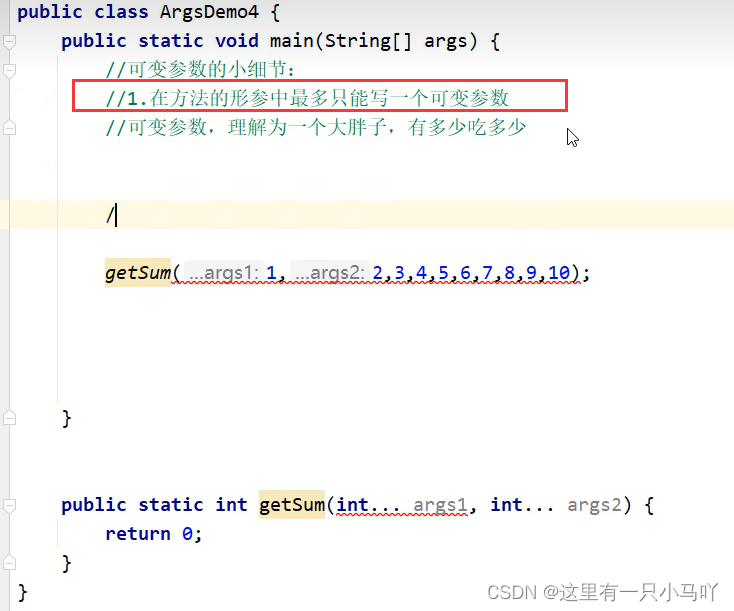
在方法当中,如果出了可变参数以外,还有其他的形参,那么可变参数要写在最后
- 可变参数本质上就是一个数组
- 作用:在形参中接收多个数据
- 格式:
数据类型...参数名称
- 注意事项:
- 形参列表中可变参数只能有一个
- 可变参数必须放在形参列表的最后面
1.7 Collections
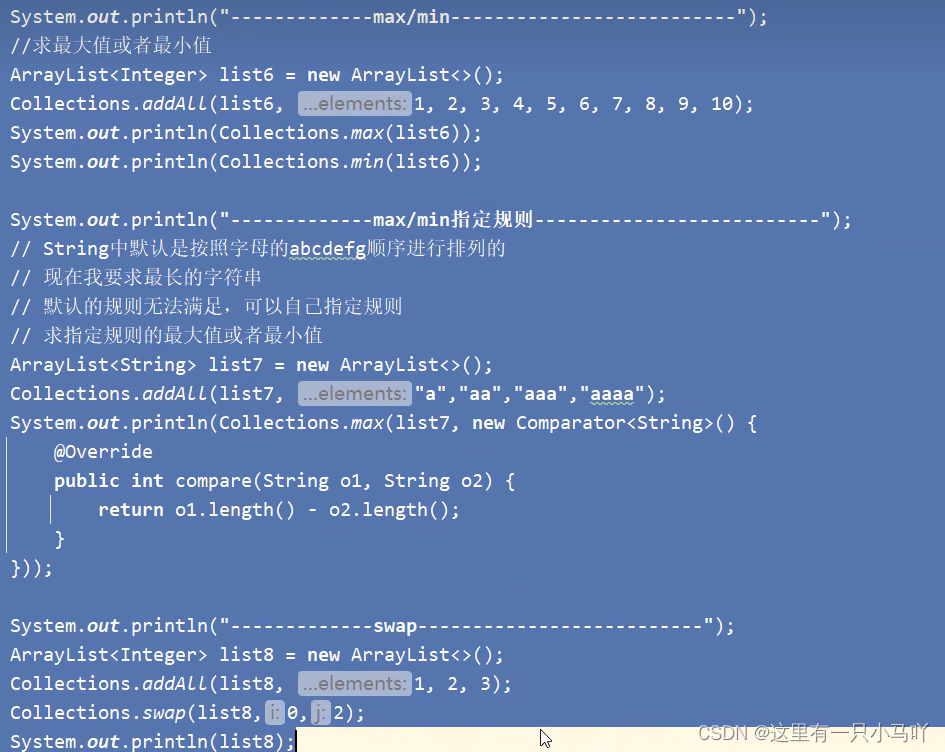
- java.util.Collections:是集合工 具类
- 作用: Collections不 是集合,而是集合的工具类。

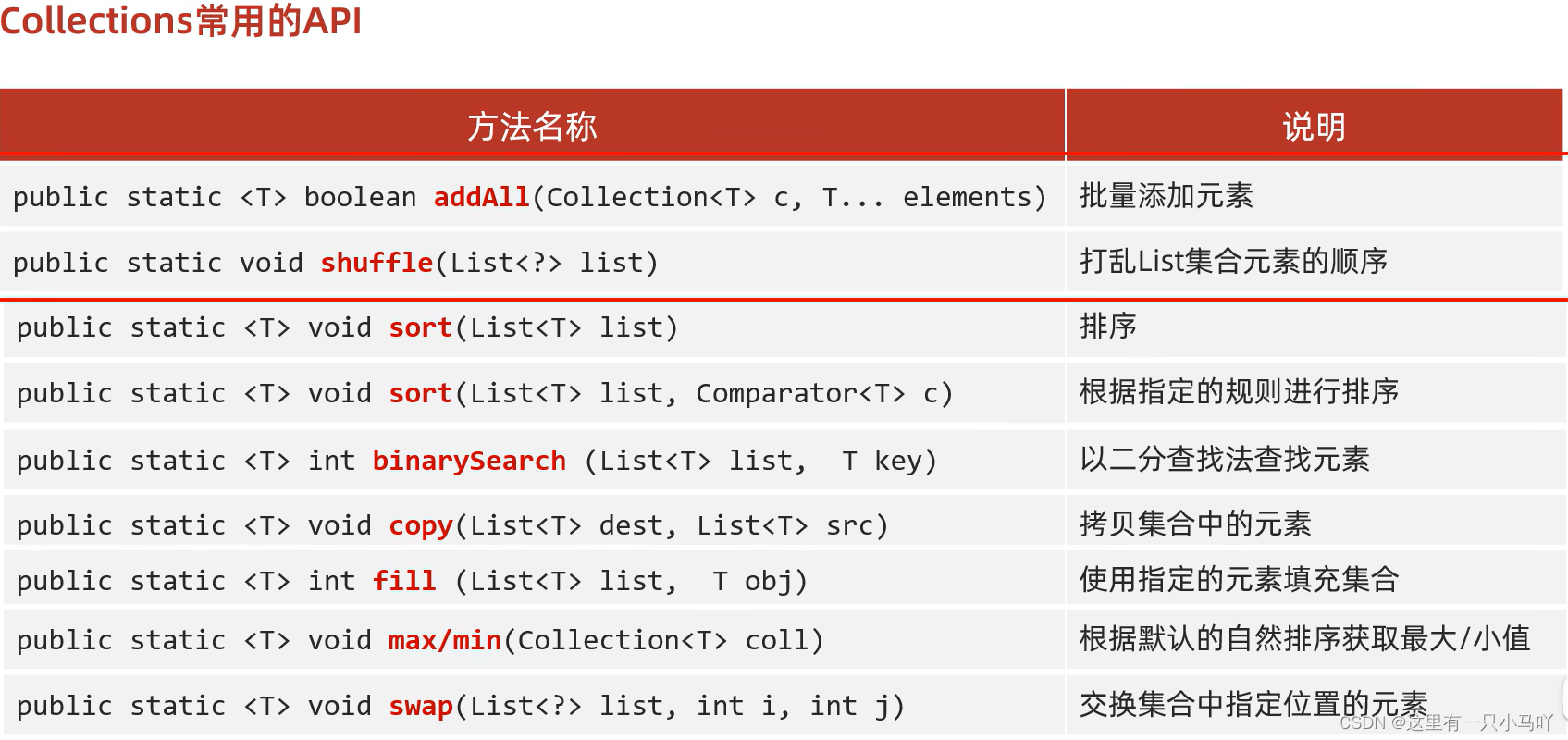
1
2
3
4
5
6
7
8
9
10
11
12
13
14
15
16
17
18
19
20
21
22
23
24
25
26
27
28
29
| import java.util.*;
import java.lang.Integer;
import java.lang.String;
public class main {
public static void main(String[] args) {
ArrayList<Integer> arrayList = new ArrayList<>();
Collections.addAll(arrayList,1,3,5,5,6,3,5,3,4,3,4,4,65);
System.out.println(arrayList);
}
}
import java.util.*;
import java.lang.Integer;
import java.lang.String;
public class main {
public static void main(String[] args) {
ArrayList<Integer> arrayList = new ArrayList<>();
Collections.addAll(arrayList,1,3,5,5,6,3,5,3,4,3,4,4,65);
Collections.shuffle(arrayList);
System.out.println(arrayList);
}
}
|
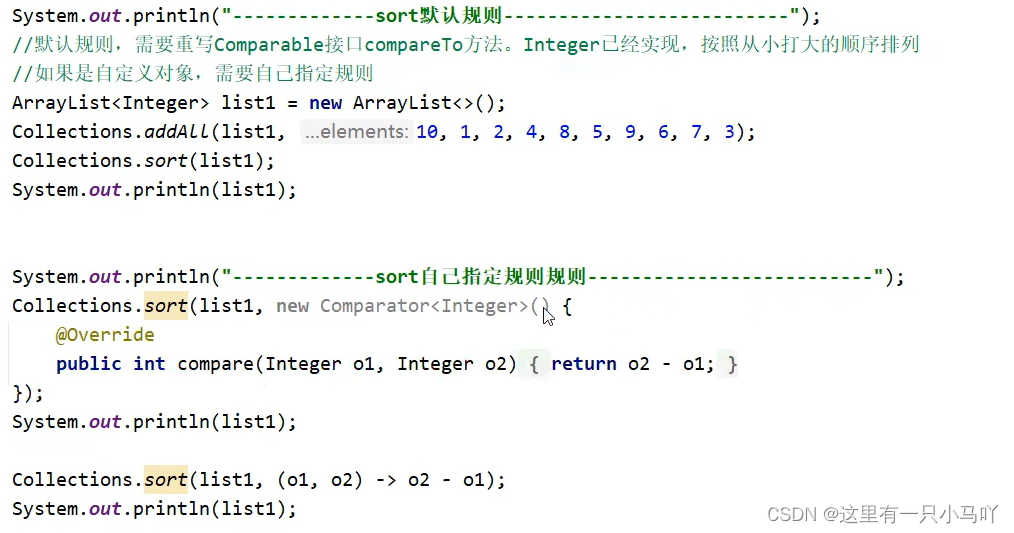
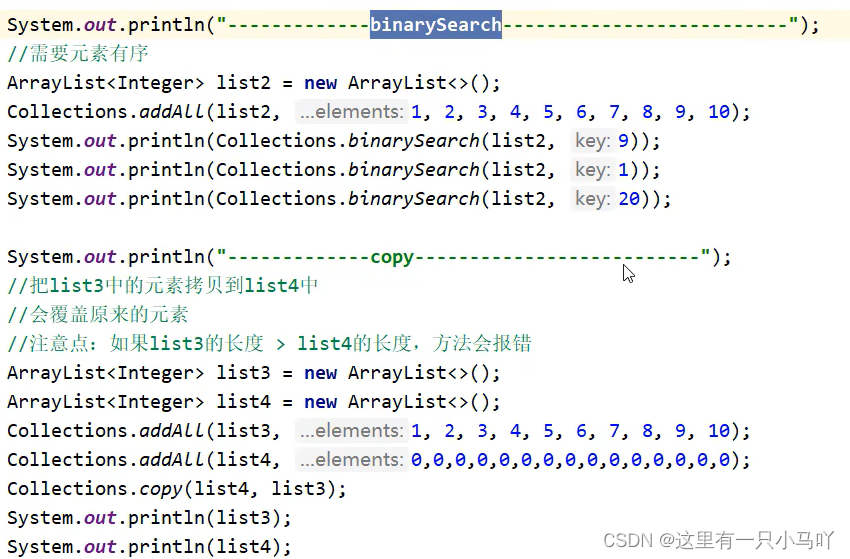
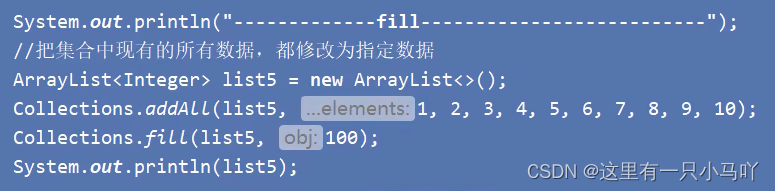
1.8 综合练习(集合的嵌套,斗地主等)
1.8.1 自动点名器1
班级里有N个学生,实现随机点名器。
1
2
3
4
5
6
7
8
9
10
11
12
13
14
| import java.util.*;
import java.lang.String;
public class main {
public static void main(String[] args) {
ArrayList<String> arrayList = new ArrayList<>();
Collections.addAll(arrayList,"范闲", "范建","范统", "杜子腾",
"杜琦燕","宋合泛","侯笼藤", "朱益群", "朱穆朗玛峰","袁明媛");
Random r = new Random();
int index = r.nextInt(arrayList.size());
System.out.println(arrayList.get(index));
}
}
|
1.8.2 自动点名器2
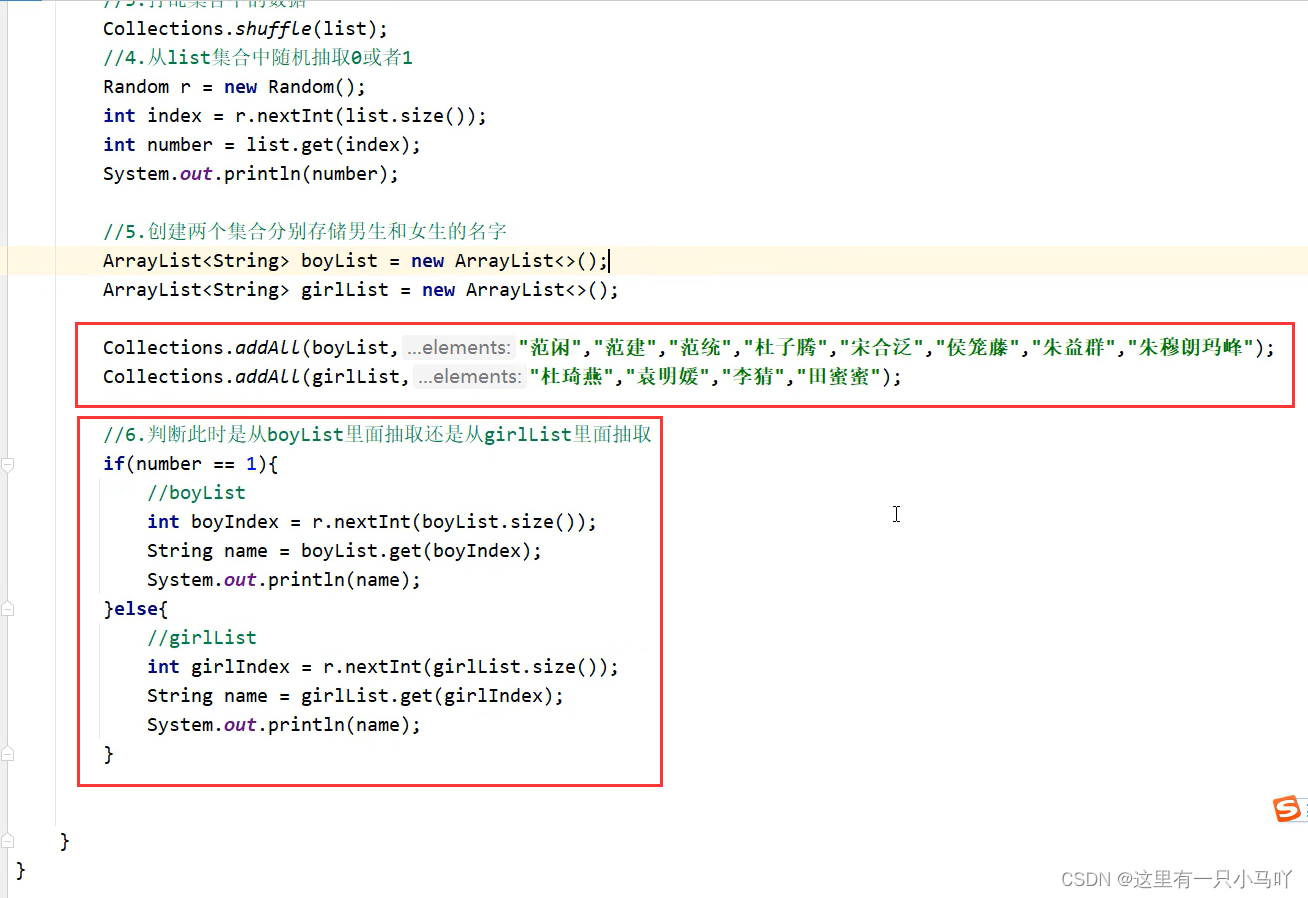
班级里有N个学生
要求:70%的概率随机到男生 30%的概率随机到女生
1
2
3
4
5
6
7
8
9
10
11
12
13
14
15
16
17
18
19
20
21
22
23
24
25
26
27
| import java.util.*;
import java.lang.String;
public class main {
public static void main(String[] args) {
ArrayList<String> arrayList = new ArrayList<>();
Collections.addAll(arrayList,"范闲", "范建","范统", "杜子腾",
"杜琦燕","宋合泛","侯笼藤", "朱益群", "朱穆朗玛峰","袁明媛");
ArrayList<Integer> arr = new ArrayList<>();
Collections.addAll(arr,1,1,1,1,1,1,1,0,0,0);
Random r = new Random();
Random n = new Random();
int index = r.nextInt(arr.size());
if(arr.get(index)==1)
{
int index1 = n.nextInt(5);
System.out.println(arrayList.get(index1));
}
else {
int index2 = n.nextInt(5,10);
System.out.println(arrayList.get(index2));
}
}
}
|
1.8.3 自动点名器3
班级里有N个学生
要求:
被点到的学生不会再被点到。
但是如果班级中所有的学生都点完了,需要重新开启第二轮点名。
1
2
3
4
5
6
7
8
9
10
11
12
13
14
15
16
17
18
19
20
21
22
23
24
25
26
27
28
29
30
31
32
33
34
35
36
37
38
39
40
41
42
| import java.util.*;
import java.lang.String;
public class main {
public static void main(String[] args) {
ArrayList<String> arrayList1 = new ArrayList<>();
Collections.addAll(arrayList1,"范闲", "范建","范统", "杜子腾",
"杜琦燕","宋合泛","侯笼藤", "朱益群", "朱穆朗玛峰","袁明媛");
boolean flag = true;
ArrayList<String> arrayList2 = new ArrayList<>();
Random r = new Random();
while(true)
{
if(flag&&arrayList1.size()==0)
flag = false;
if((!flag)&&arrayList2.size()==0)
flag = true;
if(flag)
{
int index = r.nextInt(arrayList1.size());
String name = arrayList1.remove(index);
arrayList2.add(name);
}
else {
int index = r.nextInt(arrayList2.size());
String name = arrayList2.remove(index);
arrayList1.add(name);
}
System.out.println(arrayList1);
System.out.println(arrayList2);
System.out.println("请输入:1点名 2停止");
Scanner sc = new Scanner(System.in);
int a = sc.nextInt();
if(a==2) break;
}
}
}
|
1.8.4 自动点名器4
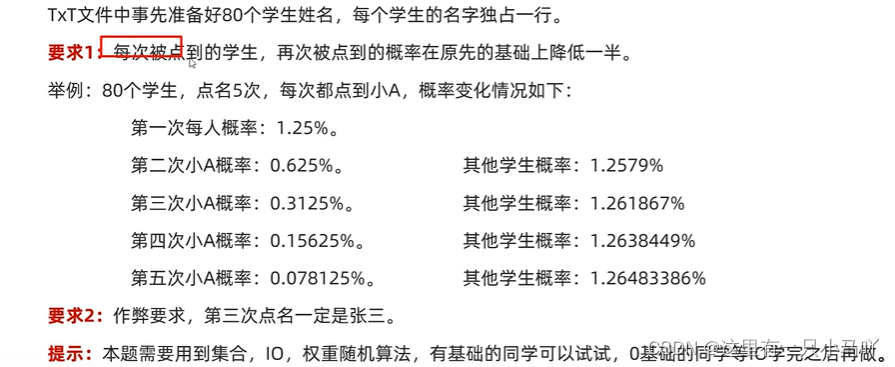
1.8.4 自动点名器5
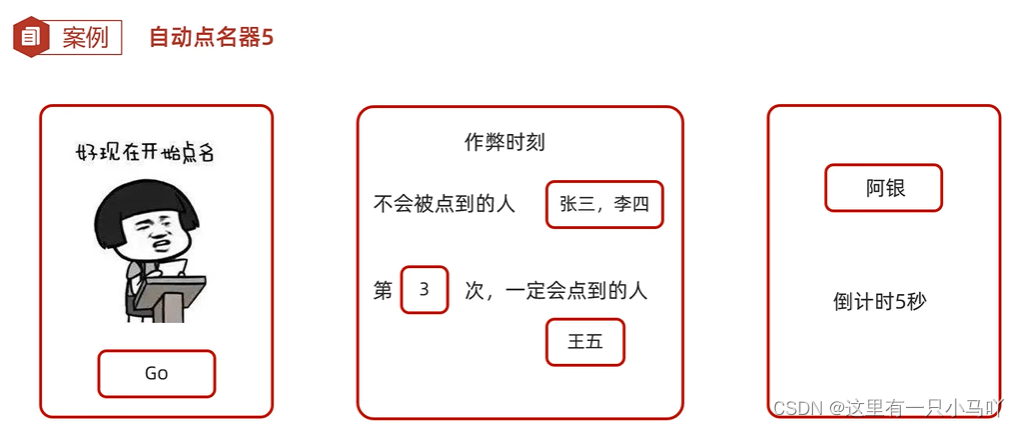
1.8.5 省和市
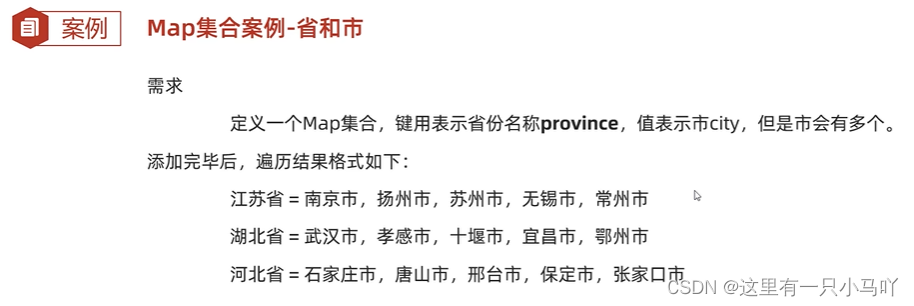
1
2
3
4
5
6
7
8
9
10
11
12
13
14
15
16
17
18
19
20
| public class main {
public static void main(String[] args) {
HashMap<String,HashSet<String>> province = new HashMap<>();
HashSet h1 = new HashSet<>();
province.put("江苏省",h1);
Collections.addAll(h1,"南京市","扬州市","苏州市","无锡市");
HashSet h2 = new HashSet<>();
province.put("湖北省",h2);
Collections.addAll(h2,"武汉市","孝感市","十堰市","宜昌市");
province.forEach(new BiConsumer<String, HashSet<String>>() {
@Override
public void accept(String s, HashSet<String> strings) {
System.out.println(s+"="+strings);
}
});
}
}
|
1.8.6 斗地主
第一节课
1
2
3
4
5
6
7
8
9
10
11
12
13
14
15
16
17
18
19
20
21
22
23
24
25
26
27
28
29
30
31
32
33
34
35
36
37
38
39
40
41
42
43
44
45
46
47
48
49
50
51
52
53
54
55
56
57
58
59
60
61
62
63
64
65
66
67
68
69
70
71
72
73
74
75
76
77
78
79
80
81
82
| package doudizhu;
import java.util.ArrayList;
import java.util.Collections;
public class PokerGame {
static ArrayList<String> pokerlist = new ArrayList<>();
static {
String[] color = {"♦","♣","♥","♠"};
String[] number = {"3","4","5","6","7","8","9","10","J","Q","K","A","2"};
for(String c:color)
{
for (String n:number)
{
pokerlist.add(c+n);
}
}
pokerlist.add("bJ");
pokerlist.add("rJ");
}
public PokerGame()
{
Collections.shuffle(pokerlist);
ArrayList<String> lord = new ArrayList<>();
ArrayList<String> play_1 = new ArrayList<>();
ArrayList<String> play_2 = new ArrayList<>();
ArrayList<String> play_3 = new ArrayList<>();
for (int i = 0; i < pokerlist.size(); i++) {
if(i<3)
{
lord.add(pokerlist.get(i));
} else if (i<20) {
play_1.add(pokerlist.get(i));
} else if (i<37) {
play_2.add(pokerlist.get(i));
}else{
play_3.add(pokerlist.get(i));
}
}
lookPoker("lord",lord);
lookPoker("西施",play_1);
lookPoker("貂蝉",play_2);
lookPoker("火舞",play_3);
}
public void lookPoker(String name,ArrayList<String> play)
{
System.out.print(name+": ");
for(String i :play)
{
System.out.print(i + " ");
}
System.out.println();
}
}
package doudizhu;
public class App {
public static void main(String[] args) {
new PokerGame();
}
}
|
第二节课
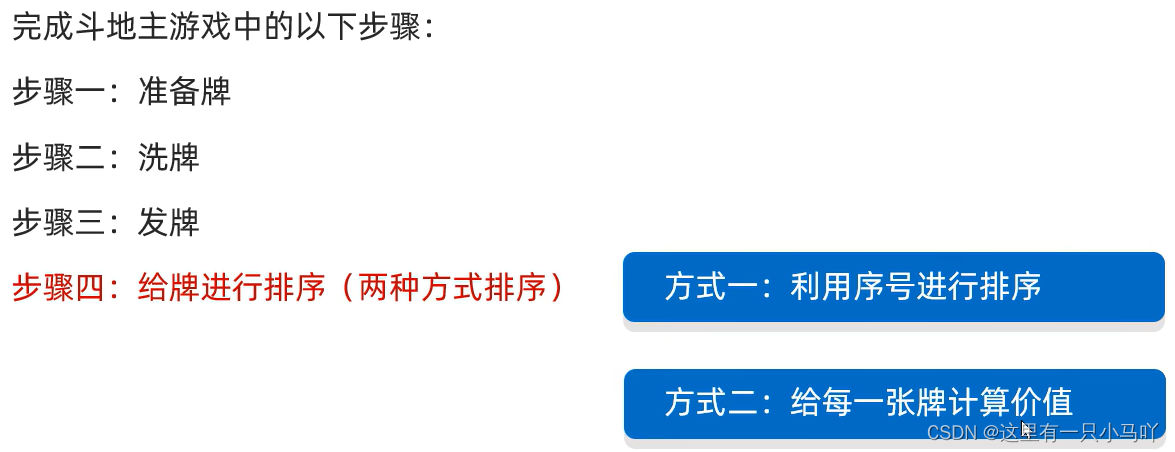
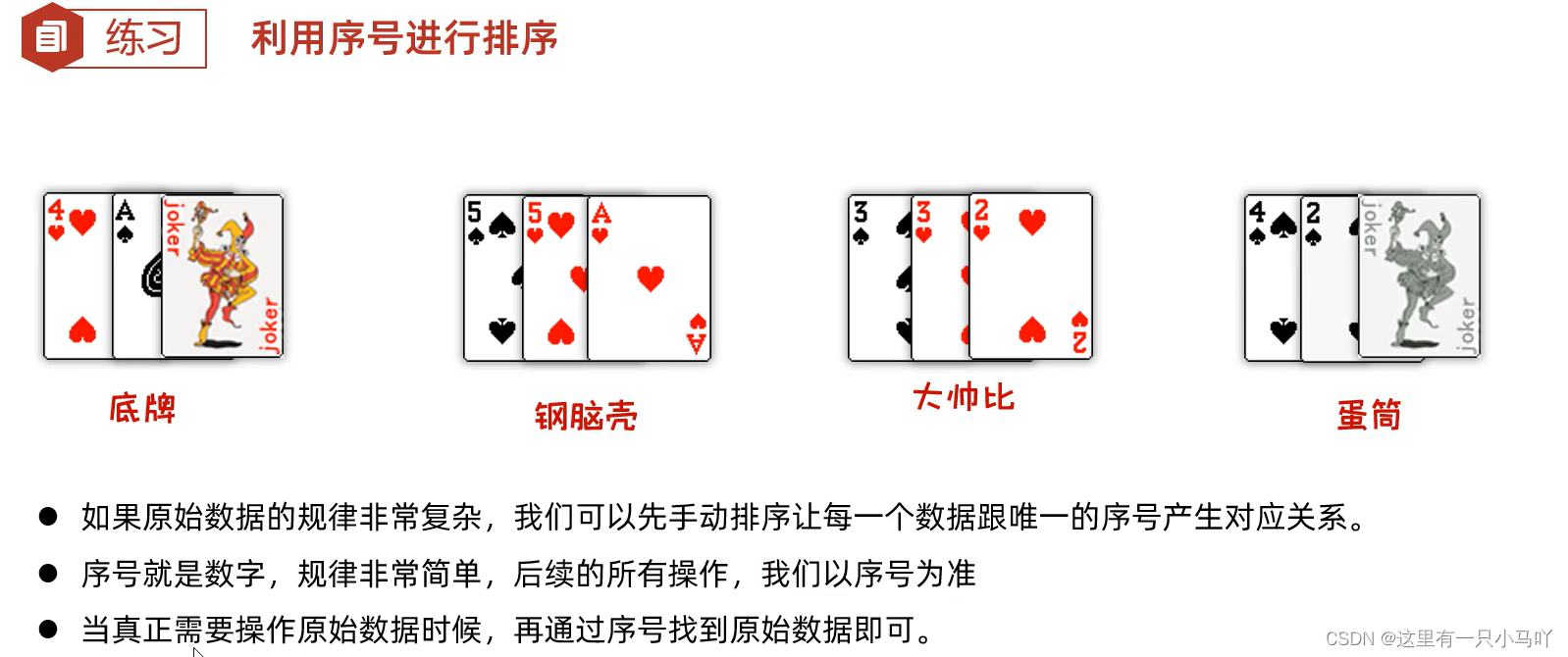
1
2
3
4
5
6
7
8
9
10
11
12
13
14
15
16
17
18
19
20
21
22
23
24
25
26
27
28
29
30
31
32
33
34
35
36
37
38
39
40
41
42
43
44
45
46
47
48
49
50
51
52
53
54
55
56
57
58
59
60
61
62
63
64
65
66
67
68
69
70
71
72
73
74
75
76
77
78
79
80
81
82
83
84
85
86
87
88
89
90
| package doudizhu;
public class App {
public static void main(String[] args) {
new PokerGame();
}
}
Lobster AIjava运行123456789
package doudizhu;
import java.lang.String;
import java.lang.Integer;
import java.util.*;
public class PokerGame {
static HashMap<Integer,String> poker = new HashMap<>();
static ArrayList<Integer> list = new ArrayList<>();
static {
String[] color = {"♦","♣","♥","♠"};
String[] number = {"3","4","5","6","7","8","9","10","J","Q","K","A","2"};
int sericalNumber = 1;
for(String c:color)
{
for (String n :number)
{
poker.put(sericalNumber,c+n);
list.add(sericalNumber);
sericalNumber++;
}
}
poker.put(sericalNumber,"bP");
list.add(sericalNumber);
sericalNumber++;
poker.put(sericalNumber,"rP");
list.add(sericalNumber);
}
public PokerGame()
{
Collections.shuffle(list);
TreeSet<Integer>lord = new TreeSet<>((Integer o1, Integer o2)-> o2-o1);
TreeSet<Integer>player_1 = new TreeSet<>((Integer o1, Integer o2)-> o2-o1);
TreeSet<Integer>player_2 = new TreeSet<>((Integer o1, Integer o2)-> o2-o1);
TreeSet<Integer>player_3 = new TreeSet<>((Integer o1, Integer o2)-> o2-o1);
for (int i = 0; i < list.size(); i++) {
if(i<3)
{
lord.add(list.get(i));
} else if (i<20) {
player_1.add(list.get(i));
} else if (i<37) {
player_2.add(list.get(i));
}
else{
player_3.add(list.get(i));
}
}
lookPoker("地主",lord);
lookPoker("西施",player_1);
lookPoker("貂蝉",player_2);
lookPoker("火舞",player_3);
}
public void lookPoker(String name,TreeSet<Integer> ts)
{
System.out.print(name+":");
for(Integer t:ts)
{
System.out.print(poker.get(t)+" ");
}
System.out.println();
}
}
|
2. 创建不可变集合
- 如果某个数据不能被修改,把它防御性地拷贝到不可变集合中是个很好的实践。
- 当集合对象被不可信的库调用时,不可变形式是安全的。
简单理解:不想让别人修改集合中的内容
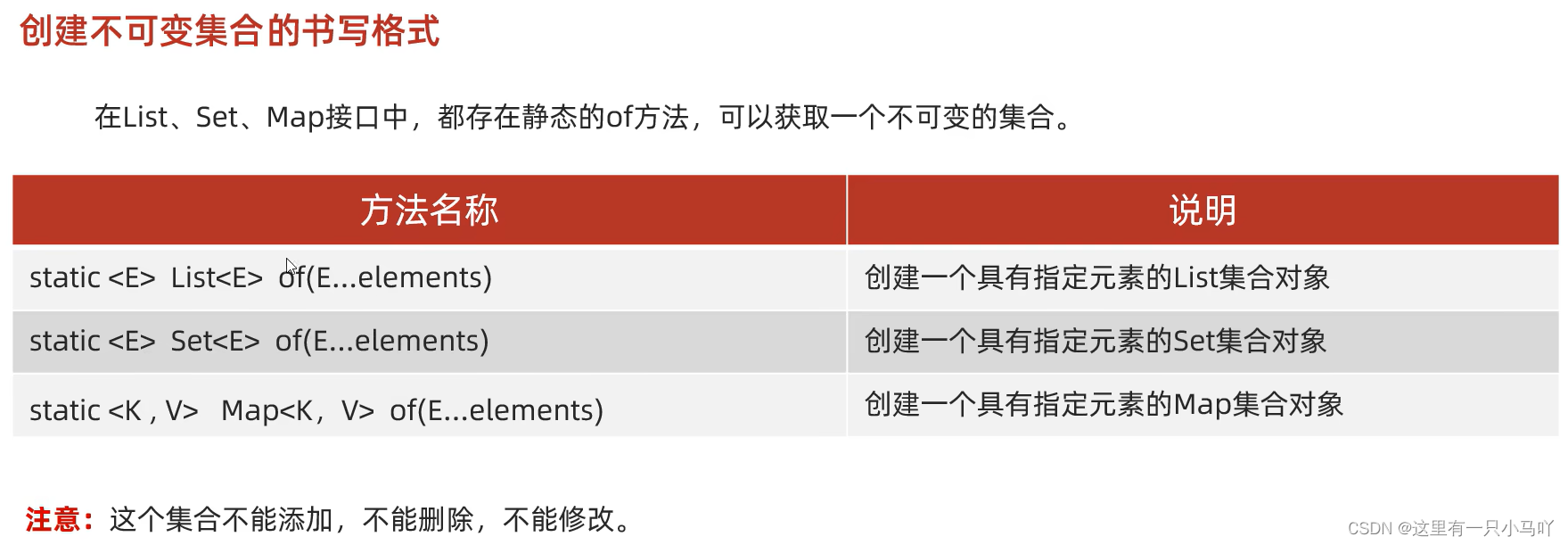
1
2
3
4
5
6
7
8
9
10
11
12
13
14
15
| import java.util.*;
import java.lang.String;
public class main {
public static void main(String[] args) {
List<String> ls = List.of("范闲", "范建","范统", "杜子腾","杜琦燕","宋合泛","侯笼藤", "朱益群", "朱穆朗玛峰","袁明媛");
for (int i = 0; i < ls.size(); i++) {
System.out.println(ls.get(i));
}
}
}
|
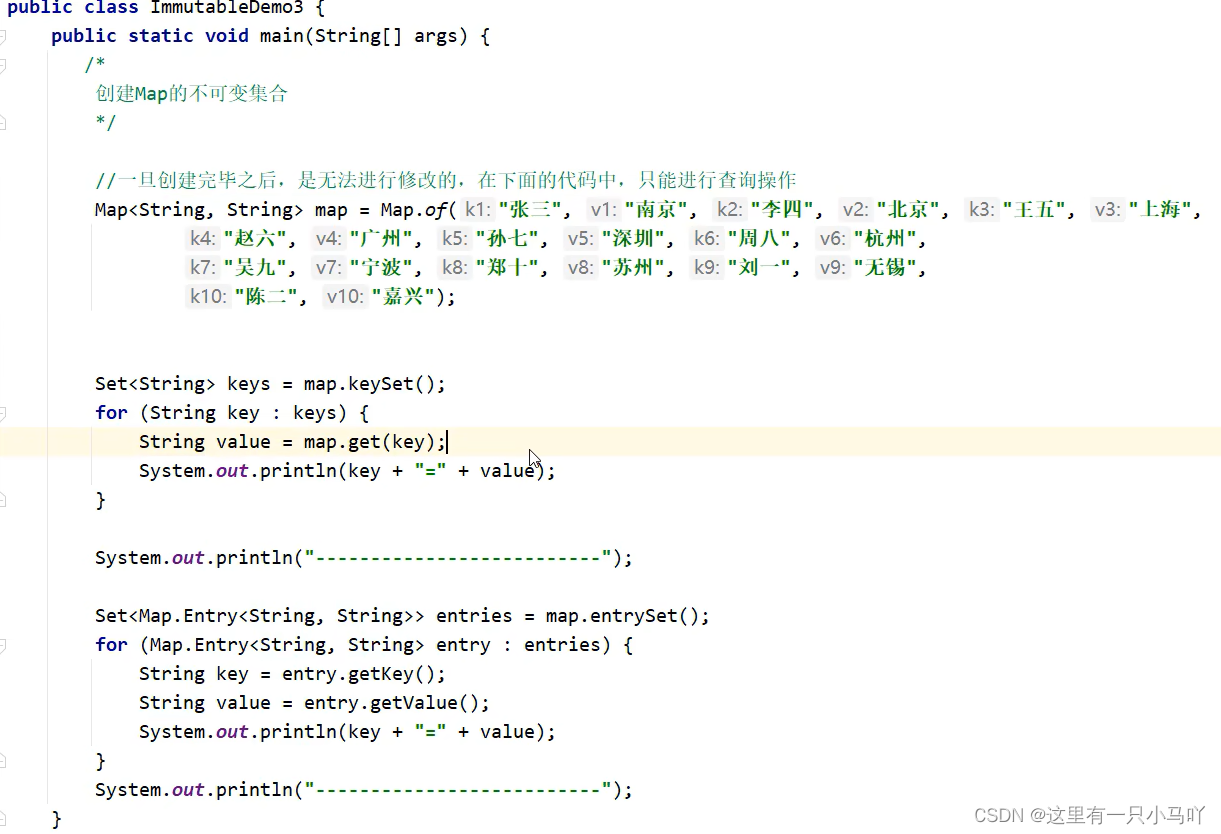
细节:当我们要获取一个不可变的Set集合时,里面的参数一定要 保证唯一性
细节2: Map里面的of方法,参数是有上限的,最多只能传递20个参数, 10个键值对
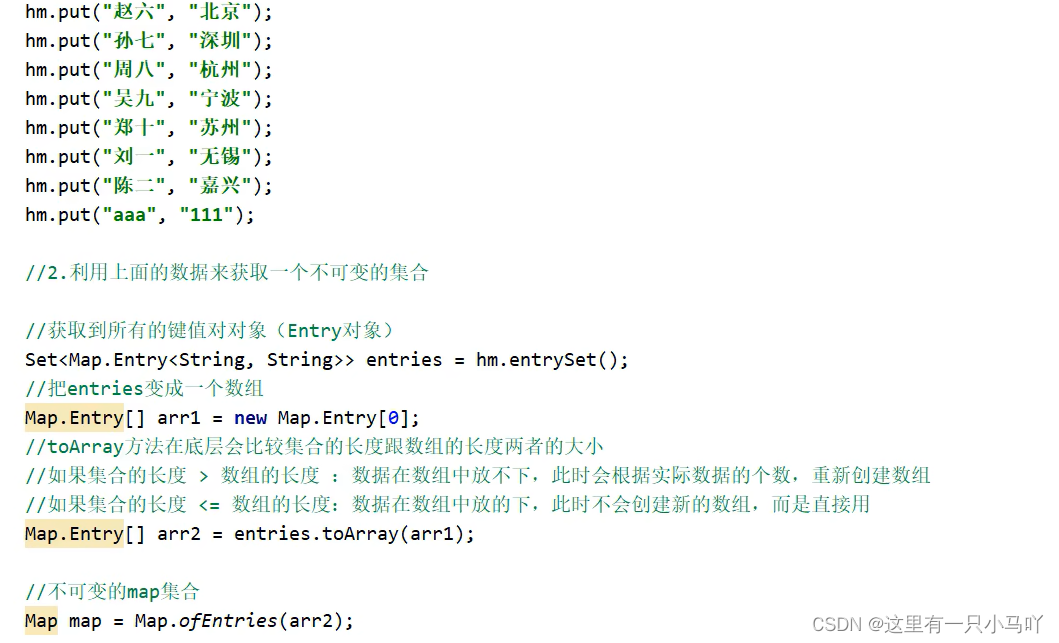
简化后:

简化后:
1
| Map<String, String> map = Map.copyOf(hm);
|
3. Stream 流
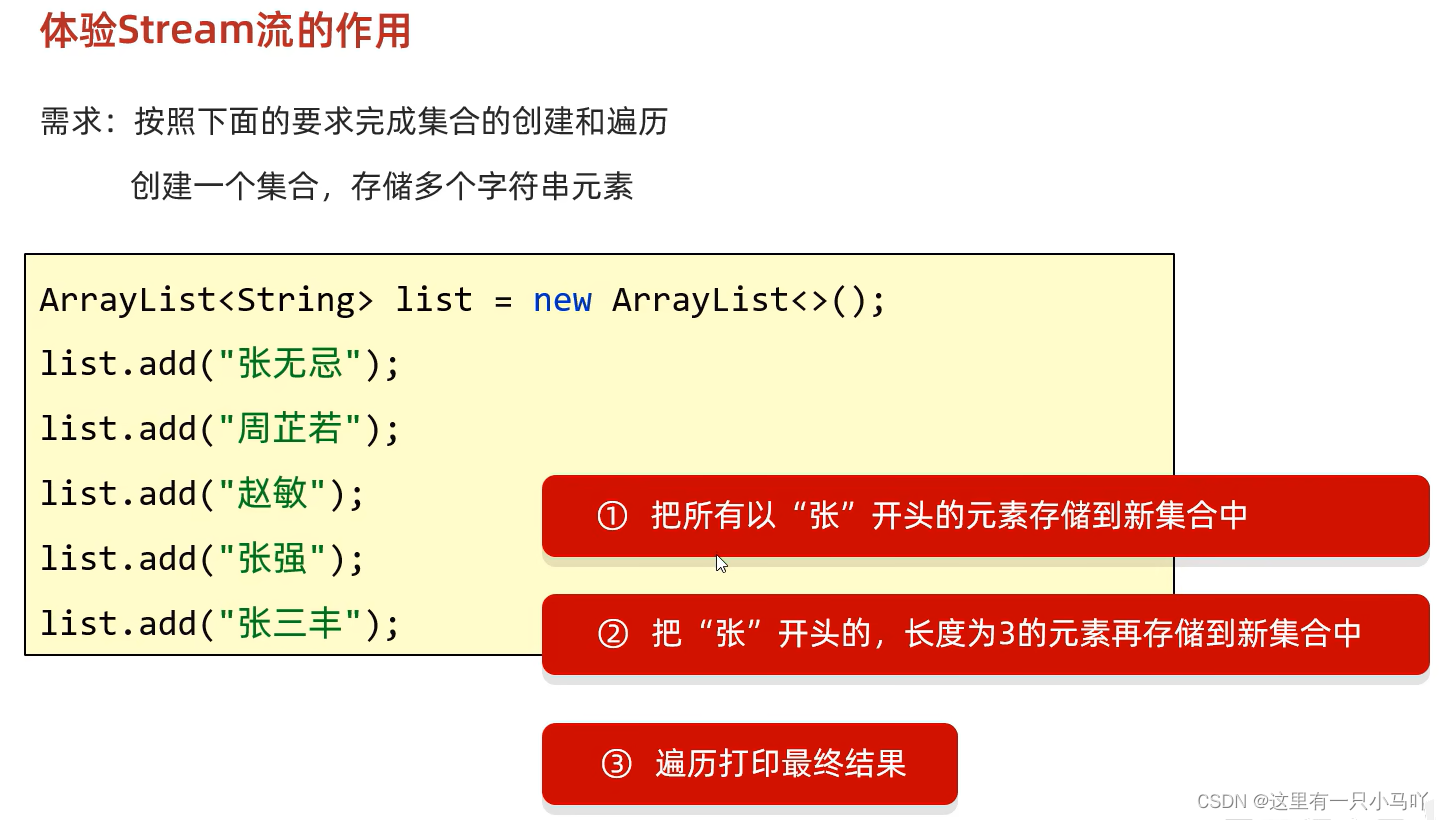
1
2
3
4
5
6
7
8
9
10
11
12
13
14
15
16
17
18
19
20
21
22
23
24
25
26
27
28
29
| import java.util.*;
import java.lang.String;
public class main {
public static void main(String[] args) {
ArrayList<String> list1 = new ArrayList<>();
list1. add("张无忌");
list1. add("周芷若");
list1. add("赵敏");
list1. add("张强");
list1. add("张三丰");
ArrayList<String> list2 = new ArrayList<>();
ArrayList<String> list3 = new ArrayList<>();
for(String l : list1)
{
if(l.charAt(0)=='张')
{
list2.add(l);
if(l.length()==3)
{
list3.add(l);
}
}
}
System.out.println(list1);
System.out.println(list2);
System.out.println(list3);
}
}
|
startsWith
1
2
3
4
5
6
7
8
9
10
11
12
13
14
15
16
17
18
19
20
21
22
23
24
25
26
27
28
29
30
| import java.util.*;
import java.lang.String;
public class main {
public static void main(String[] args) {
ArrayList<String> list1 = new ArrayList<>();
list1. add("张无忌");
list1. add("周芷若");
list1. add("赵敏");
list1. add("张强");
list1. add("张三丰");
ArrayList<String> list2 = new ArrayList<>();
ArrayList<String> list3 = new ArrayList<>();
for(String l : list1)
{
if(l.startsWith("张"))
{
list2.add(l);
if(l.length()==3)
{
list3.add(l);
}
}
}
System.out.println(list1);
System.out.println(list2);
System.out.println(list3);
}
}
|
Steam大法
1
2
3
4
5
6
7
8
9
10
11
12
13
14
15
16
17
18
19
| import java.util.*;
import java.lang.String;
public class main {
public static void main(String[] args) {
ArrayList<String> list1 = new ArrayList<>();
list1. add("张无忌");
list1. add("周芷若");
list1. add("赵敏");
list1. add("张强");
list1. add("张三丰");
ArrayList<String> list2 = new ArrayList<>();
ArrayList<String> list3 = new ArrayList<>();
list1.stream().filter(name->name.startsWith("张")).filter(name->name.length()==3).forEach(name-> System.out.print(name+' '));
}
}
|
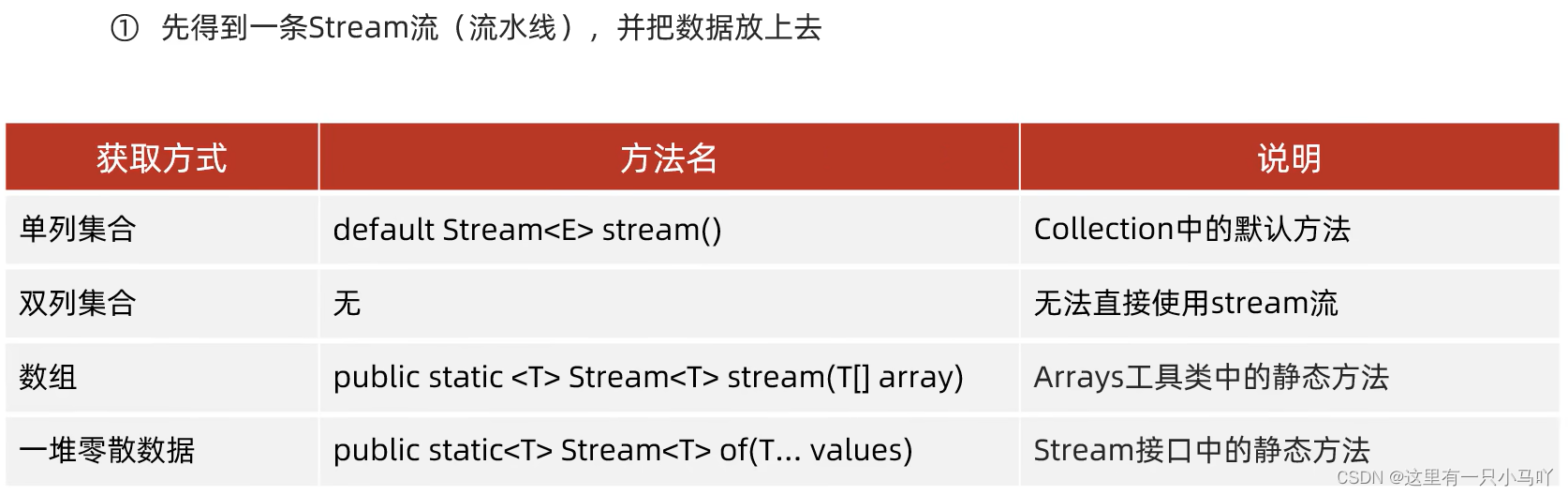
双列集合KeySet()与entrySet()要转成单列集合
1.单列集合
1
2
3
4
5
6
7
8
9
10
11
12
13
14
15
16
17
18
19
20
21
22
23
24
25
26
27
28
29
30
31
32
33
| import java.util.*;
import java.lang.String;
import java.util.function.Consumer;
import java.util.stream.Stream;
public class main {
public static void main(String[] args) {
ArrayList<String> list = new ArrayList<>();
Collections.addAll(list,"asd","we","sdf","syh");
Stream<String> stream = list.stream();
stream.forEach(new Consumer<String>() {
@Override
public void accept(String s) {
System.out.println(s);
}
});
System.out.println("==================");
list.stream().forEach(s -> System.out.println(s));
}
}
|
2.双列集合
1
2
3
4
5
6
7
8
9
10
11
12
13
14
15
16
17
18
19
20
21
22
23
24
25
26
27
28
29
30
31
32
33
34
35
36
37
38
39
40
41
42
43
44
45
46
47
48
49
50
| import java.util.*;
import java.lang.String;
import java.util.function.Consumer;
import java.util.stream.Stream;
public class main {
public static void main(String[] args) {
HashMap<Character,Integer> tm = new HashMap<>();
tm.put('a',2);
tm.put('f',4);
tm.put('e',5);
tm.put('d',78);
tm.put('c',224);
tm.put('b',21);
Stream<Character> stream = tm.keySet().stream();
stream.forEach(new Consumer<Character>() {
@Override
public void accept(Character character) {
System.out.println(character);
}
});
System.out.println("==========");
tm.keySet().stream().forEach(c -> System.out.println(c));
tm.entrySet().stream().forEach(e-> System.out.println(e));
}
}
|
3.数组
1
2
3
4
5
6
7
8
9
10
11
12
13
14
15
| import java.util.*;
import java.lang.String;
import java.util.function.Consumer;
import java.util.stream.Stream;
public class main {
public static void main(String[] args) {
int[] arr = {1,3,5,6,8,1,5,5};
Arrays.stream(arr).forEach(a-> System.out.println(a));
}
}
|
4.零散数据类型
1
2
3
4
5
6
7
8
9
10
11
12
13
| import java.util.*;
import java.lang.String;
import java.util.function.Consumer;
import java.util.stream.Stream;
public class main {
public static void main(String[] args) {
Stream.of(1,3,5,3,5,4,5).forEach(a-> System.out.print(a+" "));
System.out.println();
Stream.of("234","34","34","sdf").forEach(s-> System.out.print(s+" "));
}
}
|

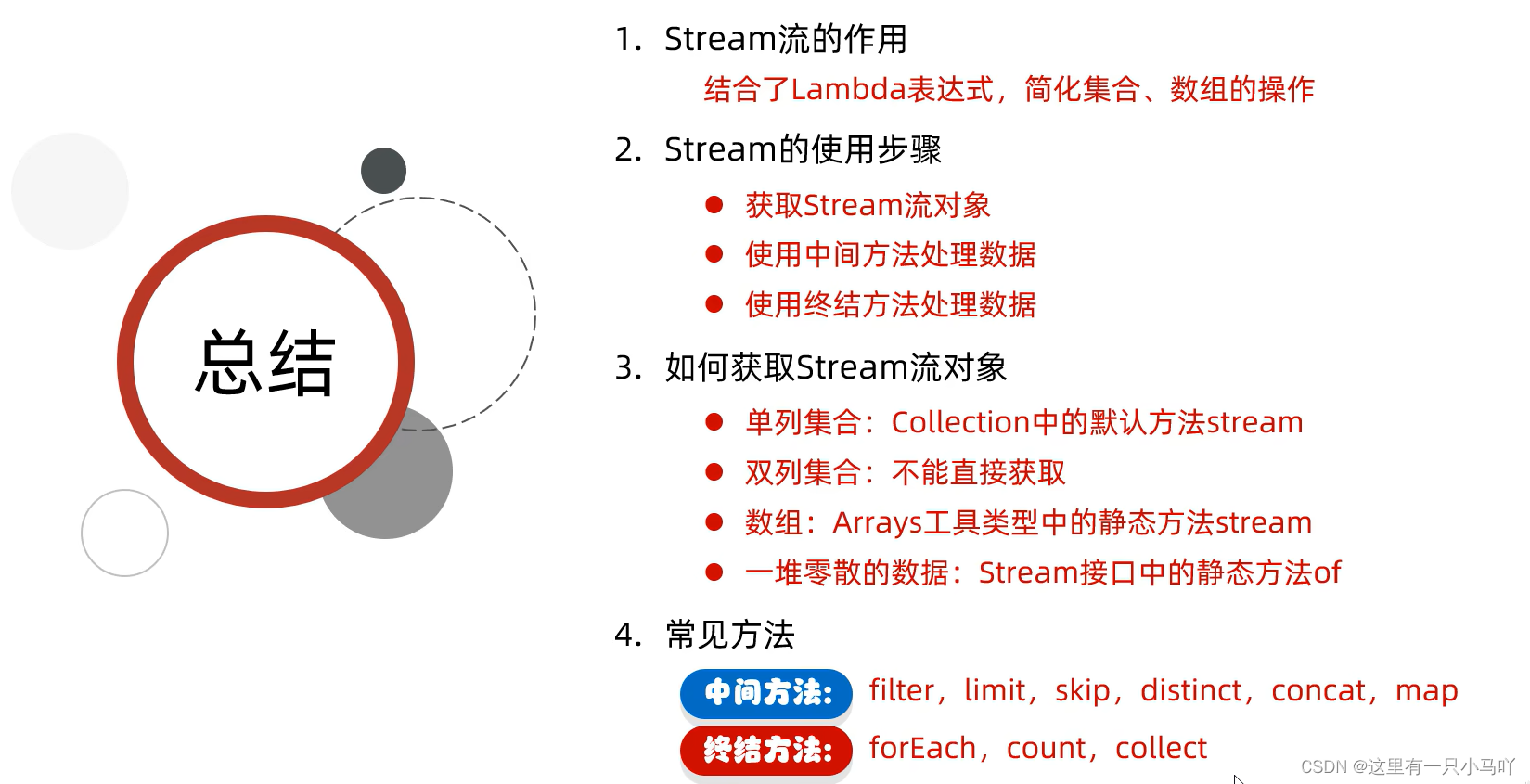
3.1 Stream流的中间方法
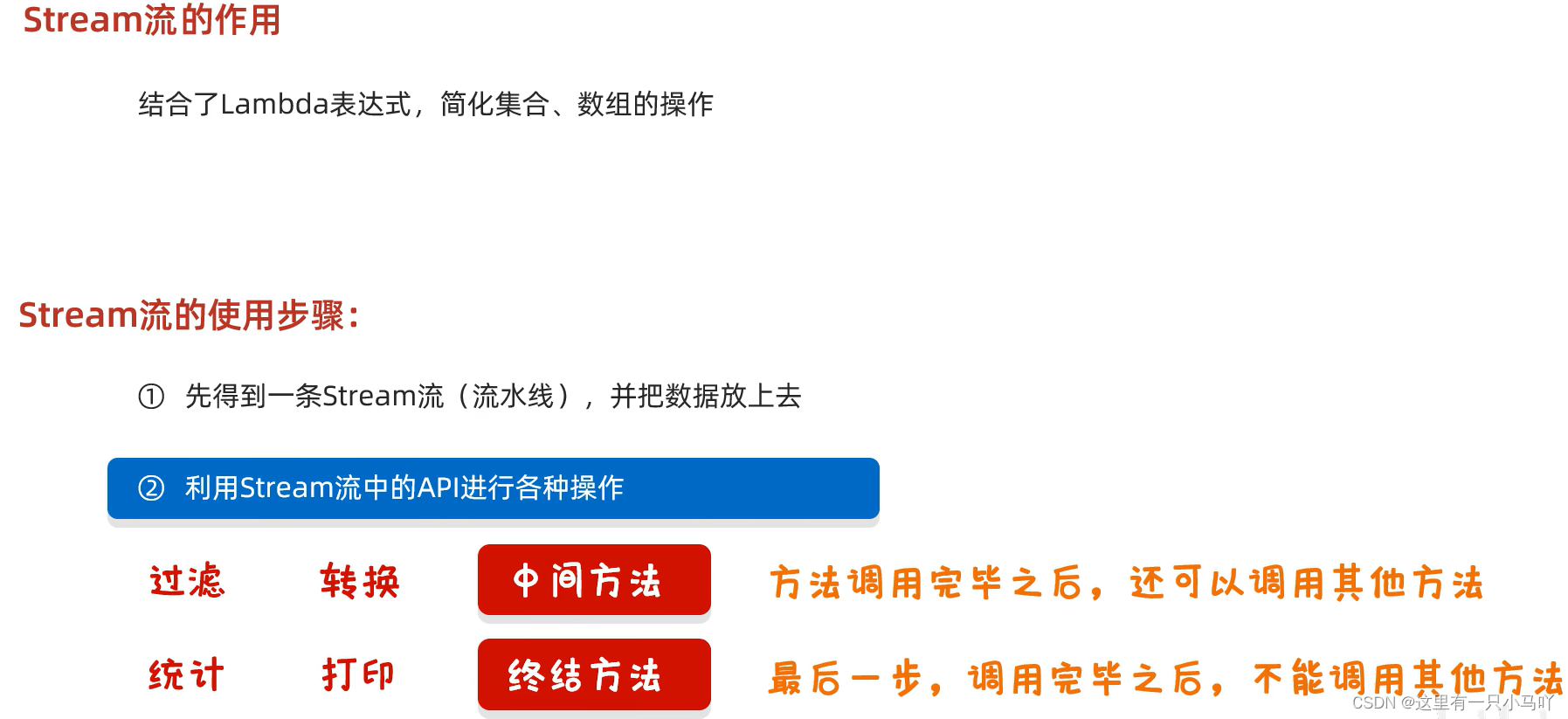
就是方法的返回值仍然是stream流了,能继续链式调用
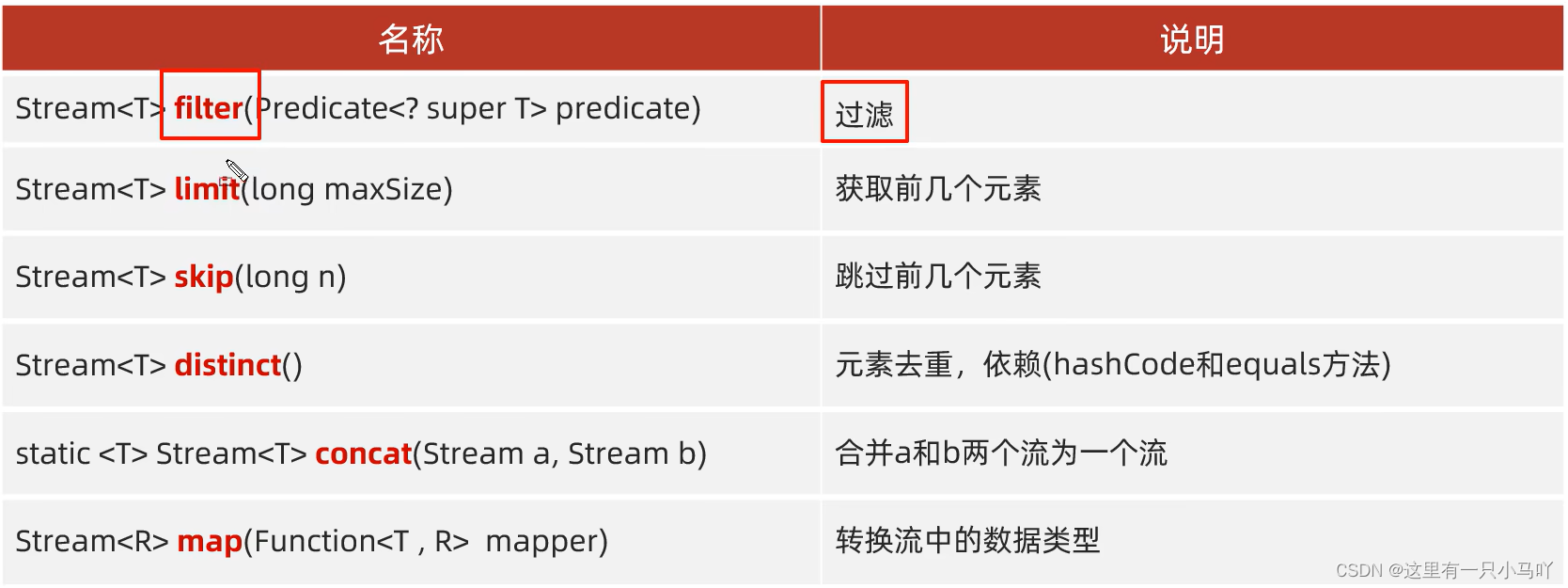
注意1:中间方法,返回新的Stream流,原来的Stream流只能使用一次,建议使用链式编程
注意2:修改Stream流中的数据,不会影响原来集合或者数组中的数据
filter
1
2
3
4
5
6
7
8
9
10
11
12
13
14
15
16
17
18
19
20
21
22
| import java.util.*;
import java.lang.String;
public class main {
public static void main(String[] args) {
ArrayList<String> list = new ArrayList<>();
Collections.addAll(list,"张无忌","周芷若","赵敏", "张强","张三丰","张翠山","张良","王二麻子", "谢广坤");
list.stream().filter(s->s.startsWith("张")).forEach(a-> System.out.println(a));
}
}
|
limit and skip
1
2
3
4
5
6
7
8
9
10
11
12
13
14
15
16
17
18
19
| import java.util.*;
import java.lang.String;
public class main {
public static void main(String[] args) {
ArrayList<String> list = new ArrayList<>();
Collections.addAll(list,"张无忌","周芷若","赵敏", "张强","张三丰","张翠山","张良","王二麻子", "谢广坤");
list.stream().skip(3).forEach(a-> System.out.print(a+" "));
System.out.println();
list.stream().limit(4).forEach(a-> System.out.print(a+" "));
}
}
|
distinct and concat
1
2
3
4
5
6
7
8
9
10
11
12
13
14
15
16
17
18
19
20
21
22
23
24
25
26
27
28
29
| import java.util.*;
import java.lang.String;
import java.util.stream.Stream;
public class main {
public static void main(String[] args) {
ArrayList<String> list1 = new ArrayList<>();
Collections . addAll(list1,"张无忌","张无忌","张无忌","张强", "张三丰","张翠山","张良", "王二麻子","谢广坤");
ArrayList<String> list2 = new ArrayList<>();
Collections . addAll(list2,"周芷若","赵敏");
list1.stream() .distinct().forEach(s -> System. out. print(s+" "));
System.out.println();
Stream.concat(list1.stream(),list2.stream()).forEach(a-> System.out.print(a+" "));
}
}
|
类型转化
1
2
3
4
5
6
7
8
9
10
11
12
13
14
15
16
17
18
19
20
21
22
23
24
25
26
27
28
29
30
| import java.util.*;
import java.lang.String;
import java.util.function.Function;
import java.util.stream.Stream;
public class main {
public static void main(String[] args) {
ArrayList<String> list1 = new ArrayList<>();
Collections . addAll(list1,"张无忌-14","张强-68", "张三丰-21","张翠山-12","张良-35", "王二麻子-210","谢广坤-23");
list1.stream().map(s->Integer.parseInt(s.split("-")[1])).forEach(a-> System.out.println(a));
}
}
|
3.2 Stream流的终结方法
就是方法的返回值不是stream流了,不能继续链式调用了
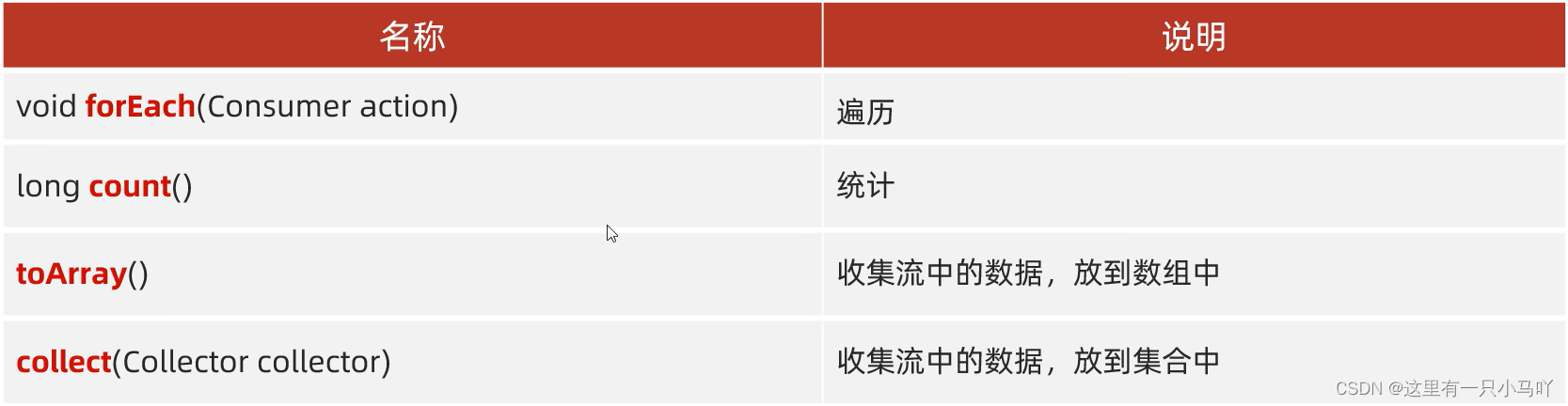
收集到数值中的方法。
1
2
3
4
5
6
7
8
9
10
11
12
13
14
15
16
17
18
19
20
21
22
23
24
25
26
27
28
29
30
31
32
33
34
35
36
37
38
| import java.util.*;
import java.lang.String;
import java.util.function.Function;
import java.util.function.IntFunction;
import java.util.stream.Stream;
public class main {
public static void main(String[] args) {
ArrayList<String> list = new ArrayList<>();
Collections . addAll(list,"张无忌","张强", "张三丰","张翠山","张良", "王二麻子","谢广坤");
Object[] o1 =list.stream().toArray();
System.out.println(Arrays.toString(o1));
String[] arr = list.stream().toArray(new IntFunction<String[]>() {
@Override
public String[] apply(int value) {
return new String[value];
}
});
System.out.println(Arrays.toString(arr));
String[] arr2 = list.stream().toArray(value -> new String[value]);
System.out.println(Arrays.toString(arr2));
}
}
|
收集到集合中的方法。
1
2
3
4
5
6
7
8
9
10
11
12
13
14
15
16
17
18
19
20
21
22
23
24
25
26
27
28
29
30
31
32
33
34
35
36
37
38
39
40
41
42
43
44
45
46
47
48
49
50
51
52
53
54
55
56
57
58
59
60
61
62
63
64
65
66
67
68
69
| import java.util.*;
import java.lang.String;
import java.util.function.Function;
import java.util.function.IntFunction;
import java.util.stream.Collectors;
import java.util.stream.Stream;
public class main {
public static void main(String[] args) {
ArrayList<String> list = new ArrayList<>();
Collections.addAll(list,"张无忌-男-18","张强-男-18", "张三丰-男-78",
"张翠山-男-54","张良-女-58", "王二麻子-女-17","谢广坤-男-87");
Map<String, String> collect = list.stream().filter(s -> "男".equals(s.split("-")[1])).
collect(Collectors.toMap(s -> s.split("-")[0], s -> s.split("-")[2]));
System.out.println(collect);
}
}
|
3.3 Stream流的练习
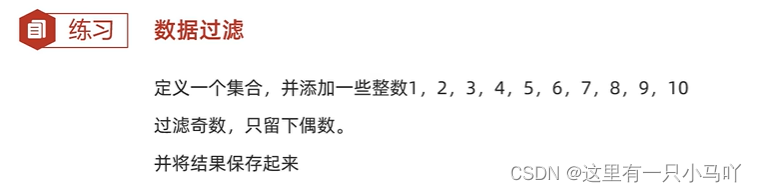
1
2
3
4
5
6
7
8
9
10
11
12
13
14
15
16
17
| import java.util.*;
import java.lang.String;
import java.util.function.Function;
import java.util.function.IntFunction;
import java.util.stream.Collectors;
import java.util.stream.Stream;
public class main {
public static void main(String[] args) {
ArrayList<Integer> arr = new ArrayList<>();
Collections.addAll(arr,1,2,3,4,5,6,7,8,9,10);
List<Integer> newList = arr.stream().filter(a -> a % 2 == 0).collect(Collectors.toList());
System.out.println(newList);
}
}
|
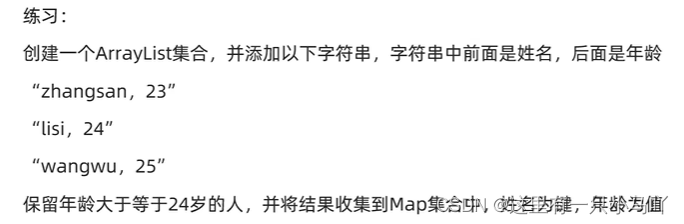
1
2
3
4
5
6
7
8
9
10
11
12
13
14
15
16
17
18
| import java.util.*;
import java.lang.String;
import java.util.function.Function;
import java.util.function.IntFunction;
import java.util.stream.Collectors;
import java.util.stream.Stream;
public class main {
public static void main(String[] args) {
ArrayList<String> arr = new ArrayList<>();
Collections.addAll(arr,"zhangsan,23","lisi,24","wangwu,25");
Map<String, String> collect = arr.stream().filter(a -> Integer.parseInt(a.split(",")[1]) >= 24).collect(Collectors.toMap(a -> a.split(",")[0], a -> a.split(",")[1]));
System.out.println(collect);
}
}
|
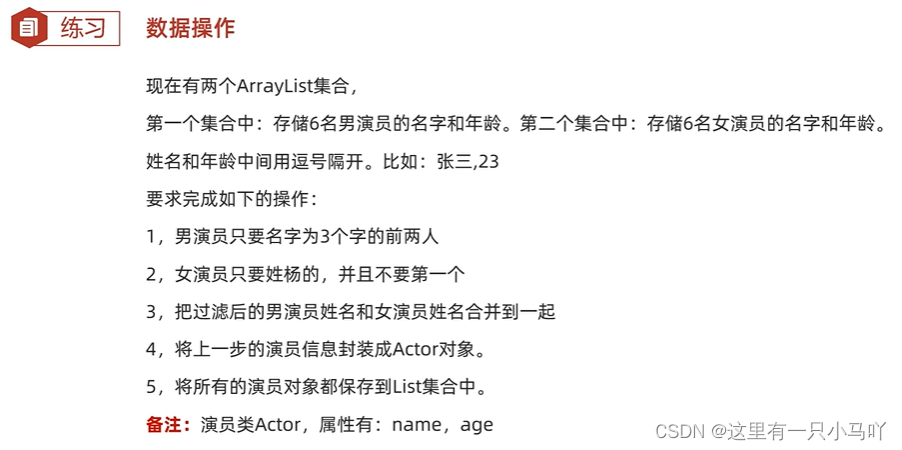
1
2
3
4
5
6
7
8
9
10
11
12
13
14
15
16
17
18
19
20
21
22
23
24
25
26
27
28
29
30
31
32
33
34
35
36
37
38
39
40
41
42
43
44
45
46
47
48
49
50
51
52
53
54
55
56
57
58
59
60
61
62
63
64
65
66
67
68
69
70
71
72
73
74
75
76
77
78
79
80
81
82
83
84
85
| public class Actor {
private String name;
private int age;
public Actor() {
}
public Actor(String name, int age) {
this.name = name;
this.age = age;
}
public String getName() {
return name;
}
public void setName(String name) {
this.name = name;
}
public int getAge() {
return age;
}
public void setAge(int age) {
this.age = age;
}
public String toString() {
return "Actor{name = " + name + ", age = " + age + "}";
}
}
import java.util.*;
import java.lang.String;
import java.util.function.Function;
import java.util.function.IntFunction;
import java.util.stream.Collectors;
import java.util.stream.Stream;
public class main {
public static void main(String[] args) {
ArrayList<String> arr1 = new ArrayList<>();
Collections.addAll(arr1,"李云滴,23","吴亦饭,24","张继磕,45","张三,34","李四,34","王五,54");
ArrayList<String> arr2 = new ArrayList<>();
Collections.addAll(arr2,"杨颖,35","杨超越,32","王八蛋,24","周姐,64","王姐,13","杨姐,67");
List<String> arr11 = arr1.stream().filter(a -> a.split(",")[0].length() == 3).limit(2).collect(Collectors.toList());
List<String> arr22 = arr2.stream().filter(a -> (a.split(",")[0].startsWith("杨"))).skip(1).collect(Collectors.toList());
Stream.concat(arr11.stream(),arr22.stream()).forEach(a-> System.out.print(a +" "));
System.out.println();
List<Actor> collect = Stream.concat(arr11.stream(), arr22.stream()).map(new Function<String, Actor>() {
@Override
public Actor apply(String s) {
String name = s.split(",")[0];
int age = Integer.parseInt(s.split(",")[1]);
return new Actor(name, age);
}
}).collect(Collectors.toList());
System.out.println(collect);
}
}
|
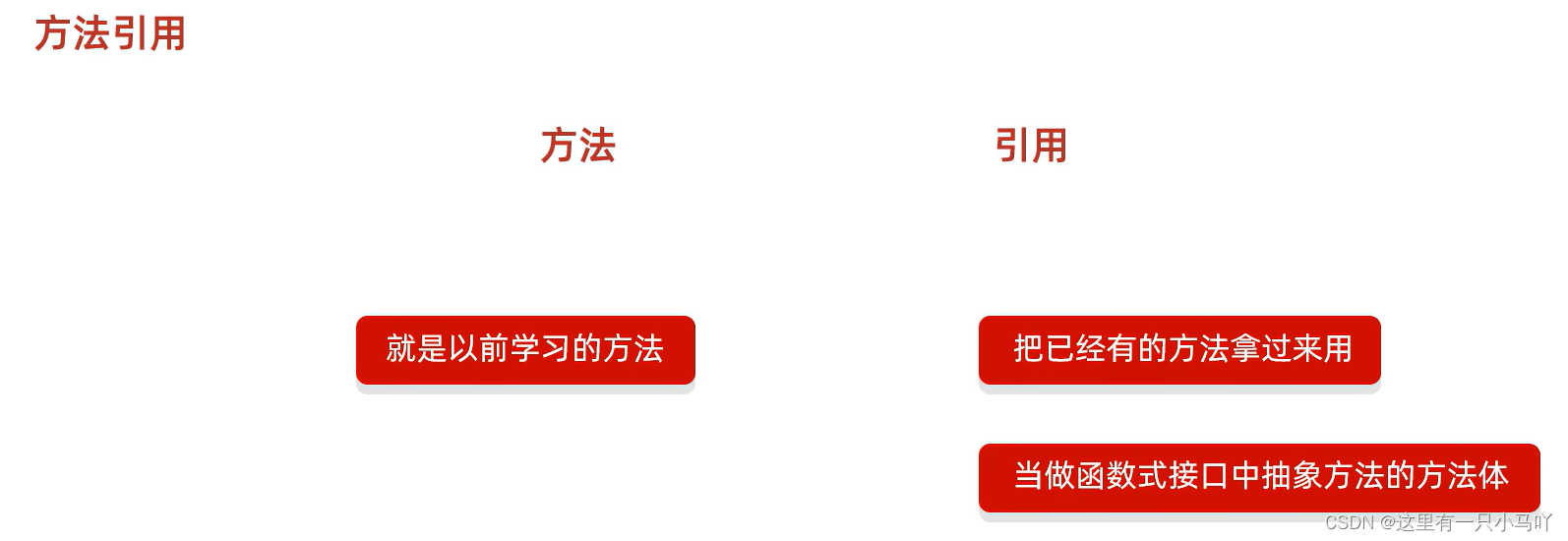
4. 方法引用
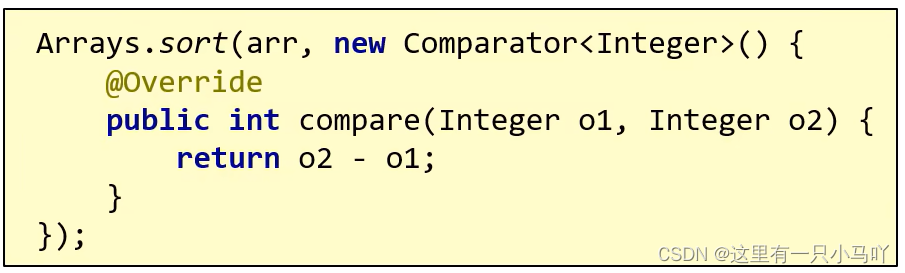
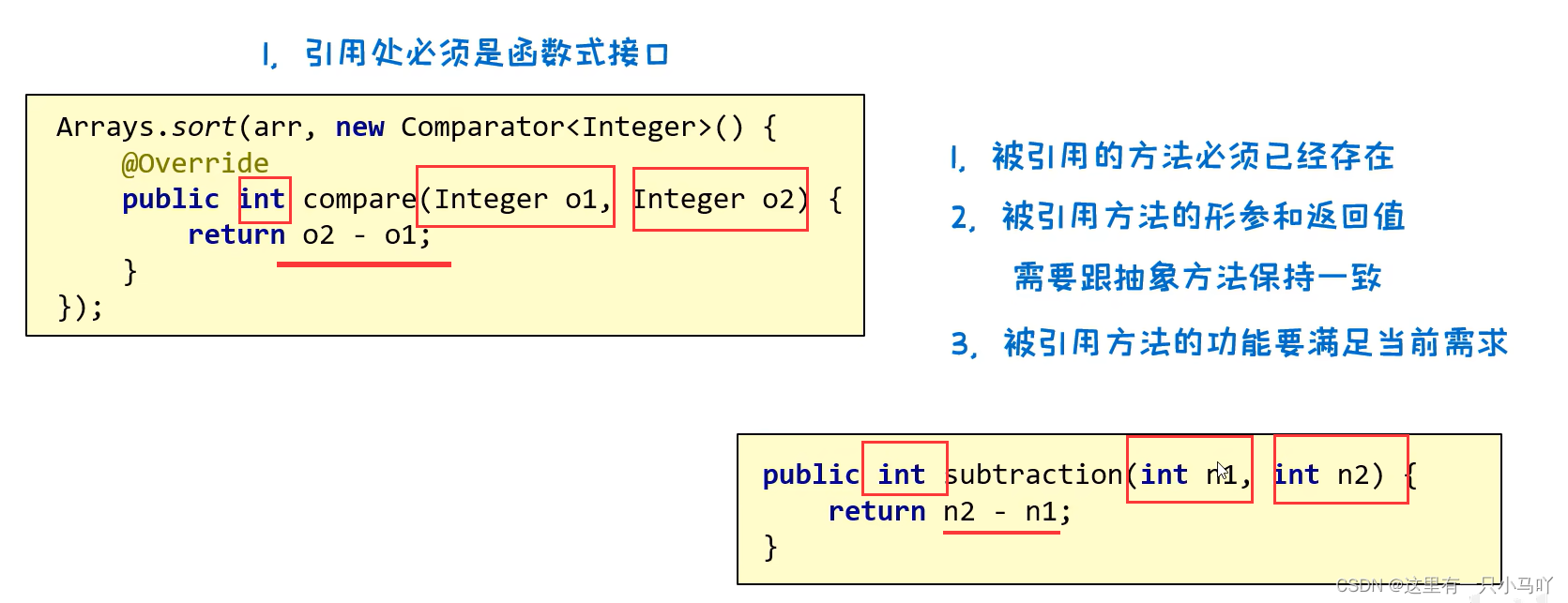
1
2
3
4
5
6
7
8
9
10
11
12
13
14
15
16
17
18
19
20
21
22
23
24
25
26
27
28
29
30
31
32
33
34
35
36
| import java.util.*;
import java.lang.String;
import java.util.function.Function;
import java.util.function.IntFunction;
import java.util.stream.Collectors;
import java.util.stream.Stream;
public class main {
public static void main(String[] args) {
Integer[] arr ={3,4,6,2,5,1};
Arrays.sort(arr,main::subtraction);
System.out.println(Arrays.toString(arr));
}
public static int subtraction(int num1,int num2)
{
return num2-num1;
}
}
|
4.1 引用静态方法
格式:类名::静态方法
范例: Integer::parseInt
1
2
3
4
5
6
7
8
9
10
11
12
13
14
15
16
17
18
19
20
21
22
23
24
25
26
27
| import java.util.*;
import java.lang.String;
import java.util.function.Function;
import java.util.function.IntFunction;
import java.util.stream.Collectors;
import java.util.stream.Stream;
public class main {
public static void main(String[] args) {
ArrayList<String> arr = new ArrayList<>();
Collections.addAll(arr,"1","2","45","24","45");
arr.stream().map(new Function<String, Integer>() {
@Override
public Integer apply(String s) {
return Integer.parseInt(s);
}
}).forEach(s-> System.out.println(s));
}
}
|
转化成下面
1
2
3
4
5
6
7
8
9
10
11
12
13
| import java.util.*;
import java.lang.String;
public class main {
public static void main(String[] args) {
ArrayList<String> arr = new ArrayList<>();
Collections.addAll(arr,"1","2","45","24","45");
arr.stream().map(Integer::parseInt).forEach(s-> System.out.println(s));
}
}
|
4.2 引用成员方法
4.2.1 引用其他类 的成员方法
引用成员方法
格式:对象: :成员方法
- ①其他类:
其他类对象::方法名
- ②本类:
this::方法名
- ③父类:
super::方法名
4.2.2 引用本类的成员方法
引用处不能是静态方法
视频链接
4.2.3 引用父类的成员方法
引用处不能是静态方法
视频链接
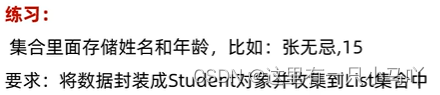
4.3 引用构造方法
引用构造方法
格式:类名::new
范例: student:: new
1
2
3
4
5
6
7
8
9
10
11
12
13
14
15
16
17
18
19
20
21
| import java.util.*;
import java.lang.String;
import java.util.function.Function;
import java.util.stream.Stream;
public class main {
public static void main(String[] args) {
ArrayList<String> arr = new ArrayList<>();
Collections.addAll(arr,"张无忌,15","周芷若,14","赵敏,13", "张强,20", "张三丰,100", "张翠山,40", "张良,35", "王二麻子,37" );
arr.stream().map(new Function<String, Actor>() {
@Override
public Actor apply(String s) {
return new Actor(s.split(",")[0], Integer.parseInt(s.split(",")[1]));
}
}).forEach(a-> System.out.println(a));
}
}
|
转换成下面
Actor
1
2
3
4
5
6
7
8
9
10
11
12
13
14
15
16
17
18
19
20
21
22
23
24
25
26
27
28
29
30
31
32
33
34
35
36
37
38
39
40
41
42
43
44
45
46
47
48
49
50
51
| public class Actor {
private String name;
private int age;
public Actor() {
}
public Actor(String str) {
this.name = str.split(",")[0];
this.age = Integer.parseInt(str.split(",")[1]);
}
public Actor(String name, int age) {
this.name = name;
this.age = age;
}
public String getName() {
return name;
}
public void setName(String name) {
this.name = name;
}
public int getAge() {
return age;
}
public void setAge(int age) {
this.age = age;
}
public String toString() {
return "Actor{name = " + name + ", age = " + age + "}";
}
}
|
main
1
2
3
4
5
6
7
8
9
10
11
12
13
14
15
16
17
| import java.util.*;
import java.lang.String;
import java.util.function.Function;
import java.util.stream.Collectors;
import java.util.stream.Stream;
public class main {
public static void main(String[] args) {
ArrayList<String> arr = new ArrayList<>();
Collections.addAll(arr,"张无忌,15","周芷若,14","赵敏,13", "张强,20", "张三丰,100", "张翠山,40", "张良,35", "王二麻子,37" );
arr.stream().map(Actor::new).collect(Collectors.toList()).forEach(a-> System.out.println(a));
}
}
|
4.4 其他调用方式
4.4.1 使用类名引用成员方法
1
2
3
4
5
6
7
8
9
10
11
12
13
14
15
16
17
18
19
20
21
22
| import java.util.*;
import java.lang.String;
public class main {
public static void main(String[] args) {
ArrayList<String> arr = new ArrayList<>();
Collections.addAll(arr,"aaa","bbb","ccc","ddd");
arr.stream().map(String::toUpperCase).forEach(a-> System.out.println(a));
}
}
|
方法引用(类名引用成员方法)
格式:类名::成员方法
需求:集合里面一些字符串,要求变成大写后进行输出
方法引用的规则:
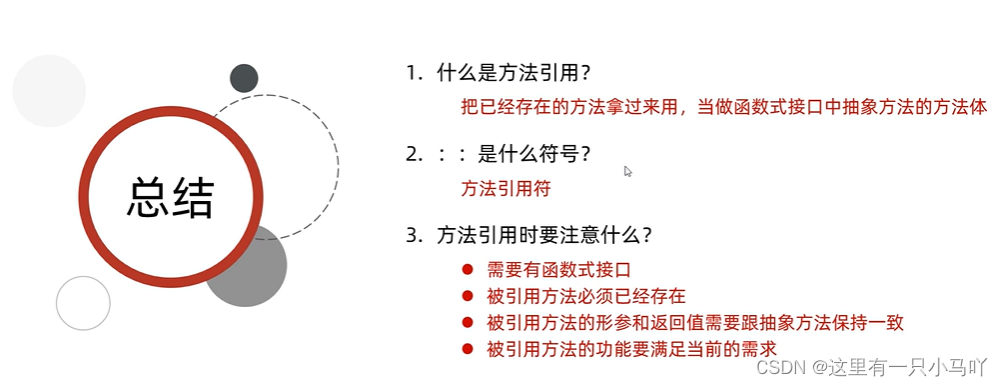
- 需要有函数式接口
- 被引用的方法必须已经存在
- 被引用方法的形参,需要跟抽象方法的第二个形参到最后一个形参保持一致,返回值需要保持一致。
- 被引用方法的功能需要满足当前的需求
抽象方法形参的详解:
- 第一个参数:表示被引用方法的调用者,决定了可以引用哪些类中的方法
在Stream流当中,第一个参数一般都表示流里面的每一个数据。
假设流里面的数据是字符串,那么使用这种方式进行方法引用,只能引用String这个类中的方法
- 第二个参数到最后一个参数:跟被引用方法的形参保持一致,如果没有第二个参数,说明被引用的方法需要是无参的成员方法
4.4.2 引用数组 的构造方法
引用数组的构造方法
格式:数据类型[]::new
范例: int[]::new
练习:集合中存储一些整数,收集到数组当中
1
2
3
4
5
6
7
8
9
10
11
12
13
14
15
16
17
18
19
20
21
| import java.util.*;
import java.lang.String;
import java.util.function.IntFunction;
public class main {
public static void main(String[] args) {
ArrayList<Integer> arr = new ArrayList<>();
Collections.addAll(arr,1,2,3,4,5,6);
Integer[] integers = arr.stream().toArray(Integer[]::new);
System.out.println(Arrays.toString(integers));
}
}
|
4.5 引用方法练习
1
2
3
4
5
6
7
8
9
10
11
12
13
14
15
16
| import java.util.*;
import java.lang.String;
import java.util.function.IntFunction;
import java.util.stream.Stream;
public class main {
public static void main(String[] args) {
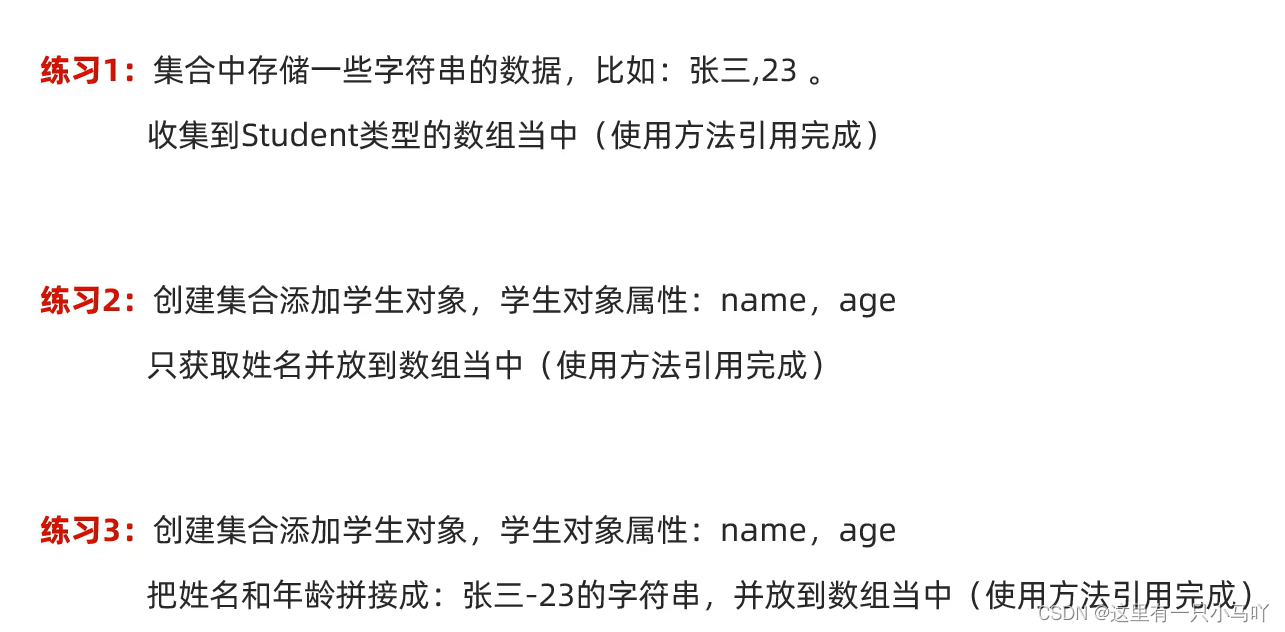
ArrayList<String> arr = new ArrayList<>();
Collections.addAll(arr,"张三,12","赵六,211","李四,35","王五,56");
Actor[] actors = arr.stream().map(Actor::new).toArray(Actor[]::new);
System.out.println(Arrays.toString(actors));
}
}
|

 微信
微信 支付宝
支付宝